Low-code benefits and disadvantages at a glance
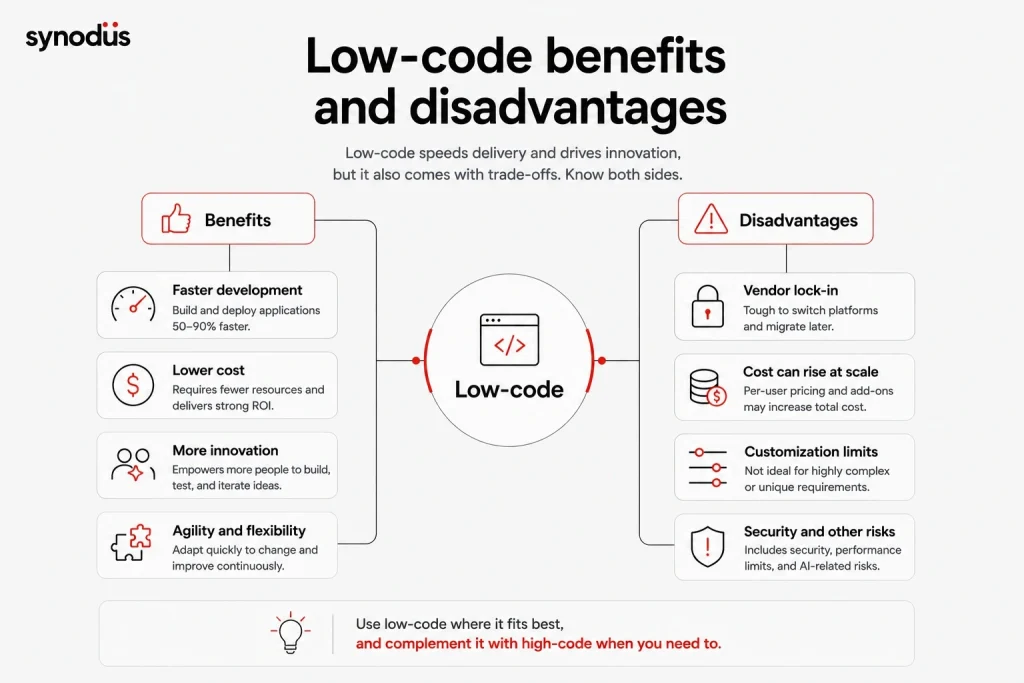
Low-code offers both opportunities and trade-offs
| Benefits | Disadvantages |
|---|---|
| Lower cost and strong ROI (260 to 506% over 3 years) | Cost can climb at scale with per-user pricing |
| Builds apps 50 to 90% faster | Vendor lock-in if you pick the wrong platform |
| Opens development to citizen developers | Still has a learning curve |
| Simplifies automation and integration | Limited customization for complex apps |
| Eases legacy modernization and maintenance | Performance limits for demanding workloads |
| Better collaboration and faster prototyping | Security and source-code ownership concerns |
| AI-assisted building speeds delivery further | New risks from unreviewed AI-generated code |
The benefits of low-code
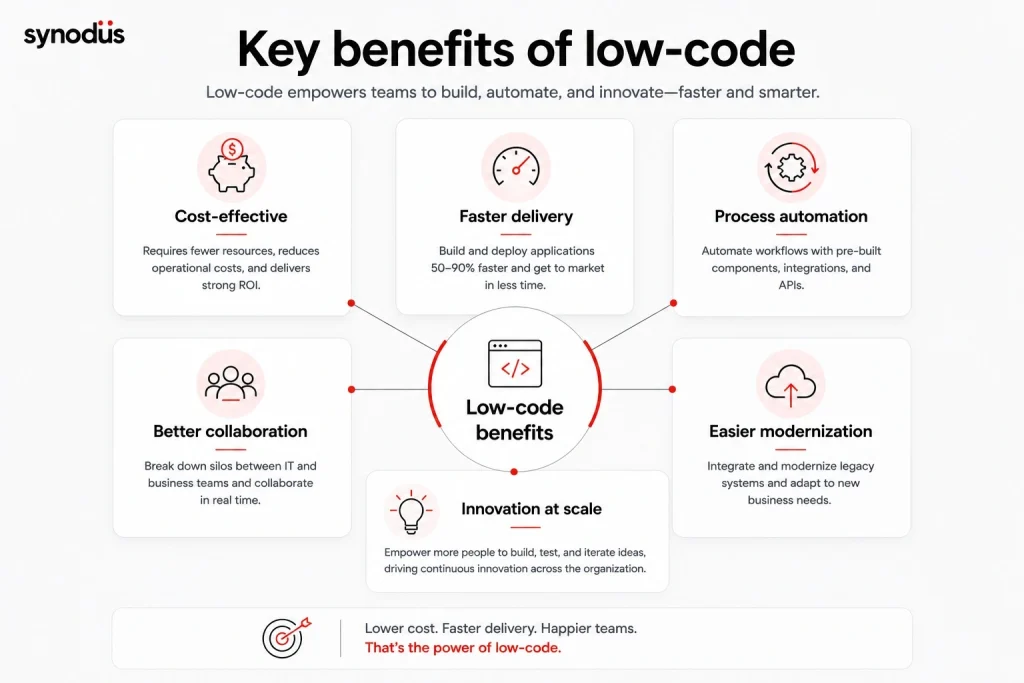
1. Cost-effective
Traditional development (high-code, or coding from scratch) takes a long time, needs a full team of developers, and drives up project costs. Not every business, especially an SME, has that kind of budget.
Set high-code against low-code and the savings become obvious. Low-code requires fewer resources and works for both coders and non-coders. Because the platform ships with a built-in code base, users do not need deep coding knowledge, they drag and drop, which cuts operating costs sharply. Forrester’s Total Economic Impact studies found companies achieved 260 to 506% ROI over three years with payback in under six months, and one composite organization reported $8.08 million in app delivery savings.
2. No deep programming skills needed
Experienced coders are an asset, but they are expensive and hard to hire. With today’s top low-code platforms, even a citizen developer can handle basic building and deployment, whatever their level. Gartner expects 80% of low-code users to come from outside formal IT by 2026, up from 60% in 2021.
For example, a marketing team can use a low-code platform to maintain and update a website or app for engagement. Instead of contacting a developer for every interface change, they can independently adjust content, imagery, and design, with coders advising only when needed. That is a practical, time-saving win for non-specialist departments.
3. Faster development
Low-code tools handle the tedious, time-consuming steps so you build faster, and lower entry barriers mean more hands on deck. 451 Research found that low-code reduces programming time by 50 to 90%.
Low-code also lets non-technical users create minimum viable products (MVPs) that you can test before involving developers, saving time and money. If an MVP fails, you discard it and move on. Drag-and-drop makes it easy to edit, add, and remove details, and finished work is saved as reusable components you can reuse as templates without re-coding. Faster development leads to faster deployment, happier customers, and higher ROI over the long term.
4. Fighting the talent shortage
Low-code is a strong way to cope with high demand for qualified developers. It will not replace them, but while you search for the right hire, a low-code tool keeps your digital transformation moving rather than stalling. This matters because a developer shortage could cost businesses worldwide $8.5 trillion in lost revenue, and technical roles take roughly 50% longer to fill than other positions.
Startups and SMEs often run into technical debt when they skip steps to speed up time to market, and those shortcuts become costly to fix later. Low-code lets you move quickly through each step without skipping it, which reduces the risk of technical debt.
5. Simplified automation
For developers, low-code automates parts of the build by simplifying front-end work, leaving more time to standardize a clean back-end. Most businesses also use low-code to automate their workflows, thanks to:
- Pre-built code blocks and modular architecture, so you can break a workflow into small chunks and connect processes across departments. Change one workflow and it will not affect the others.
- Easy editing and iteration of each process to fit your business strategy.
Pre-built integrations and open APIs let you automate almost any digital business process.
6. High flexibility
Low-code makes it easy to adapt a website or app to changing needs. Instead of complex hand-coding, you open the platform’s visual editor and make changes directly. Developers get the tools to iterate on existing processes, and full project documentation and revision history stay available, so anyone can pick up the work and reuse it on similar projects.
7. Seamless collaboration
Traditional development splits teams into coders and non-coders. Business teams set the vision and hand it to developers, but scope often gets lost in translation. Low-code removes these silos and lets both sides contribute in real time, from executives to front-end developers.
It also cuts out the back-and-forth and long waits between handoffs. You are no longer stuck on someone else’s timetable: if you need a solution now, you can build an MVP rather than wait for the next sprint.
8. Agile prototyping
Low-code lets anyone build prototype solutions quickly. You can compare, analyze, and test prototypes to find the best option, then hand the chosen one to advanced development for scaling and integration. To go deeper, read our piece on low-code and agile development and how the two fit together.
9. Easier modernization and integration
Another major advantage is integrating and modernizing legacy systems. Low-code boosts app development agility with faster delivery, more resilient solutions, and the ability to adapt to new requirements, so your project is not left behind without room to scale.
10. Low maintenance
By abstracting the tedious plumbing of day-to-day development, low-code eases the maintenance burden. Standardized, pre-tested, ready-made components mean far fewer bugs and integration issues, which frees developers to focus on innovative work that drives real business value.
11. Better control of shadow IT
Shadow IT happens when a person or department uses an unapproved tool for daily work, which can expose your organization to security risks, especially if employees move internal data into those apps. A low-code platform helps by centralizing app building in one governed system, so you can build or integrate with third parties while keeping data in view.
There is a catch: low-code can also create shadow IT if employees keep building apps for their own use with no IT guidance. You can avoid this by educating staff on the dangers of shadow IT and setting up low-code governance to manage usage.
12. More room for innovation
By cutting time spent on basic coding, your tech team gets more time for higher-impact work. Many businesses also let non-technical staff use low-code to turn ideas into reality, while the tech team focuses on refining the ones that stand out. It works as a low-cost way to surface the best ideas from a sea of them. McKinsey research shows companies that empower citizen developers score 33% higher on innovation. Across industries and company sizes, businesses have found success this way, as our low-code examples from Coca-Cola, Toyota, and others show.
13. AI-assisted building
The newest benefit is AI. Most modern platforms now include an AI copilot that turns a plain-language prompt into a working screen, flow, or data model, and AI-native low-code can deliver development 3 to 5 times faster than traditional low-code. This lowers the entry barrier further and speeds up everything from generation to testing. To see where this is heading, read our roundup of low-code AI platforms.
The disadvantages of low-code
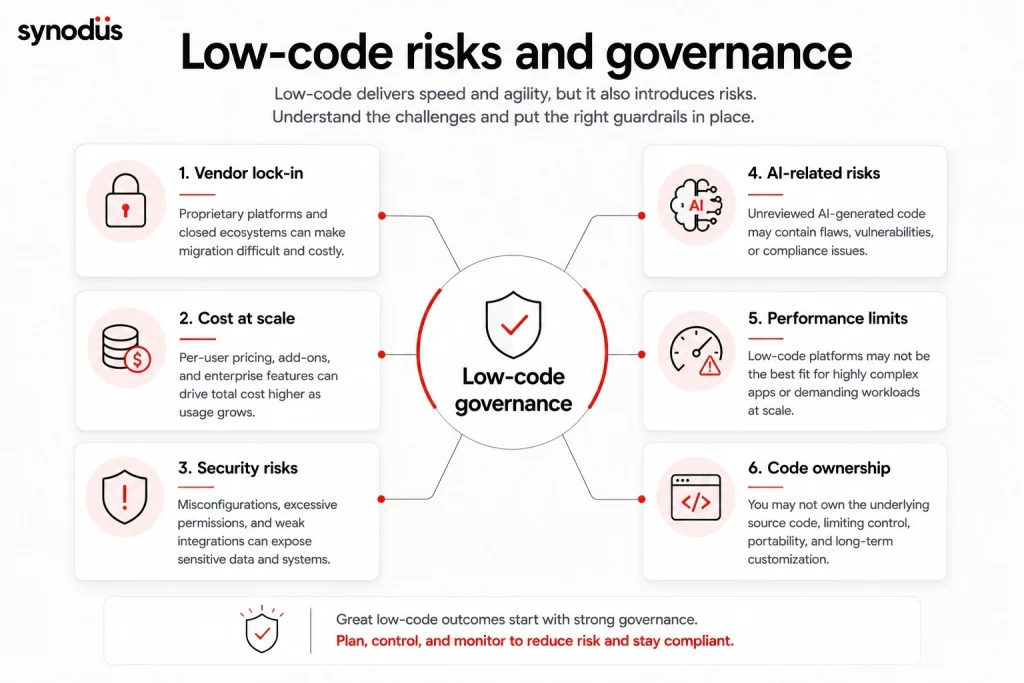
1. Vendor lock-in
One of the most common drawbacks is vendor lock-in. Many businesses assume they will never switch vendors, then find themselves dependent on a single one. Choosing a suitable vendor and a flexible platform is essential. Some platforms produce clean, standardized code you can use with other vendors, so before buying a license, read the vendor’s policy:
- Some vendors stop supporting your application once you stop using their platform.
- Others provide migration support to transfer your code and data when you leave.
How to reduce it: favor platforms that export clean, standardized code, and confirm the migration path before signing.
2. Limited complex customization
Most low-code platforms let you add custom JavaScript and Python, but only some support other languages. This works for basic needs, but for an enterprise-grade or highly complex product, custom software is often the better bet. Your team also has to make sure any custom code stays compatible with the platform’s source code, so it is critical to understand the customization limits before you commit.
How to reduce it: map your must-have custom features against the platform’s extensibility before you buy, and keep a high-code option open for the parts that exceed its limits.
3. Cost can climb at scale
Low-code looks cheap at first, but the total cost of ownership can surprise you. Most platforms price per user or per app, so the bill grows as adoption spreads across the company, and enterprise platforms with custom pricing can cost several times more than transparent-pricing tools for similar capabilities. A tool that is affordable for a 10-person pilot can become expensive at 500 users.
How to reduce it: model the cost at your expected scale, not just the pilot, and prefer platforms with transparent pricing so you can calculate total cost of ownership upfront. Our guide to low-code development cost breaks this down.
4. Performance limits for demanding apps
Low-code is excellent for most business applications, but it can fall short when you need millisecond response times, very high transaction volumes, or heavy real-time processing. The abstraction that makes low-code fast to build also takes away some of the fine control needed to optimize for extreme performance.
How to reduce it: keep performance-critical components, such as trading engines or real-time systems, in high-code, and use low-code for the layers around them.
5. A real learning curve
Low-code is not as effortless as it sounds. Although it was designed as an alternative that small teams can use, it still rewards some coding knowledge. It is far simpler than hand-coding and lets citizen developers build apps with minimal programming, but knowing a few languages still helps you get more out of it. For a fuller primer, see our guide to low-code, its types and use cases.
6. Ownership of source code
Not every platform lets you export your source code, even the parts you added. Some let you own and run it independently, but pre-built code may still be subject to licensing terms or depend on proprietary libraries and runtime environments. The best way to know is to check the terms of service and licensing agreement, and to confirm with your vendor before buying. A practical rule is to use low-code for simpler projects and processes, so that if you ever lose access, you can rebuild without too much pain.
7. Security
Often called the weakest link of low-code, security is a top concern. The risk is real but manageable, and much of it sits under the vendor’s control. A Dark Reading survey found that many organizations adopt low-code and no-code tools faster than they secure them. Most vendors are investing in security, and you can apply security strategies to protect your low-code apps while still capturing the benefits.
8. New AI-related risks
As AI features spread across low-code platforms, a new class of risk has appeared. AI-generated code and configurations can introduce security gaps and technical debt if they ship without review, since a meaningful share of AI-generated code contains vulnerabilities. The fix is discipline: treat AI output as a draft, then apply testing, review, and governance before anything reaches production.
Do the benefits outweigh the disadvantages?
For most businesses, yes, as long as you use low-code for the right work. The benefits are strongest for internal tools, workflow automation, MVPs, and apps that need to ship fast and change often. The disadvantages bite hardest on highly customized, performance-critical, or business-critical products, where traditional code keeps the edge.
Notice that most disadvantages are manageable rather than dealbreakers: vendor lock-in shrinks with the right contract, security and AI risks fall with governance, and cost stays predictable when you model it at scale. The smartest pattern for many teams is hybrid, using low-code for speed and breadth while reserving high-code for the complex core. Choose the platform and the use case carefully, and the trade-offs mostly take care of themselves.
Frequently asked questions
For most businesses, yes. The cost savings, speed, and ability to involve non-developers usually outweigh the drawbacks, as long as you use low-code for suitable projects like internal tools, automation, and MVPs rather than highly complex, performance-critical products.
It depends on your situation, but the two most cited are vendor lock-in and limited customization for complex apps. Both are manageable: choose a platform that exports clean code, and keep a high-code option for features that exceed the platform’s limits.
It can. Most platforms charge per user or per app, so costs grow as adoption spreads. Model the price at your expected scale, not just a small pilot, and favor platforms with transparent pricing so you can plan total cost of ownership.
Low-code can be secure, but security depends heavily on the vendor and on your own governance. Adopt access controls, review who builds what, and apply the vendor’s security features rather than assuming the platform is safe by default.
Wrapping up
Businesses worldwide are adopting low-code to digitize their operations, and when paired with a traditional approach, it makes application development faster and more efficient. Every technology has its trade-offs, so weigh these benefits and disadvantages against your own goals before you deploy.
If you would rather have experts handle it, Synodus builds custom low-code development solutions that turn your data into apps 10x faster and cut development costs by half, for businesses across finance, healthcare, and aviation. We delivered a task management system for Bamboo Airways in 10 weeks that lifted task completion by 25%, and an ERP for a pharmaceutical company that supported 80% year-on-year growth. Book a free consultation to find the right fit for your business.