What is low-code workflow automation?
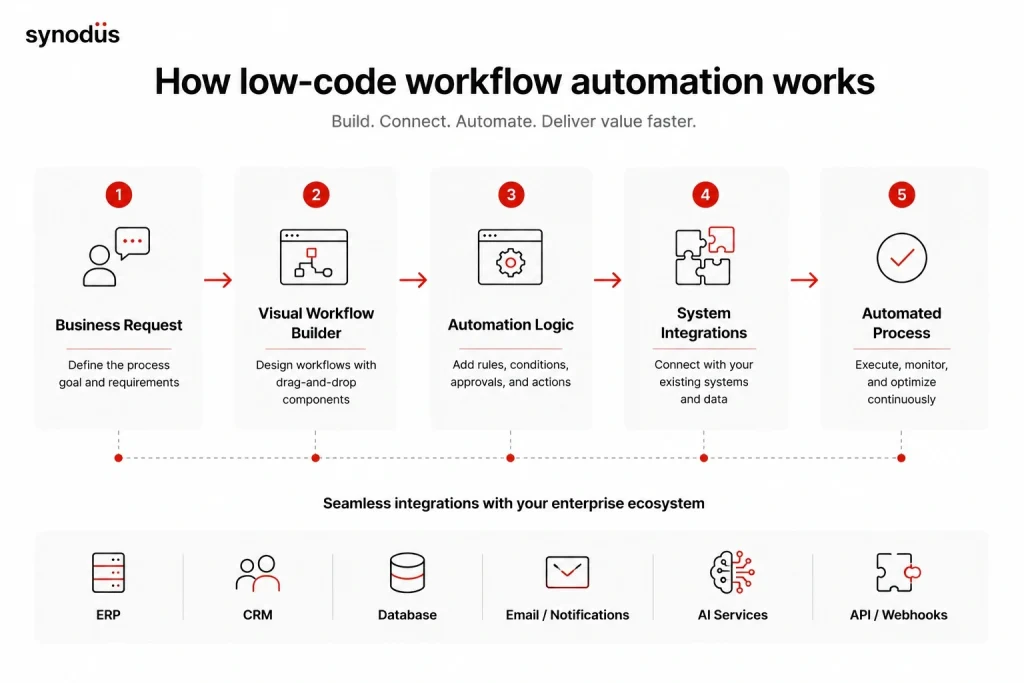
Low-code workflow automation is a development approach that lets users build custom automation apps with minimal coding. Instead of writing code from scratch, they use pre-built components and drag-and-drop elements to assemble workflow tools, which means faster development, fewer errors, and more collaboration between developers and non-technical users.
Low-code lets businesses automate processes like claims processing, policy issuance, and underwriting. It integrates easily with existing systems and removes the need for expensive IT specialists, which is why low-code workflow automation is used across insurance, finance, healthcare, and manufacturing.
Common features of a low-code automation platform
- Drag-and-drop interface: design templates, pre-built elements, and code blocks.
- Integrations: easy connection with your current suite of productivity tools.
- Collaboration: fine-grained access control so teams can work together effectively.
- Scalability and security: flexible enough to grow with the company, and secure, since low-code apps hold a lot of internal data.
- Rapid portability: build in one place and deploy everywhere.
- Vendor support: a simple interface is not enough, users also need training and support.
For the full list, see our checklist of must-have low-code features.
Low-code automation vs RPA vs AI agents
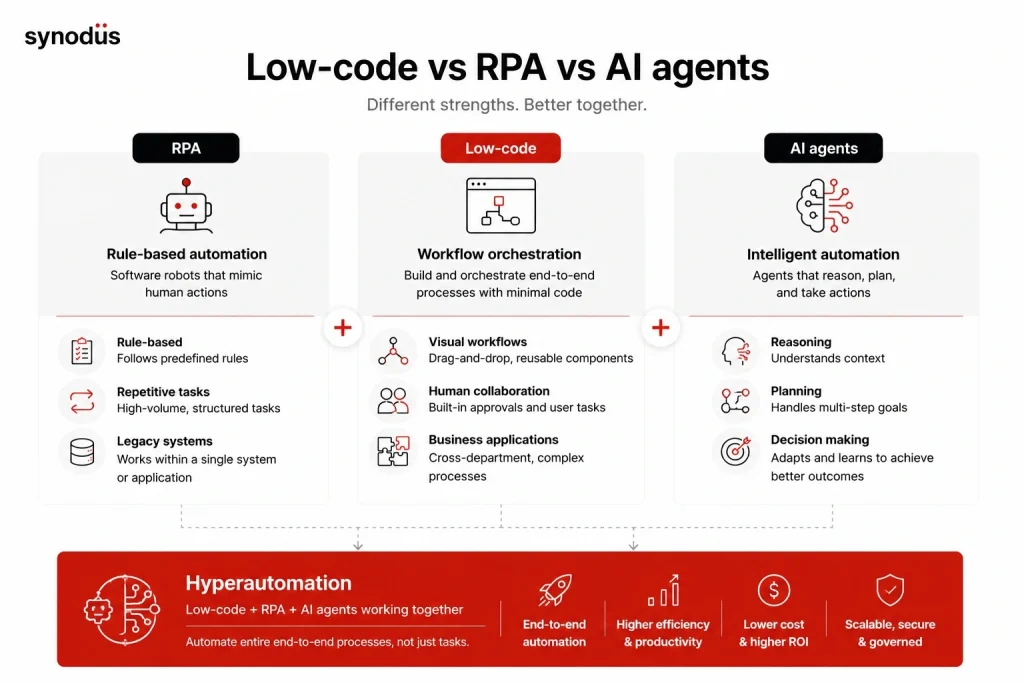
Before low-code workflow automation, companies mostly used RPA (robotic process automation) to build software robots that mimic human actions for a specific task. RPA is great for automating tedious departmental tasks and working with legacy systems in one defined area.
Low-code is better for cross-department, cross-functional processes that involve multiple tasks and human input at once, which makes it the right choice for comprehensive management systems and complex processes. The good news is the two work together: most low-code platforms support building RPA bots, so you can use a bot to scan documents, AI to analyze the data, and a low-code workflow to classify it into your database. For the deeper comparison, read our guide to low-code vs RPA.
In 2026, a third layer has joined the picture: AI agents. Where RPA follows fixed rules and a low-code workflow runs a defined process, an AI agent can reason, plan, and take multi-step actions on its own. Combining all three is what the industry calls hyperautomation, and we cover it below.
The 2026 shift: Hyperautomation and AI agents
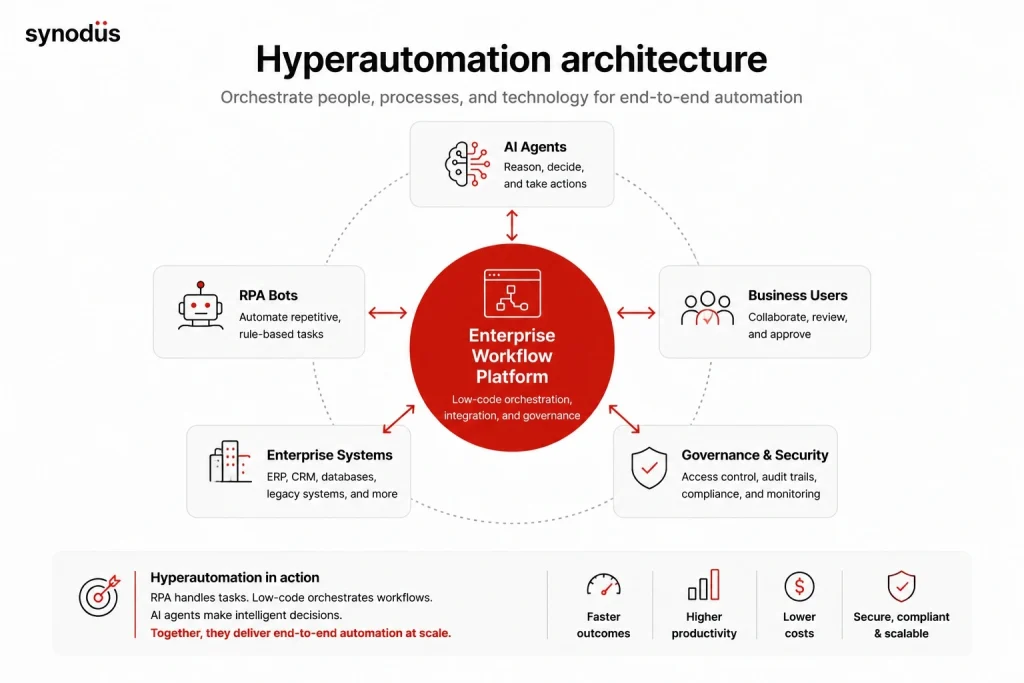
Workflow automation is moving from static, rule-based flows to intelligent, agent-driven ones. Gartner projects that 40% of enterprise applications will embed task-specific AI agents by the end of 2026, up from less than 5% a year earlier, one of the fastest adoption curves in software history. Around 90% of large enterprises now treat hyperautomation as a strategic priority.
Hyperautomation combines low-code, RPA, AI, and integrations to automate entire end-to-end processes rather than isolated tasks. In this model, RPA handles structured tasks, a low-code platform orchestrates the workflow and the human touchpoints, and AI agents make context-based decisions. Low-code platforms are central to this because they provide the visual builder, the governance, and the integration layer that tie the pieces together.
A word of caution: as agents take real actions, governance becomes essential. Gartner and Forrester warn that over 40% of agentic AI projects could be abandoned by 2027 if organizations do not get governance and ROI fundamentals right. The proven approach is human-in-the-loop control, tight permissions, audit trails, and starting with high-volume, low-risk workflows before scaling.
Why use low-code for process automation?
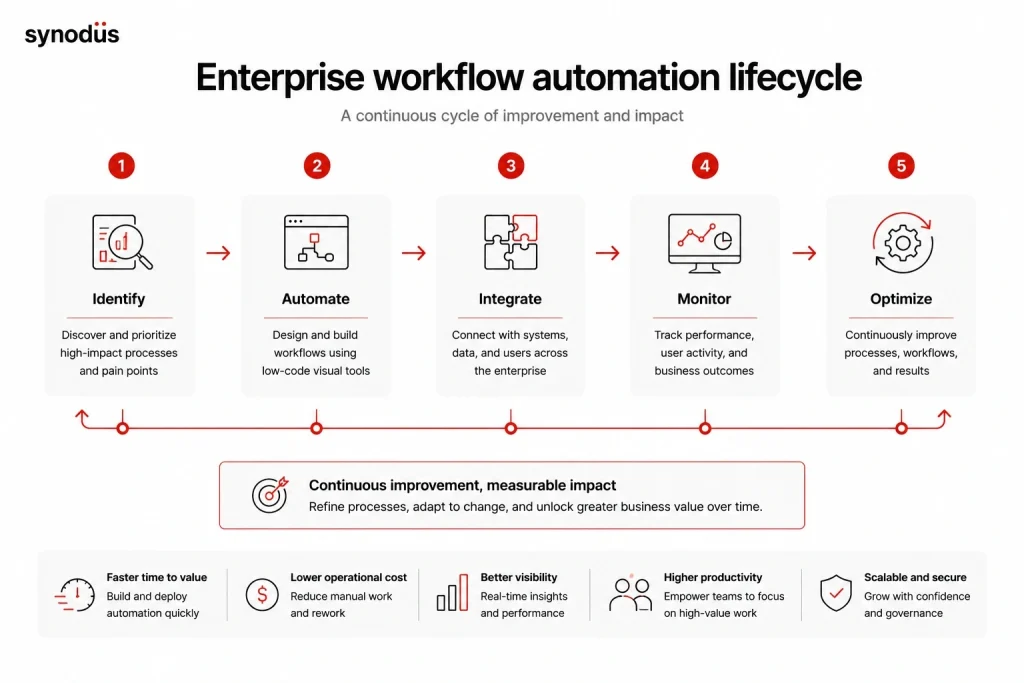
1. High performance and speed
Low-code lets companies build and ship business apps faster through drag-and-drop interaction, pre-built blocks and APIs, real-time version control and autosave, and multi-user collaboration. It hands control of end-to-end automation back to line-of-business users so they can adapt as requirements change. Structured automation is on track to reach 70% organizational adoption, up from 20% in 2021.
2. Real, measurable value
Low-code reduces the complexity and cost of development. By lowering the cost of digital transformation, you free up budget for other strategic initiatives, and faster delivery means end users adopt the automation sooner. The returns are well documented: basic automation cuts operational costs by 20 to 30%, and intelligent automation by 50 to 70%, with many enterprises reporting sub-12-month payback.
3. Agility
Previously, even small workflow changes needed custom coding. Low-code lets business leaders make changes themselves, avoiding IT bottlenecks and enabling instant updates. Most off-the-shelf automation tools are one-size-fits-all, but a low-code platform lets you build processes around your own strategy, operations, and goals.
4. Optimization and scale
Scalability works on two levels. Runtime scalability improves the service you deliver by increasing deployed capacity on demand. Developer-time scalability lets you manage many apps with a small amount of code that works across contexts. With low-code, small automated adjustments compound into higher productivity, shorter time to market, and better efficiency in existing processes.
Use cases of low-code workflow automation
1. Ending manual, tedious tasks
Low-code handles complex processes like employee portals, project management, cross-department workflows, and operational dashboards, connecting to existing infrastructure with interfaces that encourage adoption. Automating manual, repetitive work frees employees for higher-value tasks, and low-code automation can reduce errors by up to 90% while saving time.
2. Making rigid processes flexible
Some business processes are hard to change. Low-code makes them flexible, letting non-technical teams improve and tailor workflows with familiar drag-and-drop tools. Responsive design adapts to any screen, so the write-once-run-anywhere approach removes the need to manage separate codebases for different devices.
3. Standardizing processes
Standardizing processes across an organization ensures consistency and reduces errors. The idea is to connect customer service, sales, back office, and technical teams so they support each other. When a sale closes, the data moves automatically to customer service, and when a customer reports a technical issue, the technical team is notified instantly. A low-code BPM platform with document management replaces error-prone paperwork and routes documents to the right people in minutes.
4. Other use cases
Low-code workflow automation also covers employee onboarding, hiring and resume screening, procurement and purchase orders, inventory tracking and reordering, billing and payments, project management, and marketing from lead generation to campaigns. By automating routine tasks and standardizing processes, businesses save time, cut errors, and respond faster to change. To go further, read our piece on low-code and agile development.
A real example: Synodus built a task management system for Bamboo Airways on Power Apps, Power Automate, and Power BI, coordinating 2,000 employees. Delivered in 10 weeks by a team of 4, it cut manual tasks by 30% and raised task completion rates by 25% within 3 months.
Best low-code workflow automation tools
Most low-code platforms support process automation, but some do it better. Here are strong choices, and you can read our full review of the top low-code platforms for deeper comparisons.
- Microsoft Power Apps: build custom enterprise apps and process automation with little coding, part of the Power Platform alongside Power Automate. Coca-Cola, Campari Group, and Toyota use it.
- Kissflow: automate processes from procurement to finance to HR by creating workflows, approvals, and reports. Used by Pepsi, HubSpot, and Saint-Gobain.
- UI Bakery: a strong choice for small and medium businesses, used by Marshall Securities and Bandwidth.
- Quickbase: automate workflows, manage projects, and generate reports with little coding. Used by P&G and Mondelez.
- TrackVia: automate processes by building custom apps, workflows, and reports. Used by Downer and Northside Hospital.
- Airtable: build custom databases, organize data, and automate workflows with real-time collaboration. Used by Shopify and Autodesk.
- Huginn: an open-source tool for building bots and service workers. Learn more in our guide to open-source low-code platforms.
As a Microsoft Power Platform specialist in APAC, Synodus provides deep technical consultation and a custom low-code development service, with teams of low-code experts to help you build optimized process automation and robust business applications.
Challenges in using low-code workflow automation
Like any technology, low-code automation has trade-offs to consider:
- Integration issues: connecting a new platform to legacy systems, databases, APIs, and third-party services can be complex, and poor integration causes errors and inefficiency.
- Training and support: the tools are user-friendly but still need training, and you need reliable vendor support when issues arise.
- Security concerns: these platforms access sensitive data, so confirm the platform is secure and train staff to handle data safely.
- Governance: building many apps quickly raises governance challenges around who builds what and with which tools, which only grows as AI agents join the mix.
- Scalability limits: some tools struggle as workload grows, leading to delays and errors if the platform cannot keep up.
For practical fixes, see our guide to low-code challenges and how to solve them.
Frequently asked questions
RPA automates structured, repetitive tasks within one area by mimicking human actions, while low-code automation builds broader, cross-department workflows that involve multiple steps and human input. They complement each other, and many low-code platforms can build RPA bots too.
No. Low-code is one ingredient of hyperautomation, which combines low-code, RPA, AI, and integrations to automate entire end-to-end processes. Low-code typically provides the visual builder, orchestration, and governance layer.
Yes. In 2026, most platforms add AI copilots and increasingly let you build AI agents that make decisions and take multi-step actions. The key is to keep human oversight, tight permissions, and audit trails in place.
Common workflows include onboarding, hiring, procurement, inventory, billing, project management, and marketing, plus industry processes like claims, underwriting, and case management. It suits high-volume, rule-heavy, measurable processes best.
Wrapping up
Low-code workflow automation has become a game-changer for businesses chasing efficiency and productivity, letting teams automate processes without heavy coding, and increasingly pairing with RPA and AI agents for full hyperautomation. It has caveats around integration, security, and governance, so the winning approach is clear collaboration between IT and citizen developers, with governance built in from the start.
If you would rather have experts build it for you, Synodus offers a low-code automation service that turns your data into apps 10x faster and cuts development costs by half, with the governance modern automation needs. Book a free consultation to find the right fit for your processes.