The challenges of traditional enterprise development
In a competitive market, it is hard to hit business goals without digital transformation behind your internal processes. The right tools reduce manual work, optimize processes, and improve efficiency, yet many businesses still struggle to equip their teams, mainly because of:
- Outdated legacy systems: modernizing them is necessary, but not every business has the budget and resources, and removing or integrating them into an agile system is complex and disruptive.
- Limited bandwidth and long development cycles: as app demand rises, IT struggles to keep up, and coding an app to work seamlessly takes time, which creates a backlog, stressed developers, and slow delivery.
- Skill gaps: business users lack technical knowledge, so communication with developers can break down, and they often lack the tools to demonstrate their ideas.
- Tight budgets: technology investment is a gamble, and many companies cannot afford to hire professional coders or buy the apps they need.
- Shadow IT: without proper tools, employees find their own without telling IT, risking data loss, scattered files, and disconnected processes.
Because of these downsides, enterprises are looking for comprehensive solutions, and low-code is a promising one.
What is low-code?
Low-code is a development approach where developers build projects with intuitive graphic tools and reusable components instead of writing many lines of code. For enterprises, it reduces the burden of traditional coding and creates a simpler experience with a modern interface, integrations, data, and logic. For a deeper primer, read our guide to what low-code development is.
Benefits of low-code for enterprise
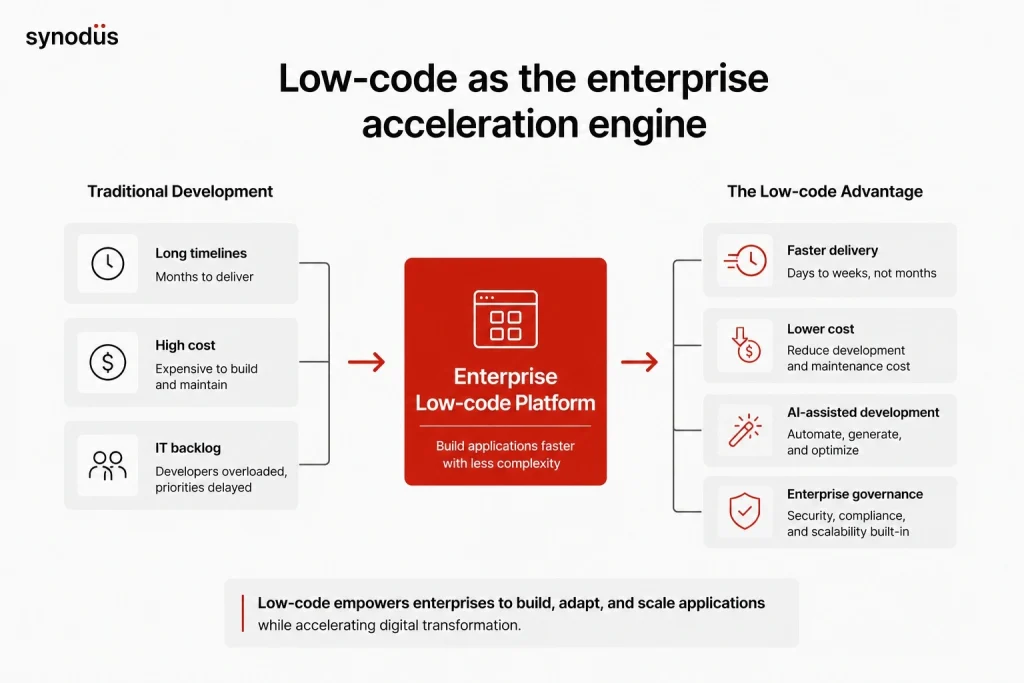
- Faster development: with complex coding removed, developers turn ideas and workflows into projects quickly, working only on the parts that need custom code while pre-built blocks handle the rest. Upgrades and iterations speed up too.
- Better efficiency: departments can build models and projects that optimize their own workflows without relying on experts.
- Lower innovation cost: businesses experiment with ideas at lower cost to find the best solution, instead of betting heavily on traditional builds.
- Optimized resources for niche projects: low-code suits restricted budgets, small user bases, and “ideal but not urgent” projects, like a marketing team that needs a scheduling tool but has no budget to buy one.
- Wider staff availability: less technical and non-professional developers from across the business can join development and make up for the shortfall of skilled developers.
- Project management and compliance: low-code helps track and manage projects, and its analytics tools support performance and deadline management, which helps establish governance and compliance.
For both sides of the picture, see our breakdown of low-code benefits and disadvantages.
Must-have features of enterprise low-code platforms
Beyond the drag-and-drop and integration every platform has, an enterprise platform should also offer:
- Consistent CI/CD support: prototype, test, debug, version control, project management, and integration, not just coding.
- Reusability: reusable code blocks you can modify and use across applications instead of rebuilding each one.
- No-code support too: developers customize where it matters while citizen developers build their own apps.
- Flexible platform control: ask what happens to your apps if you leave, whether they run independently, and who controls the data, to limit vendor lock-in.
- Workflow automation: build process automation and move data between apps for a seamless workflow.
- BI and reporting dashboards: choose a platform with real analytics, business intelligence, and dashboards, not just data storage.
- Access management: set permissions and rules to maintain control and prevent shadow IT, data loss, and security risks.
- AI assistance: in 2026, enterprise platforms should include AI copilots for app generation and built-in low-code AI agents, paired with governance and audit trails.
For a full checklist, see our guide to the must-have low-code features.
How to use low-code for enterprise
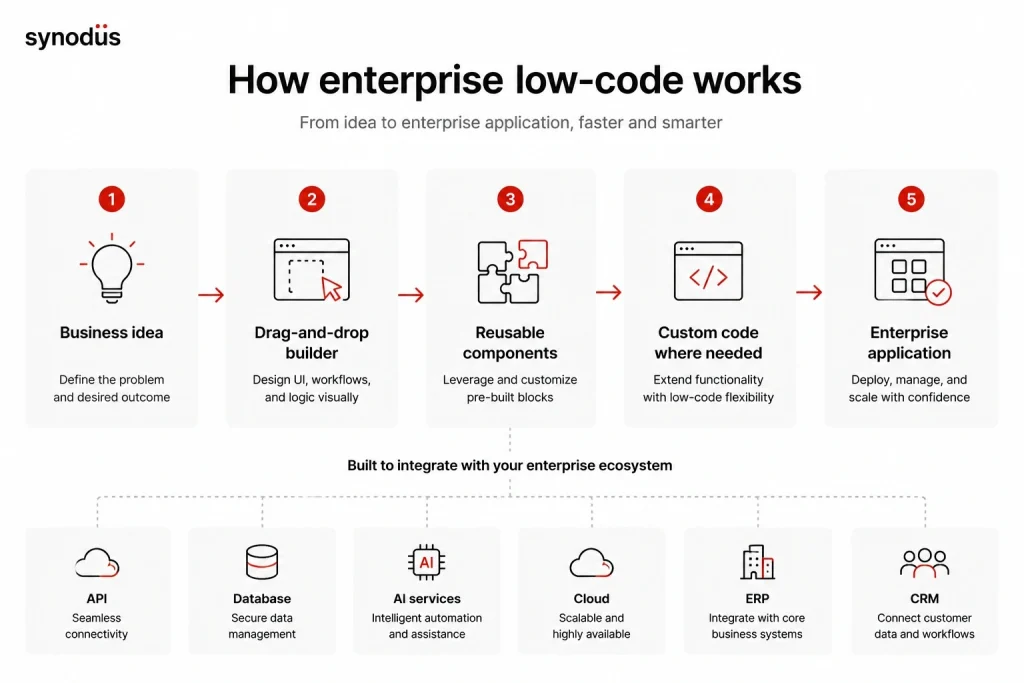
- Mobile app development: build apps for Android and iOS from a single project, with drag-and-drop front-ends and customized back-ends for advanced features.
- Web portals: create customer, partner, and employee gateways for searching products, getting quotes, placing orders, submitting requests, and checking data.
- Microservices applications: build scalable systems from independent components communicating via APIs, and translate legacy code into agile microservices.
- IoT-based apps: integrate IoT endpoints, gather and route device data, and serve internal or external consumers.
- Digitized business processes: replace error-prone, paper-based processes with apps that capture data, route approvals, and integrate with business systems.
- Line-of-business (LOB) systems: build, add, and migrate adaptable, scalable apps to single or multi-cloud deployments instead of only buying from third parties.
The AI shift in enterprise low-code
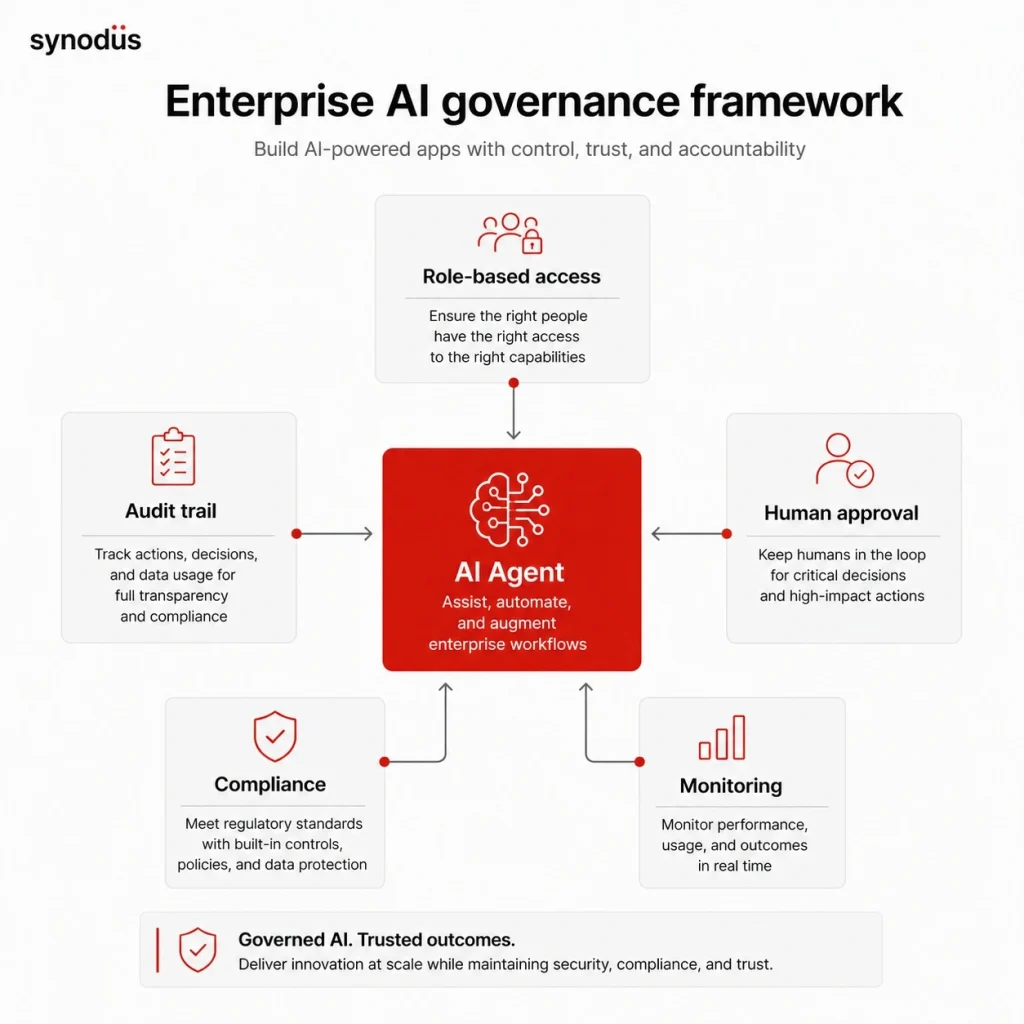
AI has become the defining factor in enterprise low-code. Gartner predicts that by 2029, 80% of mission-critical applications will use low-code platforms, up from just 15% in 2024, and much of that growth is AI-driven. The shift is from apps that run workflows to AI agents that take action across enterprise systems, handling tasks like approvals, onboarding, and reporting end to end.
For enterprises, this raises the importance of governance: agents that act need tight permissions, human oversight for consequential decisions, and audit trails. A well-governed enterprise low-code platform, with strong access control and compliance, is exactly the foundation these AI workflows need. When planning a build, ask where an AI agent could safely go beyond a static workflow.
From pilot to production: the real enterprise challenge
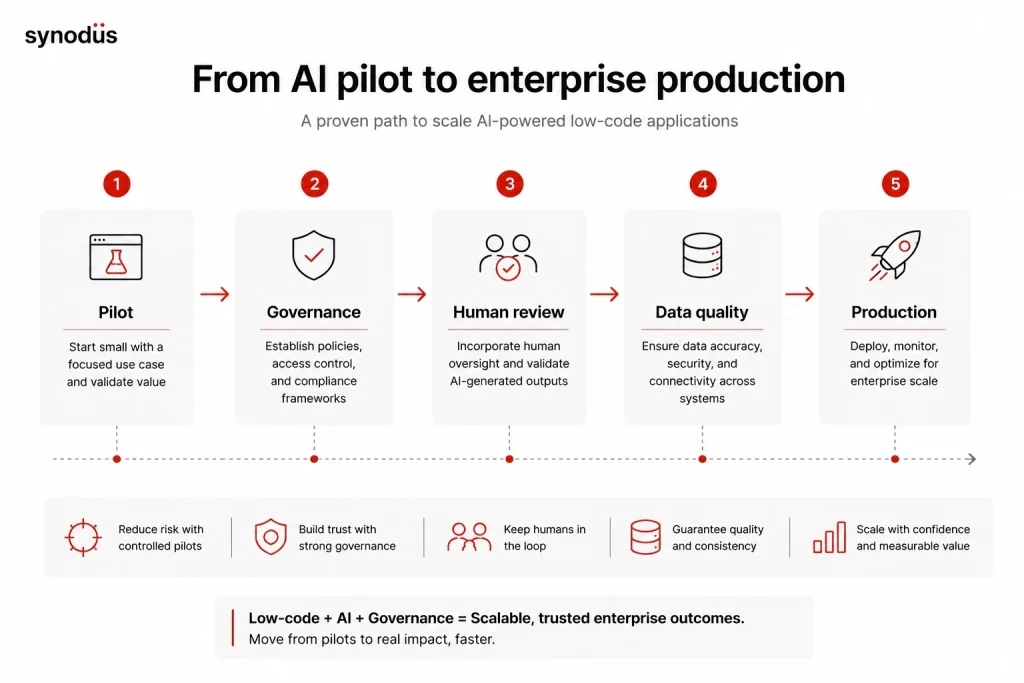
The hard part is not building an AI agent, it is getting it safely into production. As of early 2026, fewer than 25% of organizations had reached sustained production despite most running pilots, and 75% of technology leaders cite governance as their primary concern for agentic AI deployment. What separates pilots from production is not model quality, it is governance and data quality.
To cross that gap, enterprises should keep a human in the loop for consequential actions, scope each agent’s permissions tightly, insist on audit trails and role-based access control, and prepare clean, governed data before deployment. Start with bounded, well-defined workflows where the outcome is clear, then expand toward more autonomy as confidence grows. This is precisely where a governed low-code platform earns its place over a do-it-yourself stack.
Budgeting for AI: the new cost question
Classic enterprise low-code pricing is per user or per app, which is easy to forecast. AI changes that. Agent costs scale with tokens, tool calls, and orchestration, so a workflow that cost a few cents in 2023 can cost over a dollar per interaction in a complex 2026 agentic system. Traditional per-seat pricing has fallen to just 20% of buyers’ preferred AI models, with consumption- and outcome-based pricing now over half. Model AI costs at your expected scale, set usage limits and alerts, and favor platforms that give clear visibility into AI consumption, so the bill does not outrun the value.
Real-life use cases of low-code in enterprise
To picture the benefits, consider Coca-Cola UNITED. In 2014, as it expanded sales, manual processes that once worked became inefficient under the heavier workload. The company adopted Microsoft Power Apps to involve employees in tech creation, which generated thousands of new ideas. The results included order-processing automation that cut a half-day task to seconds, the ability to process more orders across more channels, handling the work of 10 full-time employees without raising labor costs, and streamlined UI development with on-brand design elements.
Closer to home, Synodus built a task management system for Bamboo Airways, coordinating 2,000 onsite and remote employees on Power Apps, Power Automate, and Power BI. Delivered in 10 weeks by a team of 4, it raised task completion rates by 25% and cut manual tasks by 30% within 3 months, a clear example of low-code at enterprise scale. For more, see our roundup of low-code examples across industries. Figures from third-party cases are drawn from published case studies, so treat them as point-in-time results.
Top enterprise low-code platforms to use
Enterprises need a platform that handles heavy workloads, serves a large user base, and stays scalable, secure, and high-performing. Here are strong options. Pricing is approximate and changes often, so confirm with each vendor.
1. Microsoft Power Platform
Gartner consistently rates Power Platform as a leader for enterprise low-code. It spans Power Apps for app development, Power Automate for workflow automation, Power Pages for web development, and Power BI for analytics, plus AI Builder, Dataverse, connectors, and the Copilot AI assistant. Microsoft-commissioned studies report large gains in cost, delivery speed, and data visibility when its tools are integrated together.
Pros: user-friendly for newcomers, easy third-party integration, and an extensive library of templates and components, all highly scalable.
Cons: debugging can be tough with complex logic, coding logic gets harder as apps expand, and large data volumes can be challenging.
Pricing: various plans, with Power Apps Premium from around $20 per user per month, plus Copilot Studio for AI agents priced separately.
This is the platform Synodus specializes in. As a Microsoft Power Platform specialist in APAC, we provide in-depth consultation and custom low-code development for enterprise-grade applications and process automation. Explore our low-code services.
2. OutSystems
OutSystems is a long-standing enterprise low-code leader and ranked #1 on G2’s 2026 best development software list. It builds and synchronizes core systems while staying secure, reliable, cloud-ready, and scalable, with a generous set of AI tools including AI-assisted development and a GenAI toolset. It has succeeded across industries, notably finance and healthcare.
Pros: a single platform for Android, iOS, web, and cloud, a strong security emphasis, and customization with JavaScript and .NET.
Cons: licensing can be expensive for smaller businesses, with some scalability and performance considerations for resource-intensive apps, and UX/UI design can be time-consuming.
Pricing: free tier for individuals, custom enterprise pricing (historically from tens of thousands per year).
Read more in our guide to low-code automation.
3. Salesforce Platform
Salesforce Lightning focuses on customer-related operations like sales, marketing, and service. You can build customized solutions, mobile apps, and automated workflows, and its clients tend to be midsize to large enterprises already using Salesforce. It now embeds AI agents through Agentforce for seamless digital transformation.
Pros: an intuitive interface, real-time data tracking, wide customization, and high accuracy through many integrable third-party apps.
Cons: rapid releases can skip rigorous testing, automated testing is hard, unplanned customizations can cause conflicts, and not every integrated tool is easy to use.
Pricing: from around $25 to $100 per user per month depending on the plan.
Also read our guide to the Salesforce low-code platform.
4. GeneXus
GeneXus is an enterprise low-code tool with strong AI for automating development, evolution, and maintenance. Businesses use its user-centered approach to build functionality around their systems, design secure omnichannel apps, and migrate from legacy systems.
Pros: simple test-to-production transitions with automatic code generation, higher developer productivity, a strong user base, and plenty of training material.
Cons: documentation can be sparse and unclear, the frontend needs improvement, implementation can require excess code, and user and access management could be stronger.
Pricing: approximate tiers from around $129 per month for startups to $329 per month for enterprise.
5. Pega
Pega builds multi-experience solutions for enterprise workflows, with CRM, RPA, and templates for business process automation, plus embedded AI for smart decisioning.
Pros: deep experience in BPM, CRM, RPA, and low-code, advanced technologies like case management and augmented analytics, and a broad partner ecosystem.
Cons: development and maintenance costs are tough for startups, and the learning curve is steep.
Pricing: enterprise-focused and case-based, typically from around $80 to $200 per user per month depending on scale, with high usage minimums and custom contracts that often run into the hundreds of thousands per year.
Platform comparison at a glance
| Platform | Best fit | AI capability | Approx. price |
|---|---|---|---|
| Microsoft Power Platform | Microsoft-ecosystem enterprises | Copilot, AI Builder, agents | From ~$20/user/mo |
| OutSystems | High-performance full-stack apps | AI-assisted dev, GenAI toolset | Free tier, custom enterprise |
| Salesforce Platform | CRM-centric enterprises | Agentforce AI agents | ~$25 to $100/user/mo |
| GeneXus | Omnichannel, legacy migration | AI for automation and maintenance | ~$129 to $329/mo |
| Pega | BPM, CRM, RPA at scale | AI decisioning | Enterprise, case-based (~$80 to $200/user/mo+) |
Downsides of low-code for enterprise
Testing and debugging
Compared with traditional languages and their rich tooling, low-code platforms offer limited unit testing, and logging is often the only practical debugging method. Some platforms provide visual debugging, but the inner workings stay hidden.
Security
Low-code apps need the same security checks as traditional ones. Platforms have a baseline level of security, but because much of it is baked in and hidden, developers may not see what happens behind the scenes and must rely on time-consuming screening. See our guide to the security risks of low-code and how to address them.
Vendor lock-in
Vendor lock-in remains the biggest fear, especially with black-box or proprietary formats. Some platforms forbid removing the underlying code or generate convoluted code, which makes moving apps across platforms hard.
AI-related risk
A newer downside: as enterprise platforms add AI, AI-generated code and agent actions can introduce flaws if they ship without review. Treat AI output as a draft and keep human oversight and governance in place.
How to implement enterprise low-code successfully
Technology
Make sure the platform has the flexibility you need, supporting citizen developers while offering the customization and scalability to solve complex projects and build comprehensive multi-app systems. In 2026, also weigh three AI-era criteria: AI agent governance (permissions, audit trails, human-in-the-loop controls), your required deployment model (cloud, on-premises, hybrid, or sovereign for sensitive data), and visibility into AI running costs so consumption stays predictable.
People
Provide training so anyone can develop, maintain, and use low-code apps, and set rules, access management, and a clear development process.
Continuous development
Encourage employees to become citizen developers, ensure your provider offers ongoing support, and confirm the platform stays scalable and compatible across services, devices, and systems.
Frequently asked questions
It depends on your ecosystem and needs. Microsoft Power Platform is a top choice for Microsoft-based organizations, OutSystems for high-performance full-stack apps, Salesforce for CRM-centric teams, and Pega for complex BPM and case management. Match the platform to your stack, scale, and governance needs.
Yes, when used correctly. Enterprise platforms offer compliance certifications, access control, and audit trails, but security still depends on your governance. Centralize app building, manage permissions, and review AI-driven workflows rather than assuming the platform is safe by default.
Increasingly, yes. Gartner expects 80% of mission-critical applications to use low-code by 2029. The exceptions are highly performance-sensitive or deeply customized systems, where traditional code can still be the better choice.
It varies widely, from around $20 to $100 per user per month for platforms with transparent pricing, to custom enterprise contracts for OutSystems, Pega, and others. Model the cost at your expected scale, since per-user pricing grows with adoption. If you add AI agents, also budget for consumption-based AI costs, which scale with usage rather than seats.
The main reasons are governance and data quality, not technology. Fewer than 25% of organizations reached sustained AI production in early 2026, and governance is the top concern for most technology leaders. Crossing the gap means human-in-the-loop controls, tight agent permissions, audit trails, and clean governed data, starting with bounded, well-defined workflows.
Wrapping up
Low-code offers undeniable advantages for enterprises in time, cost, development speed, and resources, and it now pairs naturally with AI to handle more mission-critical work. Each business should match low-code to its real use cases while staying aware of the downsides, since understanding them leads to more effective implementation.
If you would rather have experts build it for you, Synodus delivers low-code app development service for enterprises that turn your data into apps 10x faster and cut development costs by half, with the security and governance large organizations demand. Book a free consultation to find the right fit for your business.