Quick checklist
| Category | Features to look for |
|---|---|
| Core development | Drag-and-drop blocks, templates, multi-device, access control, hosting, customization, automation, portability, multi-stack, scalability, AI assistance |
| Data and analytics | Document management, multiple data types, analytics and dashboards |
| Integration and security | Custom APIs, security compliance, encrypted data centers, vendor support |
Core features every low-code platform should have
1. Pre-built code blocks with drag-and-drop
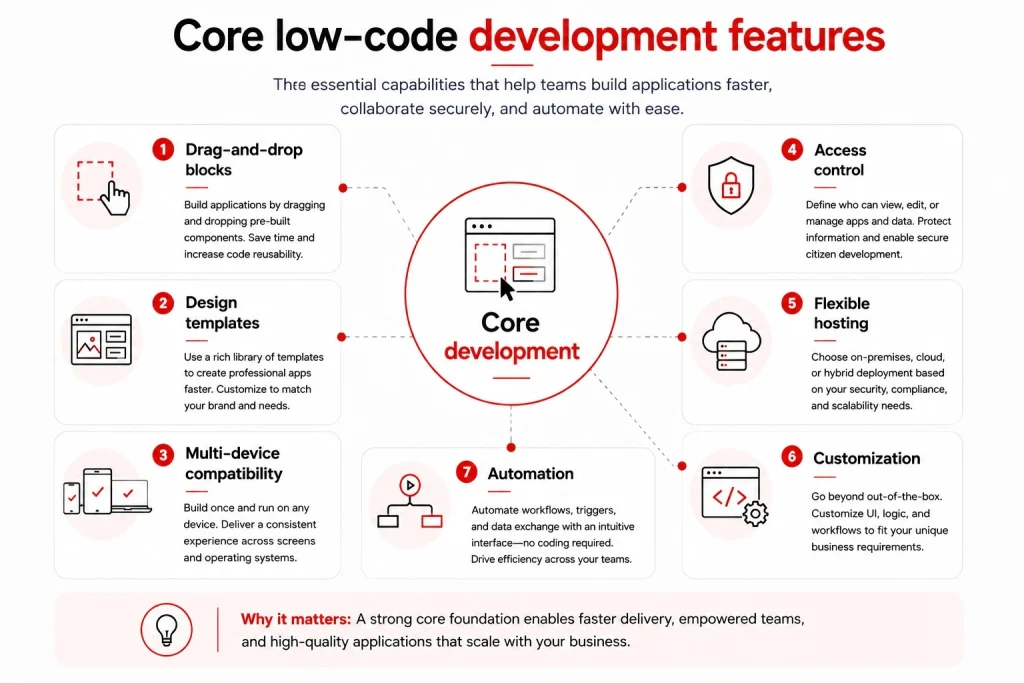
Pre-built code blocks with drag-and-drop are the primary feature of any low-code platform, for two reasons. They let developers build applications by dragging and dropping preconfigured elements, which saves significant time and effort. And they increase code reusability, since blocks can be replicated across projects, which keeps applications consistent. This feature is the foundation that makes low-code technology work.
2. Design templates
A strong platform offers a large library of design templates, which help create polished, professional applications without deep design skills. The bigger the library, the better, since developers do not start from scratch. Just as important, the platform should let you customize those templates: change colors, fonts, and layout, and add or remove elements to match your branding.
3. Compatibility with multiple systems and devices
A platform that launches multi-device applications is a big win for productivity. Users can access the same apps from smartphones, tablets, and laptops, so teams can work on the go or remotely. It also keeps the experience consistent across devices and operating systems, which improves usability and lets businesses serve employees and customers on whatever device they use.
4. Access control
Low-code is built for everyone, and that ease of use can backfire: if anyone can change an app by dragging and dropping, small daily edits can turn it into a mess. Access control prevents this by letting you decide who can view, edit, or manage each app and its data. It blocks unauthorized access and data breaches, and it makes a citizen developer program safe to run without compromising security.
5. Flexible hosting: On-premises, cloud, or hybrid
A good platform lets you choose the deployment model that fits your needs. On-premises hosting gives the most control and security, with data stored locally. Cloud hosting offers scalability and access from anywhere. Hybrid balances the two across multiple environments. This flexibility means a platform can suit anyone, from small businesses to large enterprises, based on budget, security, and compliance needs.
6. Customization
A common complaint is that low-code apps cannot be modified, but that is a myth. Most modern platforms are open to customization. To test a vendor’s flexibility, ask: What methods exist for modifying the output? Is there a GUI designer? Can you adjust HTML and CSS? Does it support white labeling and your branding? Can you build your own business logic into the apps?
7. Automation
A strong platform lets users automate both simple and complex processes through workflows that define a task’s steps, triggers that fire on conditions or events, and integrations that automate data exchange. This is one of the most common reasons businesses adopt low-code: around 68% of organizations use it to automate internal workflows. Crucially, this power should be accessible to non-technical users. Our tip: choose an automation tool with an intuitive interface, since the easier it is, the faster people adopt it. Read more in our guide to low-code automation.
8. Platform control and portability
What happens to your apps if you stop using the platform? To judge how much vendor lock-in you face, examine a few things. Who holds the records, and where do they live? Make sure you can easily transfer and retrieve your data. Can the platform produce license-free software that runs without the development environment, so apps keep working if you leave? And how easy is it to switch services or bring apps back in-house? Clear answers here protect you long term.
9. Compatibility with multiple frameworks and languages
This boosts flexibility. Low-code can build many kinds of apps, from mobile and cloud to on-premises systems, so a platform that works across tech stacks enables true cross-platform development and keeps your applications easy to use and maintain.
10. Scalability
Building apps quickly is a core low-code benefit, but as the number of apps and users grows, the platform must handle the load without losing performance or reliability. Scalability often comes from cloud-based infrastructure or a microservices architecture that breaks apps into smaller, manageable components, helping your organization grow and adapt.
11. AI-assisted development (the 2026 must-have)
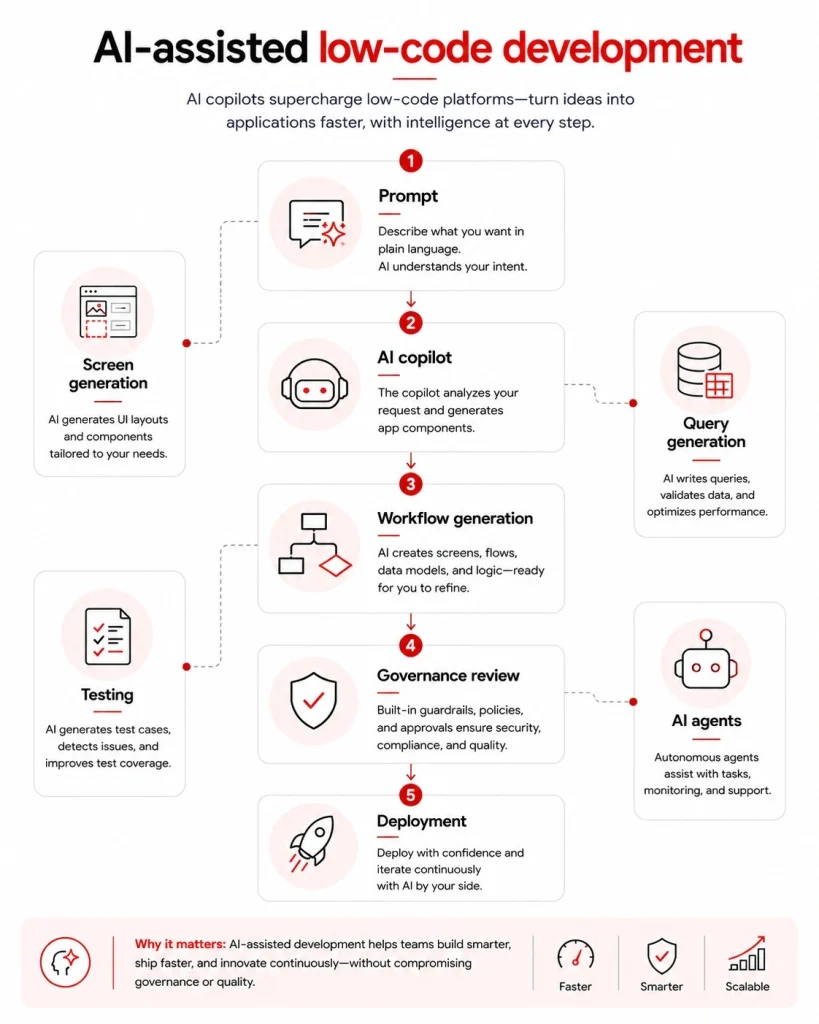
In 2026, AI has become a core feature rather than a nice-to-have. 85% of IT leaders say combining low-code with AI helps their organization innovate significantly faster. The strongest platforms now include an AI copilot that turns a plain-language prompt into a working screen, flow, or data model, plus AI for suggesting workflows, generating queries, and testing. Many also let you build AI agents that take actions across your systems, not just chatbots that answer. When comparing platforms, favor genuine AI-native tools over those that simply bolt AI on, and check that AI features come with governance and review controls, since 40 to 48% of AI-generated code has been found to contain security flaws when it ships without review.
A plus: support for data and analytics
12. Document management
This feature keeps data and documents stored, retrieved, and used securely. Look for version control to track changes over time, access control so users only see what they are authorized to, and integration to connect documents and data across systems. Some platforms combine document management with automation, so you can automate approval and review workflows, which improves efficiency and supports compliance.
13. The ability to handle many data types
A good platform lets you work with structured, semi-structured, and unstructured data. One useful capability is digitizing incoming data, so you can analyze information from sources like paper documents and forms without coding. Another is integrating third-party sources such as CRM and ERP to build a comprehensive database and more accurate analytics, which also reduces duplication and errors.
14. Data analytics and dashboards
Most platforms can store data and show simple reports, but only some excel at analytics, insights, and custom dashboards. Look for the ability to run complex analysis and queries without specialized coding, so users can spot trends and make informed decisions. Custom dashboards that display data as tables, graphs, and charts help track KPIs, monitor progress, and flag areas that need attention.
Integration and security features
15. Custom APIs and integration
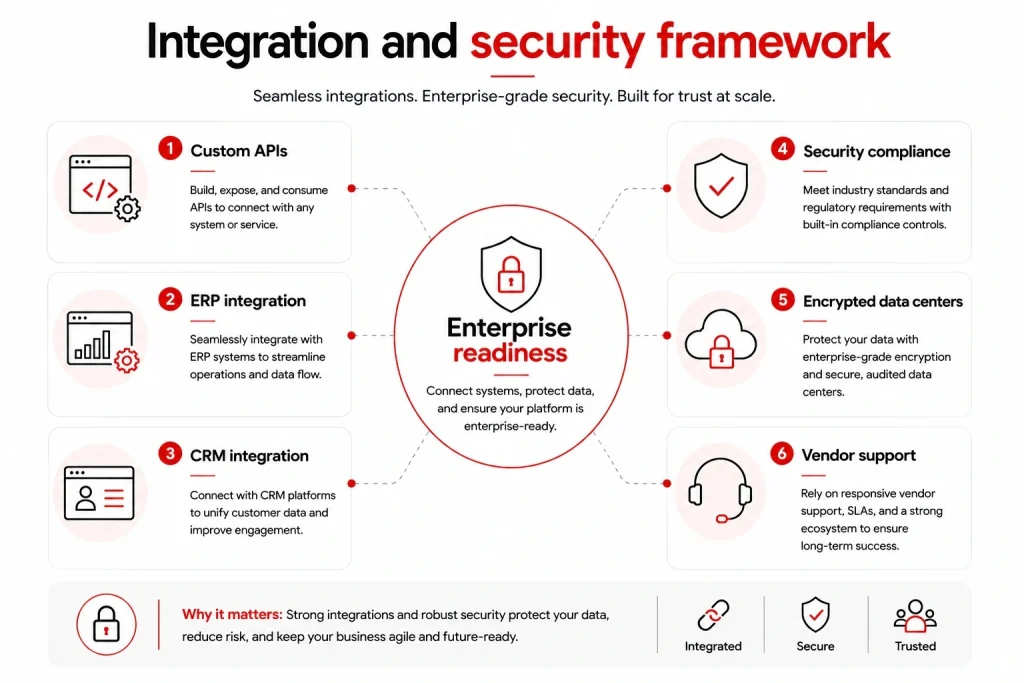
With custom API and integration features, you can connect low-code apps to external services, apps, and databases, which streamlines workflows and cuts manual work. This matters at scale: 85% of enterprises integrate their low-code apps with ERP and CRM systems. Integration also lets you build one comprehensive system that works across devices, improves security and reliability, gives better control over the tools employees use, and makes maintenance easier, since IT can upgrade everything in one place without waiting on a separate vendor.
16. Security and compliance
A lot of data flows in and out of low-code apps, so beyond general security, make sure the platform complies with standards like SOC 2 or ISO/IEC 27001. These are now standard in leading enterprise platforms, alongside built-in role-based access control, audit trails, and vulnerability scanning. With the average data breach costing around $4.4 million, compliance certifications are a strong signal that the vendor takes data protection seriously.
17. Encrypted, centralized data centers
Private, encrypted data centers within the platform are a big plus for security. Discuss this with vendors, since it supports both quick access and fully secure data transactions.
18. Technical and training support from the vendor
Your vendor should provide thorough onboarding and technical support, including documentation, tutorials, and other resources. Good support reduces the load on IT by letting business users manage and maintain their own low-code apps, which keeps workflows running smoothly without constant IT involvement.
How to prioritize these features
Not every feature matters equally for every team. As a rough guide: startups should prioritize drag-and-drop, templates, AI assistance, and transparent hosting to move fast and cheap. SMEs should add automation, integration, and access control as more people build. Enterprises should weight security and compliance, scalability, portability, and governance most heavily, since the stakes and scale are higher. Match the checklist to your size, your use case, and your future roadmap.
Frequently asked questions
It depends on your goal, but drag-and-drop building, customization, and integration are near-universal must-haves. In 2026, AI-assisted development has joined that core list, since it speeds up building and lowers the skills barrier.
Most modern platforms do, contrary to the old myth that low-code apps cannot be changed. Always confirm with the vendor how far you can go, including HTML and CSS edits, custom business logic, and white labeling.
Look for access control, encryption, secure or on-premises hosting options, and compliance certifications like SOC 2 and ISO/IEC 27001. For regulated industries, confirm the platform supports your specific requirements.
Yes. Most leading platforms include AI copilots for app generation and, increasingly, built-in AI agents. AI capability has become a core selection criterion rather than an optional extra.
Wrapping up
With so many low-code platforms available, this checklist should help you decide what to look for. Beyond basic design, integration, and management tools, keep data analytics, scalability, customization, compatibility, AI capability, and vendor support in mind.
If you are not sure which platform or features to prioritize, Synodus offers in-depth low-code consultation and builds custom solutions that turn your data into apps 10x faster and cut development costs by half. Book a free consultation to find the right fit for your business.