What makes HIS implementation different from standard software projects
Healthcare software implementation carries stakes that most software projects do not. A misconfigured billing module costs money. A misconfigured clinical alert system can cost lives. Data migration errors can corrupt patient records. A go-live failure does not just affect productivity, it can directly disrupt patient care.
Three factors make HIS implementation consistently harder than organizations anticipate:
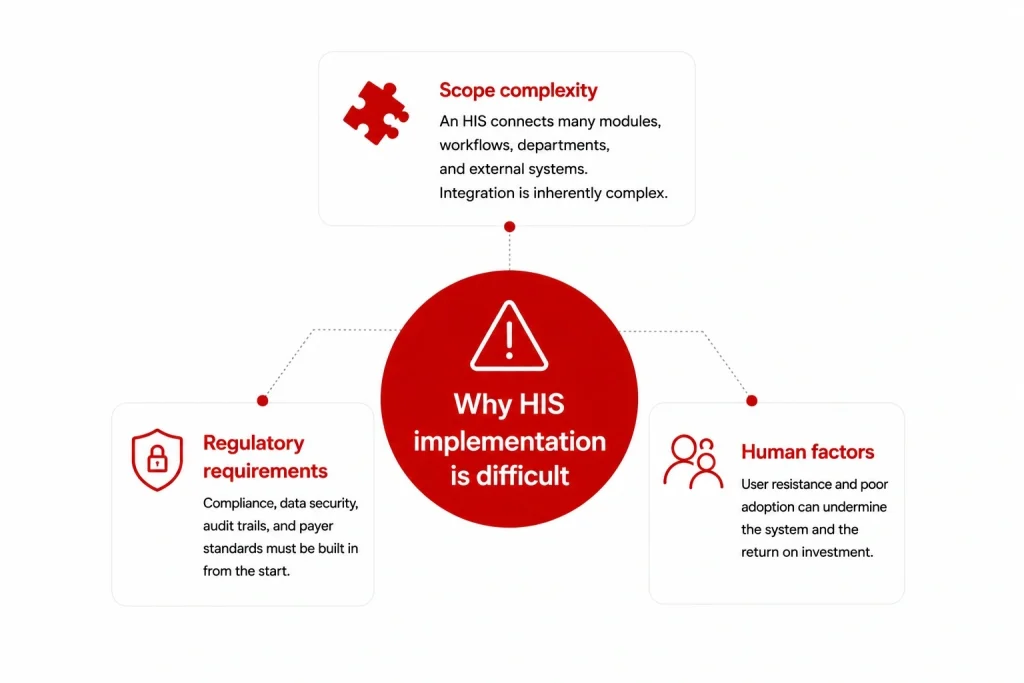
Scope complexity: An HIS is not one system – it is a platform connecting EMR, pharmacy, lab, radiology, billing, scheduling, inventory, and HR modules, each with its own data model, workflow, and user group. Getting all of these to work together, with existing systems, in a live clinical environment, is a fundamentally complex integration challenge.
Regulatory requirements: Every configuration decision has compliance implications. Access controls must satisfy HIPAA or local MOH requirements. Data migration must preserve audit trails. Interfaces with insurance payers must meet specific transaction standards. These constraints cannot be retrofitted at the end of a build.
Human factors: Clinical staff resistance is the most common cause of HIS benefit shortfall. Doctors and nurses who find the system disruptive will work around it – maintaining parallel paper processes that negate the investment. Change management is not a soft add-on; it is a core implementation workstream.
Hospital information system implementation plan: Overview
A well-structured HIS implementation runs through six phases. Timeline varies significantly by project scope, but the sequence is consistent regardless of whether you are deploying an off-the-shelf system or a custom-built one.
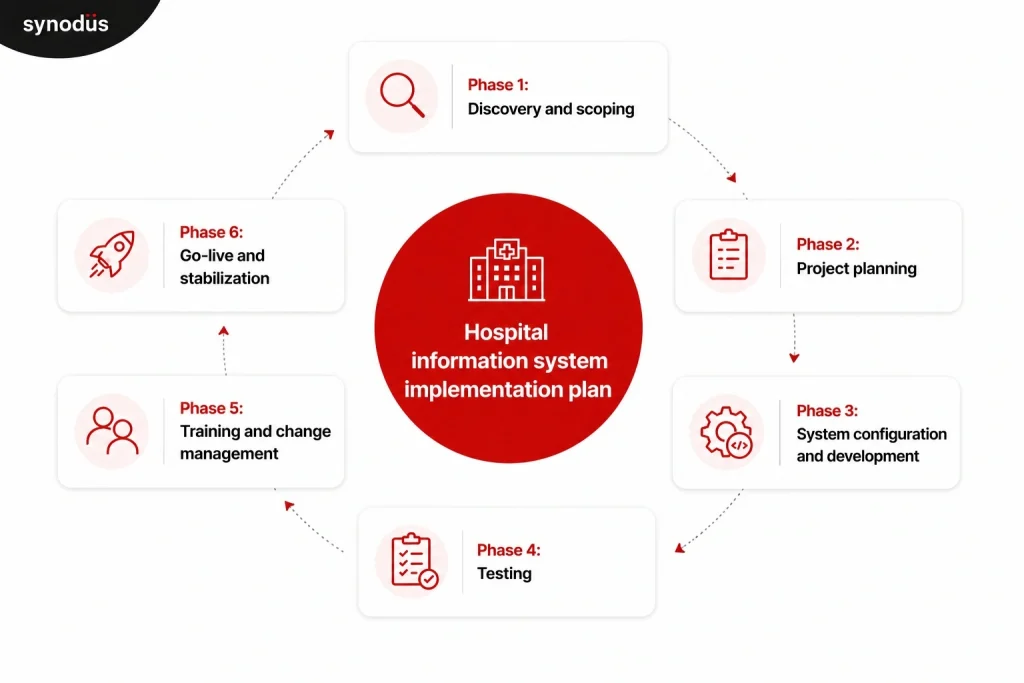
| Phase | Key activities | Typical duration |
|---|---|---|
| 1. Discovery and scoping | Requirements gathering, workflow mapping, vendor/system selection | 4-8 weeks |
| 2. Project planning | Team structure, timeline, budget, governance, risk register | 2-4 weeks |
| 3. System configuration and development | Build, configure, integrate, migrate data | 2-12 months |
| 4. Testing | Functional, integration, performance, UAT | 4-8 weeks |
| 5. Training and change management | End-user training, champion network, communication plan | 4-8 weeks (concurrent with testing) |
| 6. Go-live and stabilization | Cutover, hypercare support, performance monitoring | 4-12 weeks post go-live |
Total timeline for a mid-size hospital implementing a full HIS: 6-18 months. Large health systems with complex integrations or multi-site deployments can run 18-36 months.
Phase 1: Discovery and scoping
What happens in this phase
Discovery is the most important phase of the entire implementation and the one most commonly rushed. The goal is to build a complete, accurate picture of what the HIS needs to do before any configuration or development begins.
Workflow mapping: Document current state workflows for every department that will use the system: how patients are registered, how orders are placed, how results are communicated, how billing is processed. Do not rely on management’s description of how things work – observe and interview the staff who actually do the work. The gap between “how we think it works” and “how it actually works” is where implementation surprises come from.
Requirements definition: Translate workflow documentation into specific system requirements. Which modules are needed? What integrations are required with existing systems (lab equipment, imaging systems, insurance payer portals, national health registries)? What compliance standards must the system meet? What languages, currencies, and billing formats does it need to support?
Current system audit: Inventory existing systems, data sources, and technical infrastructure. Identify what data needs to be migrated, in what format it currently exists, and what data quality issues exist. Data migration surprises discovered mid-project are expensive; discovering them in discovery is cheap.
Vendor or system selection: If you have not yet selected a system or vendor, discovery outputs should drive that decision. Requirements gathered from actual clinical workflows are a far more reliable basis for vendor evaluation than a generic RFP checklist. For a structured framework for comparing vendors, see the hospital information system companies guide.
Who is involved
- Project sponsor (hospital CEO, CMO, or COO)
- Department heads from every affected clinical and administrative area
- IT leadership
- Selected frontline staff from nursing, pharmacy, lab, and administration
- Vendor or implementation partner (if already selected)
What to watch for
Scope creep starts in discovery. Every stakeholder group will have feature requests beyond what is needed for a functional baseline. Distinguish between “must have at go-live”, “needed within 6 months”, and “nice to have eventually”. Everything in the first category becomes the project scope. Everything else goes on a prioritized backlog.
Phase 2: Project planning
What happens in this phase
With requirements defined, phase 2 establishes the structure that will govern the entire implementation.
Team structure: Every HIS implementation needs a dedicated project team with clear role ownership. At minimum:
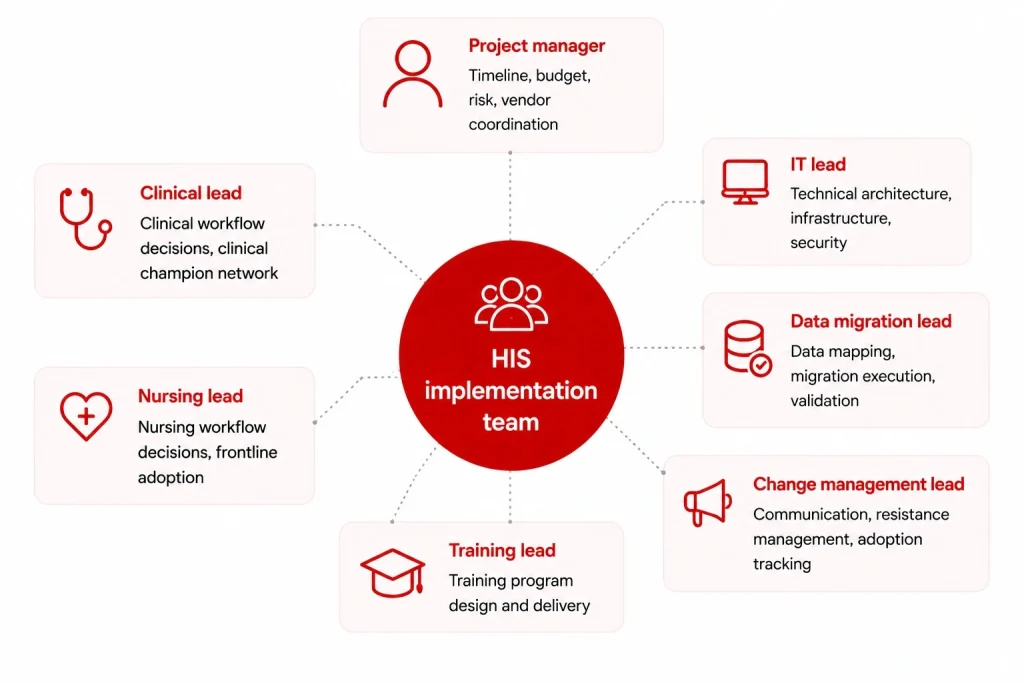
| Role | Responsibility |
|---|---|
| Project manager | Timeline, budget, risk, vendor coordination |
| Clinical lead (physician) | Clinical workflow decisions, clinical champion network |
| Nursing lead | Nursing workflow decisions, frontline adoption |
| IT lead | Technical architecture, infrastructure, security |
| Data migration lead | Data mapping, migration execution, validation |
| Training lead | Training program design and delivery |
| Change management lead | Communication, resistance management, adoption tracking |
For smaller facilities, some of these roles will be combined. For larger implementations, each will have a team behind them.
Implementation timeline: Build a detailed project plan with milestones, dependencies, and owners for each workstream. Include buffer time – HIS implementations consistently run longer than planned. A 20% timeline buffer is a reasonable baseline for mid-size projects; 30% for complex multi-site deployments.
Governance structure: Define how decisions get made. Who has authority to approve scope changes? What is the escalation path when workstreams conflict? A steering committee with clear decision rights prevents the project from stalling when disagreements arise between clinical and IT priorities.
Risk register: Identify the top 10-15 risks at project outset, with probability, impact, and mitigation plan for each. Common high-impact risks: data migration quality, interface failures with existing systems, staff adoption, vendor delivery delays, and regulatory approval timelines.
Budget: Beyond licensing or development fees, budget explicitly for: implementation services, data migration, interface development, hardware upgrades, training, change management, and post-go-live support. These typically add 50-100% on top of the core software cost. For a detailed cost breakdown, see the HIS cost guide.
Phase 3: System configuration and development
What happens in this phase
For off-the-shelf systems, this phase is primarily configuration: mapping your workflows into the system’s structure, setting up user roles and access controls, configuring clinical alerts and order sets, and building interfaces with external systems.
For custom or hybrid systems, this phase includes development of custom modules alongside configuration of the base platform.
Configuration priorities:
- User roles and access controls (role-based, least-privilege)
- Clinical workflows: order entry, result routing, documentation templates
- Billing and coding rules mapped to your payer mix
- Formulary and pharmacy protocols
- Alert thresholds for clinical decision support (configure conservatively – alert fatigue is a real risk)
- Report templates for operational and compliance reporting
Interface development: Every connection between your HIS and an external system (lab equipment, imaging systems, insurance portals, national health registries) needs to be built, tested, and validated. HL7 FHIR and DICOM are the standard protocols; confirm your HIS vendor supports the specific version required by each connected system. Interface development is consistently underestimated – budget and timeline accordingly.
Data migration: Patient records, historical clinical data, billing history, and formulary data all need to move from legacy systems to the new HIS without loss, corruption, or compliance violation. The migration process involves:
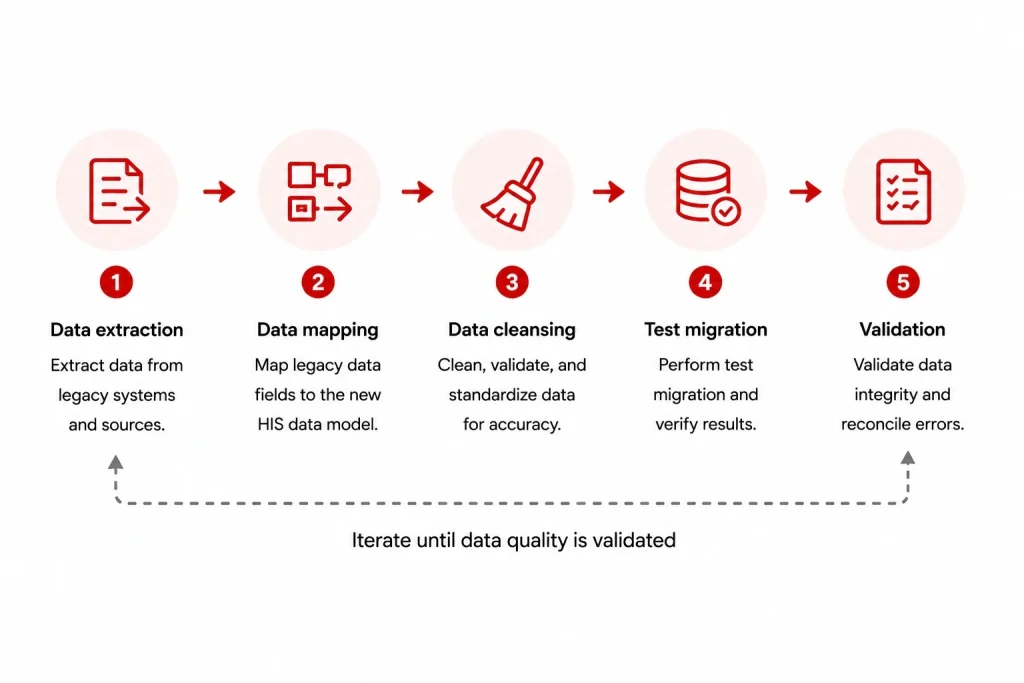
- Data extraction from source systems
- Data mapping to the new system’s data model
- Data cleansing (resolving duplicates, correcting format errors, flagging incomplete records)
- Test migration runs (run at least three before the live cutover)
- Validation (clinical and administrative staff verify migrated data accuracy)
Do not attempt a big-bang data migration on go-live day. Run parallel systems for a defined period and validate migrated data before decommissioning the legacy system.
What to watch for
Configuration drift: decisions made in early configuration get changed later without updating documentation, creating inconsistencies that surface during testing. Maintain a configuration decision log throughout this phase.
Phase 4: Testing
What happens in this phase
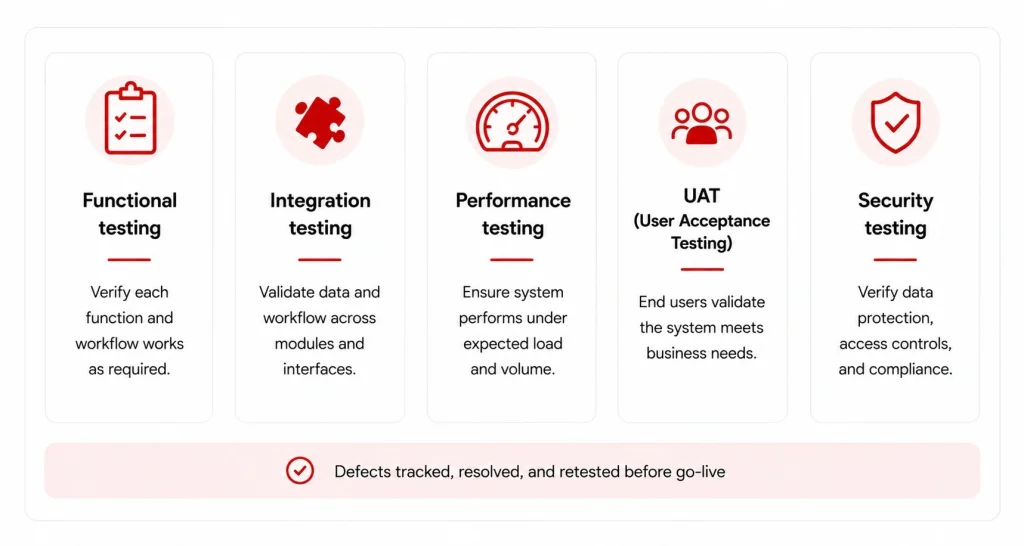
Testing for an HIS is more extensive than for most software because errors have clinical consequences. Four testing types are non-negotiable:
Functional testing: Each module works correctly in isolation. Order entry produces the correct output. Billing calculations are accurate. Pharmacy dispensing alerts fire correctly. Clinical documentation saves and retrieves accurately.
Integration testing: Data flows correctly between modules and between the HIS and external systems. A lab order placed in the EMR appears correctly in the LIS. Results from the LIS route back to the ordering physician. A discharged patient triggers the correct billing workflow.
Performance and load testing: The system handles peak concurrent user load without degradation. For most hospitals, peak load occurs during morning shift change and mid-morning outpatient hours. Test with realistic concurrent user volumes – not average load but the 95th percentile peak.
User acceptance testing (UAT): Clinical and administrative staff test the system using realistic day-in-the-life scenarios. UAT is not a sign-off exercise – it is a final opportunity to catch workflow mismatches before go-live. Involve the same frontline staff who participated in discovery; they will identify gaps that technical testers miss.
Issue tracking and resolution: All issues found in testing go into a tracked log with severity classification (critical/high/medium/low), owner, and resolution deadline. No critical issues should remain open at go-live. High-severity issues need a documented plan before go-live, even if the fix is scheduled post-launch.
Phase 5: Training and change management
What happens in this phase
Training and change management run concurrently with testing, not after it. Starting this workstream late is one of the most consistent predictors of poor adoption.
Change management:
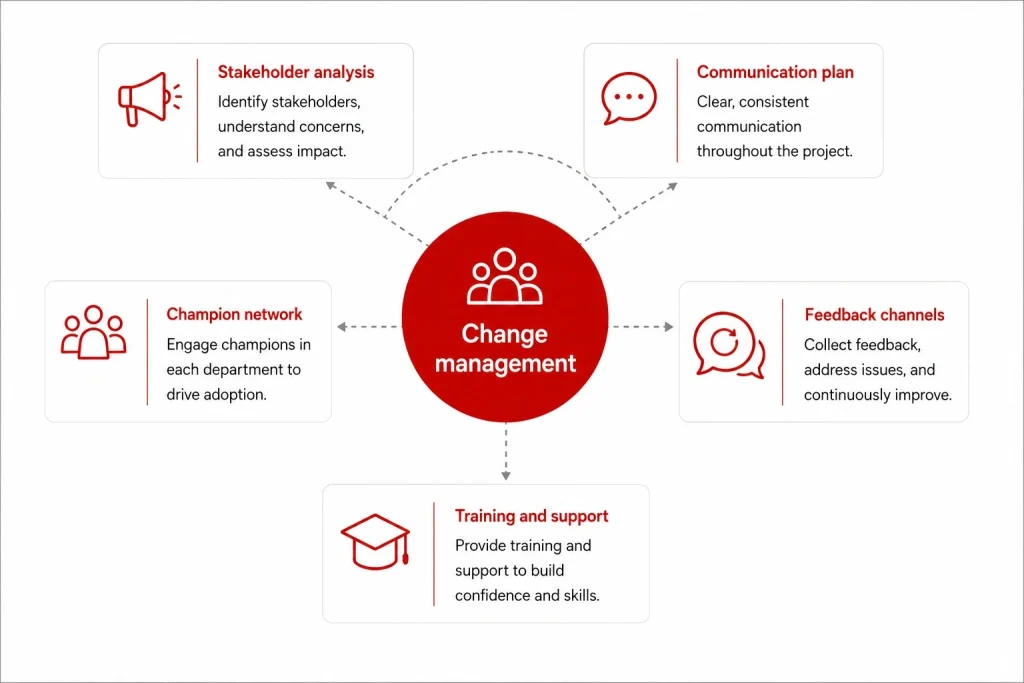
The goal of change management is not to eliminate resistance – some resistance is inevitable when changing how clinical staff work. The goal is to surface resistance early, address legitimate concerns, and build enough organizational momentum that adoption is the path of least resistance by go-live.
Key activities:
- Stakeholder analysis: Map every stakeholder group by their likely level of support and resistance. Design specific engagement strategies for each group. Resistant senior physicians require a different approach than enthusiastic nursing staff.
- Communication plan: Define what gets communicated, to whom, by whom, and when throughout the implementation. Clinical staff should never hear about major project developments through rumor.
- Champion network: Identify 2-3 respected clinical staff in each department who will use the system early, advocate for it among peers, and provide peer support during and after go-live. Champions are the most effective adoption accelerant available – more effective than formal training alone.
- Feedback channels: Create structured mechanisms for staff to report problems, suggest improvements, and escalate concerns. Staff who feel heard are more likely to engage constructively with problems rather than abandoning the system.
Training program:
One-size-fits-all training does not work for HIS. A nurse’s training needs are completely different from a physician’s, which are completely different from a billing administrator’s. Design role-based training tracks.
Training should be:
- Role-specific: Cover only the modules and workflows relevant to each user group
- Hands-on: Conducted in a training environment that mirrors production
- Just-in-time: Scheduled close to go-live, not weeks before
- Reinforced: Follow-up sessions 2-4 weeks post go-live to address gaps that only emerge in real use
For staff who will have difficulty with the transition (less tech-comfortable staff, high-volume clinical areas), plan one-on-one or small-group sessions in addition to group training.
For a detailed breakdown of what goes wrong in this phase and how to prevent it, see EHR implementation challenges – the patterns are consistent across EHR and HIS deployments.
Phase 6: Go-live and stabilization
Go-live approach: Phased vs. big-bang
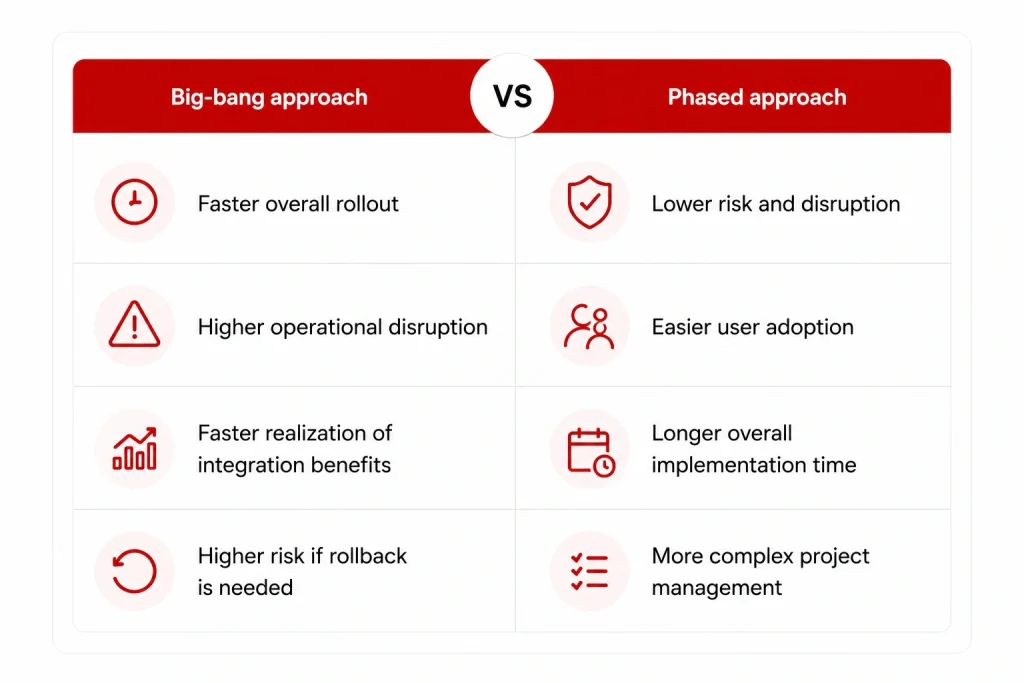
Big-bang go-live: All departments switch to the new system simultaneously on a defined cutover date. Higher risk, faster realization of integration benefits, lower cost of running parallel systems.
Phased go-live: Departments or modules go live in sequence over weeks or months. Lower risk per phase, longer timeline to full benefit realization, more complex project management.
For most mid-size hospitals implementing a full HIS for the first time, a phased approach by department (administrative functions first, then clinical) is lower risk than a big-bang cutover. For facilities replacing an existing HIS with a new one, a big-bang cutover with a short parallel period is often more practical.
Cutover planning
The cutover from legacy systems to the new HIS is the highest-risk moment in the implementation. Plan it in detail:
- Cutover window: Schedule during the lowest-volume period (typically a weekend). Build in time to validate the new system before the legacy system is taken offline.
- Parallel operation period: Run both systems simultaneously for a defined period (typically 2-4 weeks) while staff gain confidence and data migration is validated.
- Rollback plan: Define the conditions under which you would roll back to the legacy system, and verify that rollback is technically feasible before go-live. Never go live without a tested rollback option.
- Communication: All staff should know the go-live date, their role in the cutover, and exactly who to contact for different types of problems.
Hypercare support
The 4-8 weeks immediately following go-live require intensive support. This is when user adoption issues, workflow mismatches, and technical problems that testing did not surface will appear.
During hypercare:
- Vendor and implementation team are on-site or available with short response times
- Champions are active in their departments supporting peers
- A command center or dedicated support channel handles incoming issues
- Issues are triaged and resolved in real time, not queued for the next sprint
As issue volume drops and staff confidence builds, hypercare support can be tapered and transitioned to standard support operations.
Post-go-live performance monitoring
Define the KPIs you will track post-implementation before go-live. Tracking them from day one creates a baseline and demonstrates progress to stakeholders during the stabilization period.
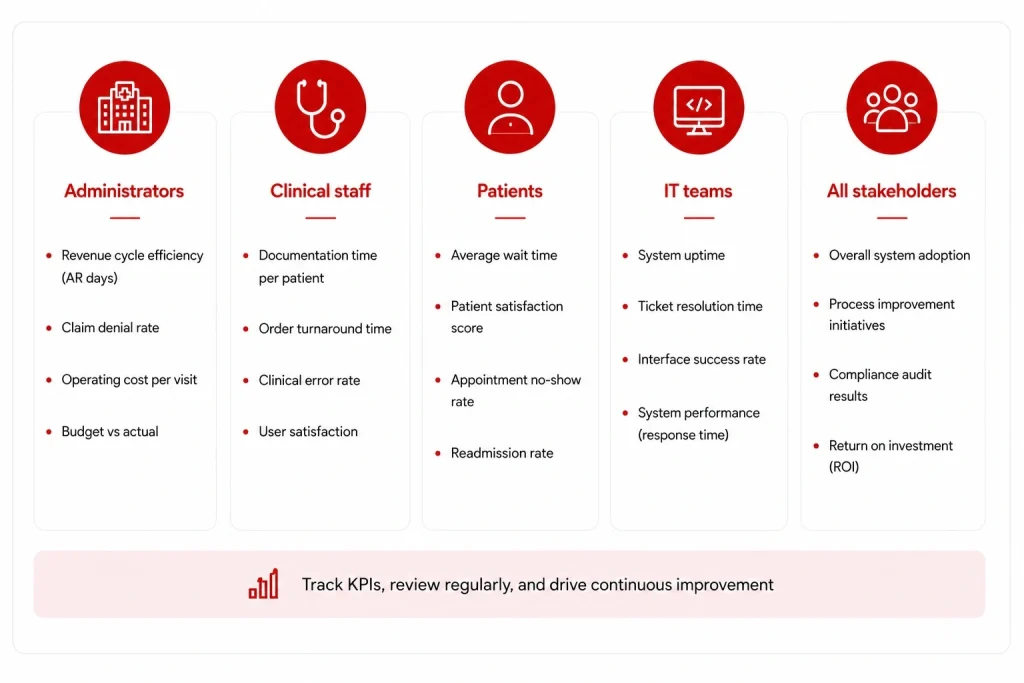
Recommended KPIs by stakeholder:
| Stakeholder | KPIs to track |
|---|---|
| Administrators | Claim denial rate, days in AR, billing error rate |
| Clinical staff | Documentation time per patient, alert override rate, order error rate |
| Patients | Registration wait time, patient satisfaction scores |
| IT | System uptime, response time, security incidents |
Review KPIs at 30, 60, and 90 days post go-live. For context on what good performance looks like, the hospital information system benefits guide covers the research benchmarks for each of these metrics.
HIS implementation checklist
Use this as a quick-reference status check across phases:
Discovery
- Workflow documentation complete for all affected departments
- System requirements signed off by clinical and administrative leads
- Legacy data audit complete with migration scope defined
- Vendor/system selected based on requirements
Planning
- Project team roles assigned with clear ownership
- Detailed project plan with milestones and dependencies
- Governance structure and decision rights documented
- Risk register established with mitigation plans
- Full budget including implementation, training, and support costs approved
Configuration and development
- User roles and access controls configured
- Clinical workflows configured and validated by clinical leads
- All required interfaces built and unit-tested
- Data migration plan documented with test migration schedule
- At least three test migration runs completed and validated
Testing
- Functional testing complete for all modules
- Integration testing complete for all interfaces
- Performance and load testing complete at peak-volume scenarios
- UAT complete with frontline clinical and administrative staff
- No critical issues open; all high-severity issues have documented resolution plans
Training and change management
- Champion network identified and trained in each department
- Role-based training tracks designed and delivered
- Communication plan executed throughout implementation
- Feedback channels established and actively monitored
- Training completion tracked by department and role
Go-live and stabilization
- Cutover plan documented and rehearsed
- Rollback plan tested and ready
- Hypercare support team and schedule confirmed
- KPI baselines established for 30/60/90-day tracking
- Legacy system decommission plan ready (do not decommission until migration validated)
Common implementation mistakes and how to avoid them
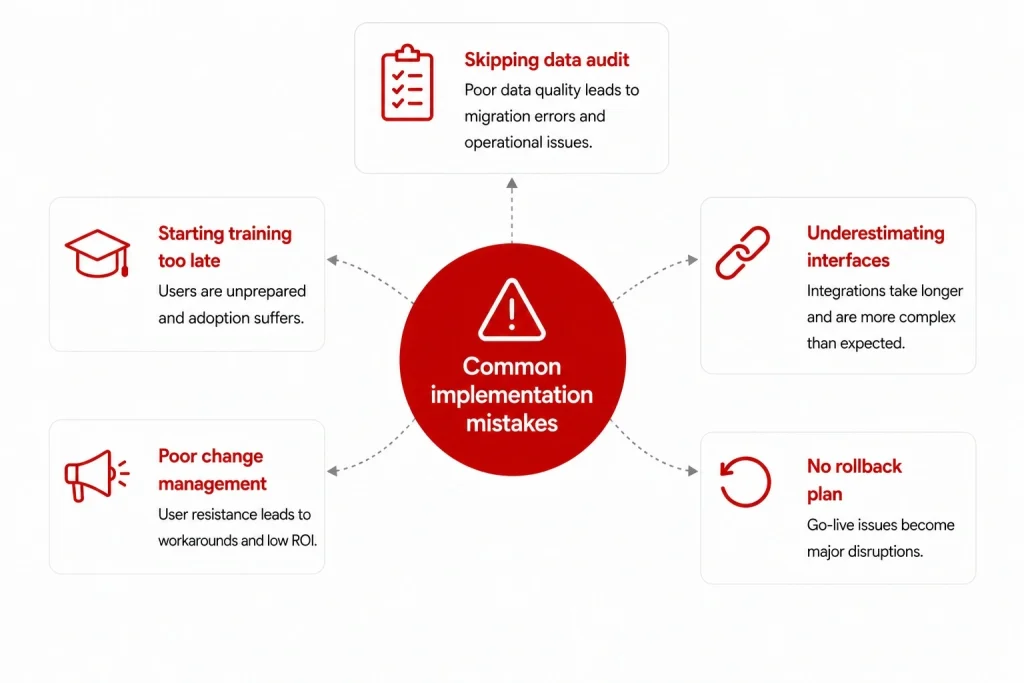
Starting training too late: Training delivered in the final two weeks before go-live does not have time to stick. Staff who feel unprepared become resistant. Start training 4-6 weeks before go-live and reinforce it in the weeks immediately after.
Underestimating interface complexity: Every external system connection is a mini-project. Facilities consistently underestimate the number of interfaces required and the time to build, test, and validate each one. Audit all interface requirements in discovery and add 30% to your interface development timeline estimate.
Skipping the data audit: Poor data quality in the legacy system becomes poor data quality in the new HIS. Running a data quality assessment before migration begins – and cleaning data before it moves – is significantly cheaper than fixing data problems post-go-live.
Leaving change management to IT: Change management is a clinical leadership responsibility, not an IT one. Clinical staff take their cues from clinical leaders. If the CMO and CNO are visibly committed to the implementation, adoption rates are higher. If they are neutral or passive, resistance fills the vacuum.
Going live without a rollback plan: If a critical failure occurs at go-live and there is no tested rollback option, the organization is exposed. Define rollback criteria and test the rollback process before the cutover date.
How Synodus approaches HIS implementation
Synodus is a healthcare software development company based in Vietnam, with 250+ developers and 30+ healthcare clients across APAC. Clutch rating: 5.0. The implementation framework in this guide reflects how their team structures HIS projects from discovery through post-go-live stabilization.
Their hybrid model starts from a pre-built HIS base covering core modules (EMR, pharmacy, inventory, billing, scheduling), then builds custom workflows, integrations, and compliance layers around each client’s specific operational context. This means the foundation-building phase is skipped – teams move directly into configuring and extending a working system rather than building from scratch – which compresses timelines significantly without sacrificing fit.
What this looks like in practice:
Vietnam University Hospital: 5,000 outpatients and 1,700 medical staff daily. Full HIS covering integrated EMR, inventory management, analytics dashboard, and patient mobile app. Built to comply with Vietnam MOH regulations. Results: 300% revenue increase, $70,000/month in administrative cost savings, 30% improvement in patient satisfaction.
Military Hospital 110: 1,500 outpatients and 500 inpatients daily. Hybrid HIS covering EMR, scheduling, bed management, billing, inventory, IoT-connected LIS and PACS, and a bilingual patient mobile app. Delivered in 4 months by a 7-person team. Results: 70% improvement in operational efficiency, full elimination of paper-based workflows. Read the full HIS case study here.
Projects start within 48 hours of scoping completion.
FAQs
Timeline depends on scope and facility size. A small clinic implementing a cloud-based OTS system: 2-4 months. A mid-size community hospital implementing a full HIS: 6-12 months. A large health system or multi-site deployment: 12-24 months or more. Epic implementations at large academic medical centers can run longer. Custom-built systems sit anywhere in the 6-18 month range depending on complexity.
User adoption failure is the most common cause of benefit shortfall. A system that clinical staff resist using delivers the same outcomes as no system. Change management – starting early, involving frontline staff in design decisions, building a champion network, and providing intensive post-go-live support – is the primary lever for managing this risk.
A complete HIS implementation plan covers: project scope and requirements, team structure and role assignments, phase-by-phase timeline with milestones and dependencies, budget (including all cost categories beyond licensing), risk register with mitigation plans, data migration plan, interface development plan, testing strategy, training program by user role, change management plan, go-live approach and cutover plan, rollback plan, and post-go-live KPI tracking framework.
Four approaches consistently reduce resistance: involving frontline clinical staff in workflow design decisions before configuration begins (not just in training); identifying and resourcing clinical champions in each department; communicating regularly and transparently about the implementation, including problems; and ensuring the system actually reduces workload for the staff using it. Resistance that persists despite these measures usually signals a legitimate workflow problem that needs to be addressed in the system configuration.
EHR implementation focuses on the clinical record layer: digitizing patient data, prescriptions, and clinical documentation. HIS implementation is broader: it connects the EHR with administrative, financial, pharmacy, lab, and operational systems across the entire hospital. HIS implementation is more complex by scope and involves more stakeholder groups. Many of the challenges overlap – see EHR implementation challenges for a detailed breakdown of issues common to both.
Implementation services, training, data migration, interface development, hardware, and post-go-live support typically add 50-100% on top of the core software cost. For a full breakdown by cost category, see the HIS cost guide.
Track metrics that directly reflect the implementation’s stated objectives. Common post-go-live KPIs: claim denial rate and days in accounts receivable (financial), documentation time per patient and alert override rate (clinical), registration wait time and patient satisfaction scores (patient experience), and system uptime and response time (IT). Establish baselines before go-live so you have a reference point for post-implementation comparisons. For research benchmarks on what these metrics should look like in a well-implemented system, see the hospital information system benefits guide.