What is an electronic medical record (EMR)?
An electronic medical record (EMR) is a digital version of a patient’s paper chart that contains the medical and treatment history within a single healthcare practice. EMR systems allow physicians, nurses, and administrative staff to create, store, update, and access patient information electronically rather than maintaining physical paper files.
Unlike traditional paper records stored in filing cabinets, electronic medical records provide real-time access to patient data from any workstation within the practice. The system captures comprehensive clinical information including patient demographics, medical history, medications, allergies, immunization records, laboratory test results, radiology images, and billing information.
History of medical record systems
Medical record-keeping has transformed dramatically over the past three decades. Before the 1990s, healthcare providers relied exclusively on handwritten notes, paper charts, and physical file storage systems. The Health Insurance Portability and Accountability Act (HIPAA) of 1996 established the first federal standards for electronic transactions in healthcare, laying the groundwork for digital adoption.
The Health Information Technology for Economic and Clinical Health (HITECH) Act of 2009 accelerated EMR adoption significantly by providing financial incentives through the Medicare and Medicaid EHR Incentive Programs. This legislation allocated over $27 billion to encourage healthcare providers to adopt certified electronic health record technology and demonstrate meaningful use of these systems.
Key components of an EMR system
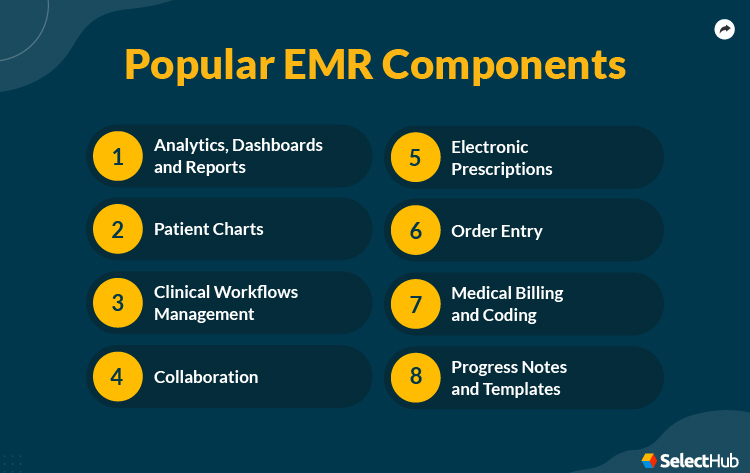
Modern electronic medical record platforms comprise several integrated modules that work together to manage patient care:
Clinical documentation captures patient encounters through structured templates, free-text notes, and voice-to-text dictation. Physicians document physical examinations, diagnoses, treatment plans, and progress notes directly into the system during or immediately after patient visits.
Medication management enables electronic prescribing (e-prescribing) with real-time drug interaction checking, allergy alerts, and direct transmission to pharmacies. The system maintains a complete medication list showing current prescriptions, dosages, administration routes, and prescription history.
Order entry systems allow providers to request laboratory tests, imaging studies, procedures, and referrals electronically. Computerized provider order entry (CPOE) reduces errors associated with handwritten orders and illegible prescriptions.
Results management integrates laboratory findings, radiology reports, pathology results, and other diagnostic information directly into the patient record. Providers receive automatic notifications when new results become available, enabling faster clinical decision-making.
Clinical decision support provides real-time alerts, reminders, and evidence-based guidelines at the point of care. The system can flag potential drug interactions, remind providers about preventive care screenings, and suggest appropriate diagnostic tests based on patient symptoms.
Real-world EMR example
Consider a typical patient visit at a primary care clinic using an electronic medical record system. When patients arrive, front desk staff verify demographics and insurance information in the EMR, automatically updating any changes since the last visit. The system flags any outstanding tasks such as annual screenings or immunization updates.
In the examination room, the physician opens the patient’s electronic chart on a tablet or workstation. The interface displays vital signs recorded by nursing staff, current medications, recent laboratory results, and notes from previous encounters. During the examination, the doctor documents findings using a combination of structured templates and free-text entry.
When prescribing medication, the physician selects the drug from a database that automatically checks for interactions with the patient’s current medications and known allergies. The prescription transmits electronically to the patient’s preferred pharmacy within seconds. Before the patient leaves, the front desk schedules a follow-up appointment and the billing staff submits insurance claims electronically using codes captured during the visit.
Market adoption statistics
Electronic medical record adoption has grown substantially across healthcare settings. According to the Office of the National Coordinator for Health Information Technology (ONC), approximately 78% of office-based physicians used some form of EHR/EMR system as of 2021. Hospital adoption reached nearly 96% during the same period, with most facilities implementing comprehensive certified systems. Over 180 hospitals implemented a new EMR in 2024 alone, with many more planning changes in 2025 and beyond.
Small practices with fewer than ten physicians historically lagged in adoption rates due to cost concerns and implementation complexity. However, cloud-based EMR solutions and government incentive programs have narrowed this gap significantly. Rural healthcare providers have also increased adoption, though they continue to face challenges related to internet connectivity and technical support access.
The global EHR/EMR market reached approximately $29 billion in 2023 and continues expanding as healthcare organizations worldwide recognize the benefits of digital record systems. Market analysts project continued growth driven by regulatory requirements, interoperability initiatives, and integration with emerging technologies such as artificial intelligence and telemedicine platforms.
Why EMR systems matter
Electronic medical records represent more than simple digitization of paper files. These systems fundamentally transform how healthcare providers deliver patient care, manage clinical workflows, and coordinate across different care settings. By centralizing patient information in accessible digital formats, EMR platforms reduce medical errors, improve care quality, and enhance operational efficiency.
The transition from paper to electronic records enables data-driven healthcare improvements at both individual and population levels. Providers can identify trends across patient populations, track quality metrics, and participate in value-based care programs that reward positive health outcomes. Electronic systems also facilitate research by making de-identified patient data available for clinical studies while maintaining privacy protections.
EMR systems are one layer of a broader hospital information system (HIS). The HIS integrates EMR with administrative, financial, inventory, and operational functions across an entire facility. Understanding the distinction matters when scoping a digitalization project: EMR addresses clinical records; HIS addresses everything else too.
EMR vs EHR: Key differences explained
EMR systems are often confused with EHR (Electronic Health Record) systems. While both Electronic Medical Records (EMR) and Electronic Health Records (EHR) digitize patient information, their purpose and scope differ significantly.
An EMR is primarily used within a single healthcare practice, acting as a digital version of the traditional paper chart. It records patient history, diagnoses, prescriptions, and lab results specific to one provider. In contrast, an EHR goes beyond internal documentation: it enables data sharing across multiple healthcare organizations, giving authorized professionals a complete and continuous view of a patient’s health journey.
From an operational standpoint, EMRs improve clinical efficiency and documentation accuracy, while EHRs drive interoperability, coordinated care, and patient engagement. For instance, when a patient moves from a general practitioner to a specialist, EHR systems allow seamless access to updated records, preventing duplicate tests or medication errors.
In essence, the EMR is a system of record, while the EHR is a system of collaboration, transforming how care teams communicate and how patients experience healthcare continuity. For a full breakdown of how EMR, EHR, and PHR differ, see the EMR vs EHR vs PHR comparison.
Core features of modern EMR systems
Contemporary electronic medical record platforms integrate dozens of features designed to support clinical workflows, enhance patient care quality, and improve operational efficiency. Understanding these capabilities helps healthcare organizations evaluate systems and configure implementations to match their specific needs.
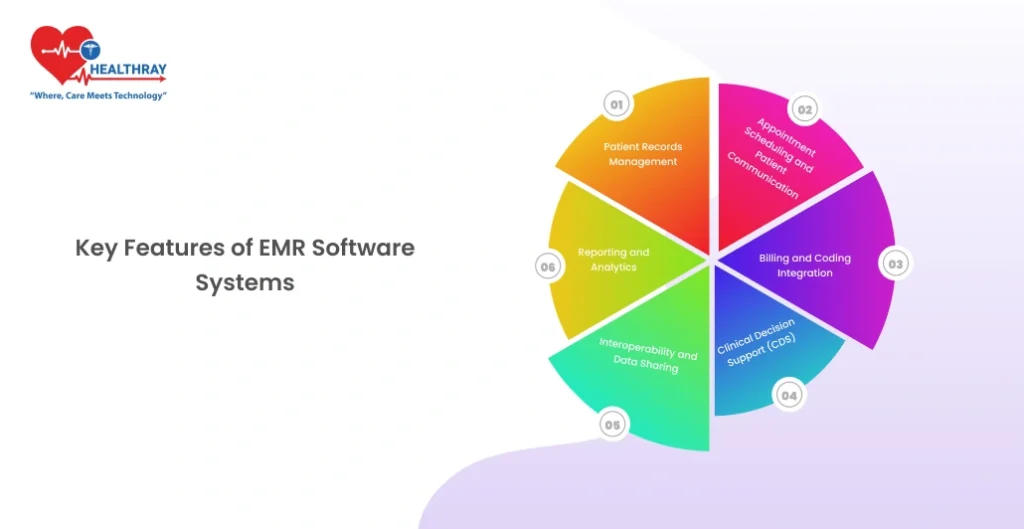
1. Patient demographics and registration management
Patient registration forms the foundation of the electronic medical record, capturing identifying information and administrative details essential for care delivery and billing processes.
- Core demographic data includes patient name, date of birth, gender, address, phone numbers, email addresses, and Social Security number. The system maintains demographic history, tracking changes over time while preserving audit trails of who made modifications and when.
- Insurance information management stores primary, secondary, and tertiary insurance coverage details including policy numbers, group identifiers, subscriber relationships, and coverage effective dates. Real-time eligibility verification connects to payer systems to confirm active coverage and determine patient financial responsibility before services are rendered.
- Emergency contact records document family members or designated individuals the practice should notify in urgent situations, including their relationships to patients and contact preferences. Advanced directive information such as healthcare proxy designations and code status preferences may also appear in this section.
- Preferred pharmacy selection allows patients to designate pharmacies for electronic prescription transmission, with options to specify different pharmacies for regular medications versus controlled substances. The system stores pharmacy contact information, hours of operation, and whether each location accepts electronic prescribing.
- Race, ethnicity, and language data supports culturally competent care delivery, quality reporting requirements, and public health surveillance. The system should accommodate preferred spoken languages, need for interpreters, and communication preferences to ensure effective patient-provider interaction.
2. Clinical documentation and charting
Clinical documentation captures the narrative of patient encounters, including history, physical examination findings, clinical assessments, and treatment plans.
- Structured templates guide documentation through predefined forms organized by specialty, visit type, or chief complaint. Templates include dropdown menus, checkboxes, and radio buttons that standardize data entry while ensuring comprehensive documentation. Pediatric well-child visits, for example, use age-specific templates that prompt documentation of developmental milestones, growth parameters, and recommended immunizations.
- Free-text notes provide flexibility for narrative descriptions that don’t fit structured formats. Physicians document complex clinical reasoning, unusual presentations, or nuanced situations through traditional paragraph-style notes supplementing structured data.
- Voice recognition and dictation enable hands-free documentation through speech-to-text conversion. Providers speak naturally while the system transcribes words into structured templates or free-text note sections. Advanced systems learn individual provider speech patterns and medical terminology to improve accuracy over time.
- Smart phrases and macros allow providers to create shortcuts for frequently documented content. Typing a brief code expands into complete paragraphs describing common physical examination findings, standard treatment instructions, or templated assessment and plan sections.
- Clinical note templates organize documentation according to recognized formats such as SOAP (Subjective, Objective, Assessment, Plan) notes used in primary care or BIRP (Behavior, Intervention, Response, Plan) notes common in mental health settings. Specialty-specific formats accommodate unique documentation requirements for fields like ophthalmology, dentistry, or orthopedics.
- Addendum and amendment capabilities permit providers to supplement or correct documentation after initial signing, maintaining complete audit trails showing original content, modifications, who made changes, and when corrections occurred. This functionality supports both clinical accuracy and legal compliance.
3. Electronic prescribing (e-Prescribing)
Electronic prescribing transforms medication ordering from error-prone handwritten prescriptions to accurate digital transmission directly to pharmacies.
- Medication database integration provides access to comprehensive drug information including available formulations, standard dosing regimens, administration routes, and branded versus generic options. Providers search by drug name, therapeutic class, or indication to select appropriate medications.
- Real-time formulary checks display which medications appear on patients’ insurance formularies, tier placement affecting copayment amounts, and whether prior authorization is required. This information enables cost-conscious prescribing by highlighting more affordable alternatives when clinically appropriate.
- Drug interaction checking automatically screens new prescriptions against patients’ current medication lists to identify potential interactions. The system categorizes interactions by severity level – contraindicated, major, moderate, or minor, and provides clinical guidance about managing identified risks. Advanced systems also check for drug-allergy interactions, drug-disease contraindications, and duplicate therapy alerts.
- Dosing calculators compute appropriate medication doses based on patient weight, age, renal function, or other clinical parameters. Pediatric dosing calculators are particularly valuable given the complexity of weight-based calculations and the serious consequences of dosing errors in children.
- Controlled substance prescribing implements additional security measures for medications regulated under the Controlled Substances Act. Providers must authenticate using two-factor verification methods before transmitting Schedule II-V prescriptions electronically. The system maintains detailed logs documenting controlled substance prescribing patterns to support DEA compliance and identify potential misuse.
- Prescription renewal management streamlines refill requests from pharmacies. When pharmacies transmit refill requests electronically, providers review current medications, assess whether refills remain clinically appropriate, and approve or deny requests with a few clicks. The system can auto-approve certain maintenance medications according to protocols while routing controlled substances and potentially problematic medications for explicit provider review.
- Medication reconciliation compares medication lists across different sources of what the EMR shows, what patients report taking, and what pharmacies have dispensed to identify discrepancies. This process is particularly important during care transitions such as hospital admissions and discharges when medication changes frequently occur.
4. Laboratory integration and results management
Laboratory integration eliminates manual result transcription, accelerates provider notification of abnormal findings, and incorporates diagnostic data directly into clinical decision-making.
- Computerized test ordering enables providers to request laboratory tests electronically with automatic inclusion of diagnosis codes justifying medical necessity. Order sets group commonly performed test combinations; such as comprehensive metabolic panels or lipid panels, reducing clicks required for routine orders.
- Interface with laboratory systems establishes bidirectional connectivity between the EMR and laboratory information systems (LIS). Orders transmit electronically to laboratories with complete clinical context, and results flow back into patient charts automatically upon completion.
- Resulted test display presents laboratory findings in multiple views including tabular formats showing current results with reference ranges, flowsheet displays plotting values over time, and graphical trends identifying patterns in serial measurements. Abnormal results appear flagged with high or low indicators, and critical values generate automatic alerts.
- Result notification workflows route new results to appropriate providers based on configurable rules. The ordering provider typically receives primary notification, while co-managing providers, care coordinators, or supervising physicians may receive copies depending on result type and organizational policies. Patients may also receive result notifications through patient portals, with sensitive findings such as HIV tests requiring additional provider approval before release.
- Cumulative result reports compile all laboratory data for a patient into comprehensive documents useful for care transitions, specialist consultations, or patient requests. These reports can span date ranges, filter by test type, or include only results meeting specific criteria.
- Reference laboratory integration connects to external reference laboratories for specialized testing not performed in-house. Major reference laboratories like Quest Diagnostics and LabCorp provide standardized interfaces enabling seamless ordering and result retrieval regardless of where tests are performed.
5. Computerized provider order entry (CPOE)
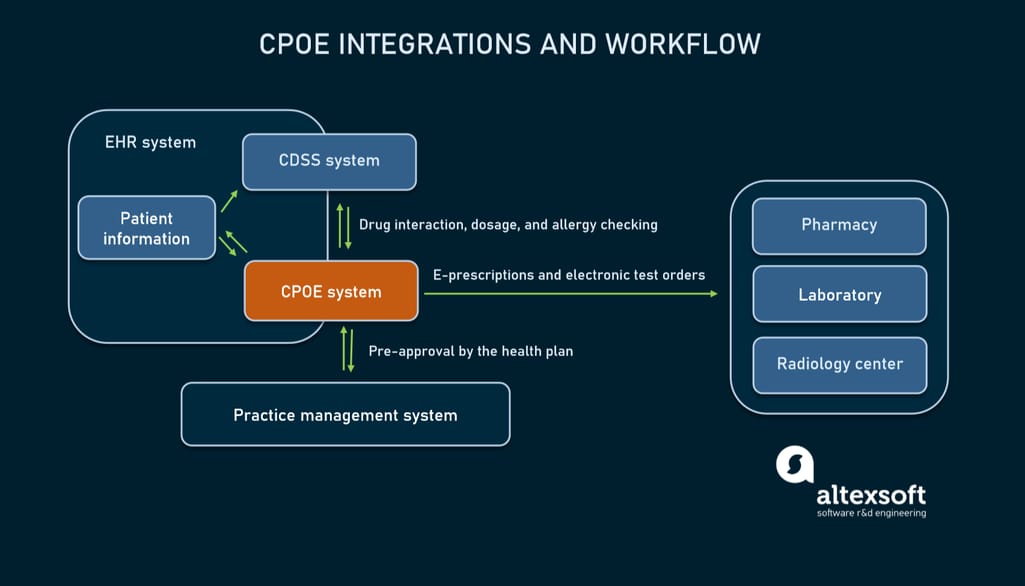
Computerized provider order entry extends beyond laboratory and medication orders to encompass all clinical orders including imaging studies, procedures, referrals, durable medical equipment, and nursing care instructions.
- Order catalogs organize available orders hierarchically by category, making it easy to find specific items. Search functionality allows providers to locate orders by name, synonyms, or CPT codes. Favorite lists enable individual providers to create personalized shortcuts to their most frequently used orders.
- Order sets and protocols bundle multiple related orders for common clinical scenarios. A heart failure admission order set might include chest x-ray, electrocardiogram, brain natriuretic peptide level, complete metabolic panel, daily weights, fluid restriction, and specific medications. Using order sets ensures comprehensive care while reducing documentation time.
- Clinical decision support for orders provides guidance at the point of ordering. When a provider orders a CT scan, the system might display evidence-based appropriateness criteria or suggest alternative imaging modalities better suited for the clinical situation. Duplicate order checking prevents redundant tests, and cost transparency tools display estimated charges for elective procedures.
- Order tracking and status updates show whether orders have been acknowledged, scheduled, performed, and resulted. This visibility helps care teams coordinate care and follow up on pending orders. For referrals, tracking includes whether patients successfully scheduled appointments and attended visits with specialists.
- Nursing and ancillary orders communicate care instructions beyond diagnostic tests and medications. Diet orders, activity restrictions, isolation precautions, wound care protocols, and physical therapy prescriptions all transmit electronically to relevant departments. This eliminates verbal orders and ensures written documentation of all care instructions.
6. Clinical decision support systems
Clinical decision support provides real-time guidance that enhances clinical judgment, promotes evidence-based care, and prevents medical errors.
- Drug-drug interaction alerts notify providers of potential problems when prescribing medications that may interact adversely. The system presents interaction mechanisms, severity assessments, and recommendations for monitoring or selecting alternative medications. Providers can override alerts by documenting clinical rationale, which becomes part of the permanent record.
- Allergy checking compares new prescriptions against documented allergies and intolerances. The system displays allergy types (drug class, specific medication, environmental), documented reactions (rash, anaphylaxis, nausea), and severity levels. Providers must explicitly acknowledge allergy alerts before prescriptions can be transmitted.
- Preventive care reminders prompt providers about overdue health maintenance services based on patient age, gender, and clinical history. Reminders appear during encounters for services like mammography screening, colorectal cancer screening, diabetic eye examinations, and immunizations. Customizable rule engines accommodate different clinical guidelines and organizational policies.
- Diagnosis-specific order suggestions recommend appropriate tests, medications, and referrals based on diagnoses documented during visits. When a provider documents a new diagnosis of hypertension, the system might suggest baseline laboratory testing, patient education materials, and lifestyle modification counseling.
- Clinical pathway integration guides management of complex conditions through evidence-based algorithms. Pathways for sepsis management, stroke protocols, or cardiac arrest responses walk providers through time-sensitive interventions with built-in documentation and order facilitation.
- Reference information access provides point-of-care access to medical references, drug information databases, and clinical guidelines. Rather than leaving the EMR to search external resources, providers can look up medication dosing, review treatment protocols, or access medical calculators within their workflow.
7. Patient portal and engagement tools
Patient portals extend EMR functionality to consumers, promoting engagement through online access to health information and communication tools.
- Health record viewing allows patients to review portions of their medical records including visit summaries, medication lists, allergy information, immunization records, and test results. Organizations control which information appears immediately versus requiring provider release before patients can access sensitive data.
- Secure messaging enables asynchronous communication between patients and care teams for non-urgent questions. Patients send messages about symptoms, medication side effects, or administrative issues, and clinical staff respond within defined timeframes. Unlike email, portal messaging occurs within the secure EMR environment, maintaining HIPAA compliance and integrating into permanent patient records.
- Prescription refill requests let patients submit refill requests electronically rather than calling pharmacies or clinics. Requests route to appropriate providers for review and approval, with approved refills transmitting directly to pharmacies.
- Appointment scheduling provides online scheduling for specific visit types during available time slots. Patients can schedule, reschedule, or cancel appointments without phone calls, reducing no-show rates and improving front-desk efficiency. Some systems support bidirectional synchronization with patient personal calendars.
- Electronic check-in and forms enable patients to complete registration updates, insurance verification, and intake questionnaires before arriving for appointments. Digital forms reduce wait times, improve data accuracy compared to handwritten forms, and populate directly into the EMR without manual transcription.
- Bill pay functionality integrates payment processing into patient portals, allowing patients to view statements, understand charges, and submit payments online using credit cards, debit cards, or bank account transfers. Payment plan setup and financial assistance applications may also occur through portal interfaces.
- Health tracking and patient-generated health data accommodate data from wearable devices, home blood pressure monitors, glucometers, and manual patient entries. This information supplements clinician-documented data and supports chronic disease management programs.
8. Scheduling and practice management
Practice management functionality handles operational aspects of running healthcare organizations including appointment scheduling, patient flow, and resource allocation.
- Appointment scheduling provides calendar interfaces showing provider availability, examination room allocation, and scheduled appointments. Schedulers can book appointments by provider, location, or visit type while respecting scheduling rules about appointment duration, buffer times, and maximum patient volumes per session.
- Waitlist management tracks patients seeking appointments sooner than available slots. When cancellations occur, staff can quickly identify waitlist patients appropriate for newly available times, maximizing schedule utilization.
- Registration workflows guide front desk staff through patient check-in processes including identity verification, insurance card scanning, copayment collection, and form completion. The system flags missing information requiring updates and alerts staff to important notifications such as outstanding balances or changed pharmacy preferences.
- Resource scheduling extends beyond provider time to include rooms, equipment, and support staff. This coordination ensures that examination rooms, procedure suites, ultrasound machines, or other resources are available when and where needed.
- Provider schedule templates define recurring availability patterns for individual providers including regular clinic sessions, surgery blocks, administrative time, and time off. Templates accommodate complex patterns such as alternating weeks, specific days per month, or seasonal variations.
- Recall and outreach campaigns identify patients due for preventive services, chronic disease follow-up, or overdue appointments. Automated outreach via phone, text message, or email prompts patients to schedule needed services, improving population health outcomes and capturing appropriate revenue.
9. Billing and revenue cycle management
Integrated billing functionality connects clinical documentation to charge capture, claims submission, payment posting, and accounts receivable management.
- Charge capture automatically generates billing charges based on documented services, procedures performed, and applied diagnosis codes. Charge capture occurs at the point of care, reducing missed charges and accelerating claim submission compared to retrospective billing processes.
- Coding assistance suggests appropriate evaluation and management (E&M) codes based on documented history, examination, and medical decision-making elements. The system calculates complexity levels according to current coding guidelines (1995, 1997, or 2021 E&M guidelines) and highlights documentation deficiencies that might prevent billing at desired levels.
- Claim generation and submission produces electronic claims in required formats (primarily 837 professional and institutional formats) and transmits to insurance payers via clearinghouses. The system performs pre-submission edits checking for common errors that would cause claim rejections.
- Remittance processing automatically posts payments and adjustments from electronic remittance advice (ERA) files received from payers. Posted payments reconcile against expected reimbursement, and variance analysis flags underpayments requiring appeals or corrections.
- Patient statement generation produces patient bills reflecting balances after insurance payments. Statements clearly explain services received, insurance payments applied, contractual adjustments, and patient responsibility. Electronic statement delivery options reduce printing and postage costs.
- Denial management tracks claim denials, categorizes denial reasons, and facilitates appeals processes. Denial analytics identify patterns suggesting needed improvements in documentation, coding, or authorization processes.
- Financial reporting provides real-time visibility into accounts receivable aging, collection rates, denial rates, and net collection percentages. Financial dashboards help practice managers identify revenue cycle bottlenecks and monitor key performance indicators.
10. Reporting and analytics
Reporting capabilities transform raw EMR data into actionable insights supporting quality improvement, population health management, and regulatory compliance.
- Quality measure reporting calculates performance on clinical quality measures required by programs like MIPS (Merit-based Incentive Payment System), HEDIS (Healthcare Effectiveness Data and Information Set), and ACO (Accountable Care Organization) contracts. Automated calculation reduces manual chart review burden while reports identify patients not meeting quality targets who need outreach.
- Population health dashboards aggregate data across patient populations to identify gaps in care, track chronic disease control, and monitor screening rates. Dashboards might show what percentage of diabetic patients achieved hemoglobin A1c control targets or how many patients completed recommended cancer screenings.
- Operational reports track practice efficiency metrics including visit volumes, no-show rates, scheduling template utilization, average check-in times, and clinical documentation completion rates. These insights inform staffing decisions, scheduling optimization, and process improvements.
- Financial analytics analyze revenue by provider, payer, procedure, or service location. Profitability reports identify high-margin services worth expanding and money-losing activities requiring attention. Comparative analytics benchmark performance against similar practices or industry standards.
- Ad hoc reporting tools enable users to create custom reports without IT assistance. Drag-and-drop query builders, data visualization options, and export capabilities democratize data access while maintaining appropriate security controls.
- Registry participation supports data submission to clinical registries for specialties like cardiology, oncology, or orthopedics. Registry reporting demonstrates quality, enables benchmarking against peers, and may satisfy maintenance of certification requirements for physicians.
Additional specialized features
Modern EMR systems often include numerous additional capabilities tailored to specific specialties, practice settings, or workflow preferences:
- Image management stores photographs, scanned documents, radiographic images, and other visual content directly in patient charts with viewing tools and annotation capabilities.
- Telemedicine integration incorporates video visit functionality into the EMR workflow, allowing virtual appointments documented identically to in-person visits with integrated e-prescribing and order entry.
- Care plan documentation supports collaborative goal-setting, intervention planning, and outcome tracking for complex patients with chronic conditions or multiple comorbidities.
- Patient education resources provide access to thousands of educational handouts, videos, and interactive tools that providers can assign to patients directly from within the EMR, with materials automatically appearing in patient portals.
- Research support features facilitate clinical trial recruitment, data collection, and reporting while maintaining separation between research and clinical data when required by IRB protocols.
Understanding these comprehensive feature sets enables healthcare organizations to evaluate EMR vendors effectively, configure systems to match their workflows, and maximize value from substantial technology investments.
Benefits of electronic medical records
The case for EMR adoption is well supported by research. These are the outcomes that matter most, with the data behind them.
Medication error reduction. A study published in npj Digital Medicine (Nature, 2023) tracked a hospital’s transition from paper to fully digital records and found a 38% reduction in voluntarily reported medication incidents, with prescribing errors falling from 52.8% to 15.7% of orders reviewed. A separate Carnegie Mellon analysis linked full EMR adoption to approximately a 30% reduction in prescription errors.
Time savings for clinical staff. Research published in PubMed Central found savings of around 75 minutes per provider per day once clinical staff fully adapted to the EMR system. That time returns directly to patient care.
Preventive care rates. EMR alerts and reminders have been shown to raise screening and vaccination rates by 10 to 20% compared to paper-based systems, particularly for chronic disease management and age-appropriate screenings.
Revenue cycle improvement. Automated charge capture, coding assistance, and electronic claim submission reduce billing errors and accelerate reimbursements. Most organizations see steady financial improvement within 12 to 18 months of full adoption.
ROI timeline. Most organizations recover their EMR investment within 3 to 5 years through labor savings, reduced error costs, and improved billing capture. For a detailed breakdown of what EMR implementation actually costs, see the EHR cost and ROI guide.
Types of EMR systems
Electronic medical record systems vary by deployment model, customization options, and cost structure. Understanding these types helps healthcare organizations choose a system that fits their size, resources, and clinical needs.
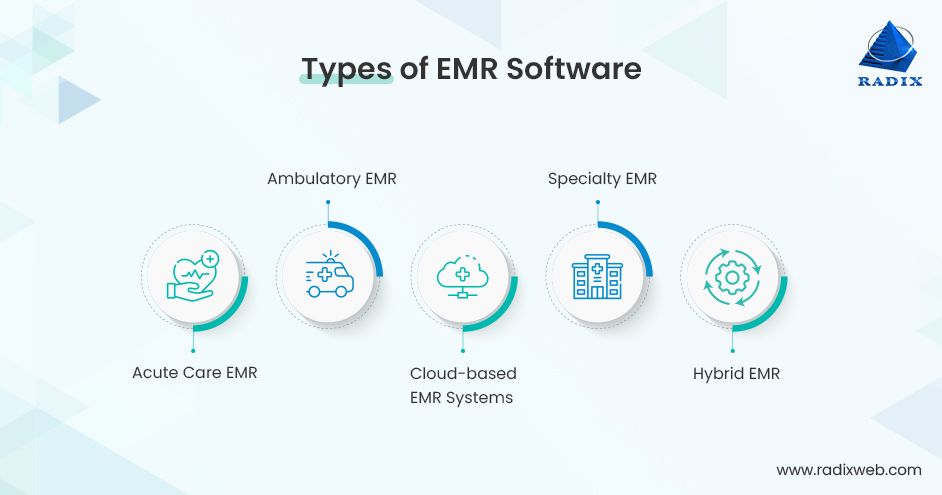
Cloud-based EMR systems
Cloud-based EMRs store all software and patient data on secure vendor servers. Providers access the system through a web browser or mobile app without installing local software.
Advantages: Low upfront investment with subscription-based pricing. No need for on-site servers or dedicated IT staff. Automatic updates and strong disaster recovery. Accessible from any device with an internet connection.
Limitations: Requires a stable internet connection to function reliably. Customization options are often limited compared to on-premise systems. Long-term subscription costs can exceed on-premise costs for large organizations over a 10+ year horizon.
Best for: Small-to-medium practices, multi-site clinics, and facilities prioritizing fast deployment and minimal IT overhead.
On-premise EMR systems
On-premise systems are installed directly on the healthcare organization’s own servers and infrastructure. The facility owns and manages the software and data entirely.
Advantages: Full control over data storage, security configuration, and system customization. No dependency on internet connectivity for core functions. Can be more cost-effective long term for large organizations with existing IT infrastructure.
Limitations: Higher upfront capital investment for servers, licenses, and implementation. Requires dedicated IT staff for maintenance, updates, and security management. Disaster recovery and backup are the organization’s responsibility.
Best for: Large hospitals and health systems with established IT departments, facilities in areas with unreliable internet connectivity, and organizations with strict data sovereignty requirements.
Hybrid EMR systems
Hybrid systems combine cloud and on-premise architecture. Core clinical data may be stored locally for security and performance, while analytics, patient portals, and remote access functions run in the cloud.
Advantages: Flexibility to optimize each component based on performance and cost requirements. Can satisfy compliance requirements that mandate local data storage while still enabling cloud-based features.
Limitations: More complex to implement and manage than pure cloud or on-premise. Requires clear data governance to manage what lives where.
Best for: Organizations with mixed requirements: some departments need offline capability, others need remote access; or facilities transitioning from on-premise to cloud gradually.
Specialty-specific EMR systems
Many vendors build EMR systems tailored to specific clinical specialties: mental health (with BIRP note templates and treatment plan workflows), ophthalmology (integrated imaging and vision testing), dentistry (odontogram, periodontal charting), and oncology (chemotherapy order sets, protocol tracking) all have specialty platforms designed around their unique documentation needs.
Advantages: Workflows and templates built specifically for the specialty reduce documentation time and improve clinical accuracy. Specialty-specific compliance reporting is built in.
Limitations: Limited interoperability with general EMR systems can create data silos when patients move between specialty and primary care. May not support all administrative and billing functions needed for a full practice.
Best for: Single-specialty practices and clinics where the clinical workflow is sufficiently unique that a general EMR would require extensive customization to match it.
Open-source EMR systems
Open-source platforms like OpenMRS, OpenEMR, and GNU Health provide core EMR functionality without licensing fees. The source code is publicly available and can be modified by the organization or implementation partner.
Advantages: No licensing fees, which significantly lowers cost for resource-constrained facilities. Full customization potential. Strong community support in specific regions (OpenMRS has over 40 country deployments, particularly in sub-Saharan Africa and Southeast Asia).
Limitations: Implementation, hosting, and maintenance costs still apply. Requires technical expertise to deploy and maintain. Feature depth and UI quality vary significantly by platform and version.
Best for: Public health programs, NGOs, government hospitals in lower-resource settings, and facilities with technical capacity to self-implement and maintain. Also a viable option for organizations that want full data control without vendor lock-in.
EMR implementation: What to expect
Implementing an EMR is not a software installation. It is a clinical transformation project that touches every department, workflow, and staff member in the facility. Understanding what the process actually involves helps organizations plan realistically rather than discover the complexity mid-project.
Timeline
Implementation timelines vary significantly by facility size and complexity. Small practices with straightforward workflows can complete the process in 3 to 6 months. Mid-sized organizations with 6 to 25 providers typically need 12 to 18 months. Large hospital systems often require 18 to 24 months or more, particularly when replacing legacy systems across multiple departments (RiverAxe, 2025; Oracle Health, 2025). Data migration from paper or legacy digital records is consistently one of the longest and most complex phases.
The five stages most implementations follow
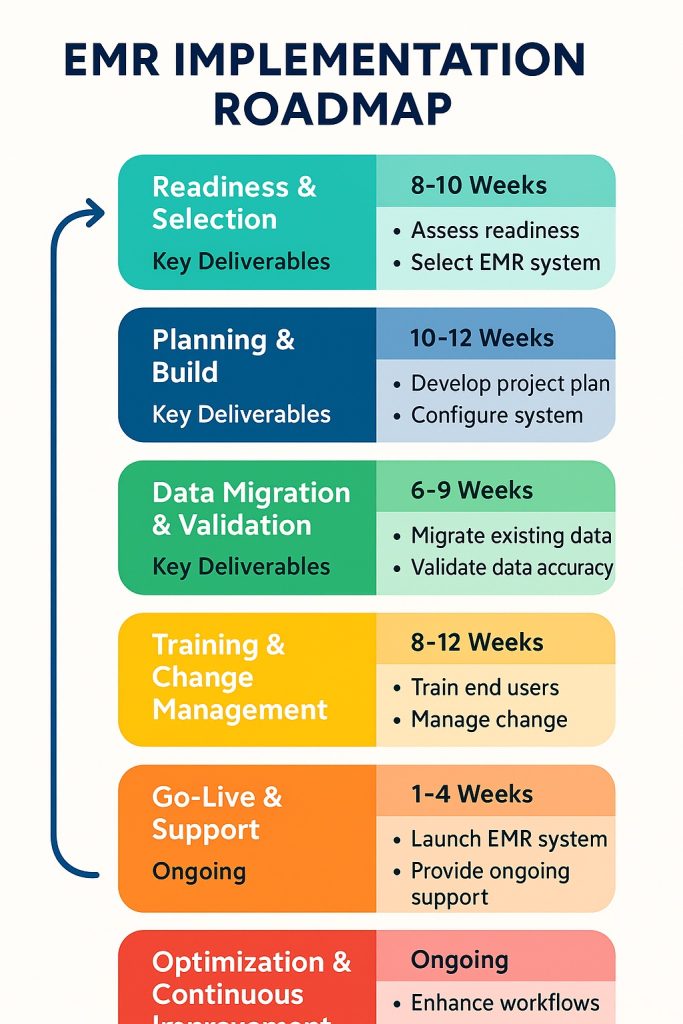
Stage 1 – Planning and vendor selection (1 to 3 months for most organizations). Define goals, assemble an implementation team with clinical and IT representation, and conduct an assessment of current workflows and IT infrastructure. This stage determines which modules are needed, what integrations are required, and which vendors to evaluate. Skipping or rushing this stage is the most common cause of costly scope changes later.
Stage 2 – System configuration and workflow redesign (2 to 6 months). Configure the selected system to match your clinical workflows, build templates and order sets, and set up integrations with laboratory systems, billing platforms, and imaging equipment. This stage also involves redesigning workflows that do not translate cleanly from paper to digital.
Stage 3 – Data migration (2 to 4 months, sometimes overlapping with Stage 2). Transfer patient records from legacy systems or paper. Data migration requires a detailed audit plan, data cleansing, mapping to the new system’s data structure, and validation testing to confirm accuracy. Errors in this stage create patient safety risks post-go-live.
Stage 4 – Training (1 to 2 months before go-live). Train all users: clinical staff on documentation and ordering workflows; administrative staff on scheduling, billing, and registration; and IT staff on system administration and support. Organizations that underinvest in training consistently report lower adoption rates and longer productivity recovery periods after go-live.
Stage 5 – Go-live and optimization (ongoing). Go-live is not the finish line. Most organizations experience a productivity dip in the first 4 to 8 weeks as staff adapt. Post-go-live support, rapid issue resolution, and ongoing optimization are essential to reaching the efficiency gains that justified the investment.
The biggest implementation risk
User adoption failure is the single most common reason EMR implementations underperform. A system that clinical staff resist using produces the same outcomes as no system at all. The evidence supports a clear mitigation strategy: involve frontline clinical staff in workflow design decisions before the system is configured, not after. Practices with strong stakeholder engagement achieve significantly higher sustained adoption rates within six months of go-live.
For a detailed breakdown of what goes wrong and how to prevent it, see the EHR implementation challenges guide.
EMR system cost: What to budget for
EMR pricing varies widely depending on deployment model, facility size, and level of customization. Here are the reference ranges most organizations work with:
Cloud-based SaaS: Typically $200 to $1,200 per provider per month, with some enterprise platforms charging more. Low upfront cost, but the five-year total cost of ownership can be significantly higher than it first appears once you factor in per-user fees, add-on modules, and annual price increases at renewal.
On-premise licensed systems: Higher upfront capital investment for server infrastructure and licensing, typically $50,000 to several hundred thousand dollars depending on facility size. Lower recurring costs long term, but requires dedicated IT staff for maintenance and security.
Custom-built EMR: Starting around $50,000 to $100,000 for smaller scope projects, scaling to $300,000 or more for large, multi-department hospital implementations. Higher initial investment but delivers the best long-term fit for complex or high-volume facilities.
Implementation costs on top of licensing: These are consistently underestimated. A 2025 analysis put the average cost of EMR implementation support at around $6,200 per user in the US, covering configuration, data migration, training, and go-live support. For a mid-sized hospital with 100 clinical users, that is $620,000 in implementation costs before the license fee.
ROI timeline: Small and solo practices typically see positive ROI within 2.5 years. Larger organizations with more complex implementations generally recover their investment within 3 to 5 years, primarily through reduced transcription costs, improved billing capture, and lower administrative overhead.
Practical ways to manage cost without compromising the implementation: phase the rollout starting with core modules (billing and scheduling often recover costs fastest); negotiate multi-year pricing locks before signing to avoid renewal increases; and verify what is included in the base license versus charged as add-ons, since many platforms price laboratory integration, patient portals, and analytics modules separately.
EMR security: What the system must have, and what to verify
Healthcare is the most expensive industry for data breaches. The average cost of a healthcare data breach reached $9.8 million per incident in 2024, nearly double the average across all other industries and $4 million more than the second most expensive sector, financial services. The Change Healthcare ransomware attack in February 2024 caused widespread disruption across US healthcare providers and became the largest known healthcare data breach in history. Security is not optional in EMR procurement.
What the system must have
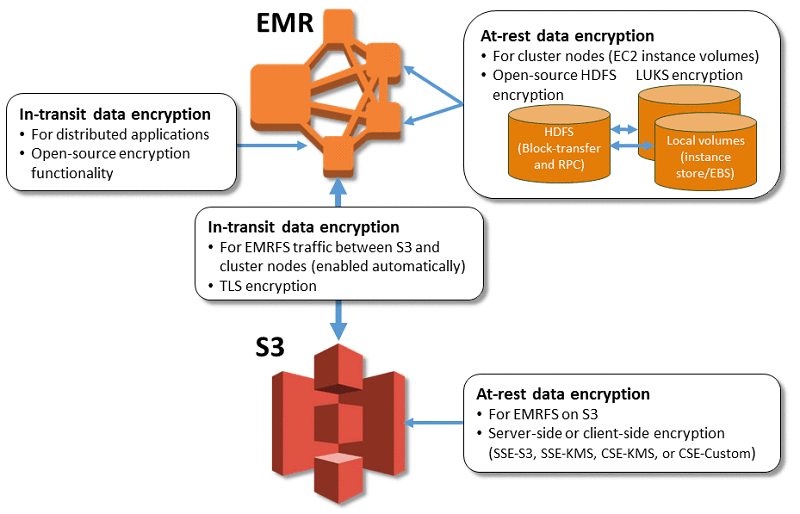
Encryption at rest and in transit. All patient data stored in the system and all data transmitted between the EMR and connected systems (labs, pharmacies, billing platforms) must be encrypted. AES-256 is the current standard for data at rest; TLS 1.2 or higher for data in transit.
Role-based access control (RBAC). Clinical staff should only access the patient records and system functions relevant to their role. A billing clerk should not be able to view clinical notes; a nurse should not be able to modify billing codes. RBAC prevents both accidental data exposure and deliberate misuse.
Audit logging. Every access, modification, and export of patient data should be logged with a timestamp and user identifier. Audit logs are required under HIPAA and are essential for detecting unusual access patterns that may indicate a breach.
Multi-factor authentication (MFA). Password-only access is insufficient for healthcare systems. MFA, particularly for remote access and administrative accounts, significantly reduces the risk of credential-based attacks.
Automatic session timeout. Unattended workstations in clinical environments are a common access risk. The system should automatically log out inactive sessions after a defined period.
Breach notification capability. HIPAA requires covered entities to notify affected individuals within 60 days of discovering a breach. The system should support the logging and reporting workflows needed to meet this requirement.
What to verify when evaluating a vendor
Vendor security claims vary widely in substance. These are the questions that surface the difference between genuine security and marketing language:
Ask for audit documentation, not assurances. Request the vendor’s most recent SOC 2 Type II report or HITRUST certification. These are third-party-validated assessments of security controls, not self-reported claims. A vendor who cannot produce documentation is a risk.
Clarify data residency. For cloud-based systems, confirm exactly where patient data is stored and processed. This matters for GDPR compliance in Europe, PDPA compliance in Southeast Asia, and local MOH data sovereignty requirements in many other regions.
Ask about their incident response history. Has the vendor experienced a security incident? How did they handle it? How quickly did they notify affected clients? A vendor with a clean history who has never been tested is a different risk profile from one who has navigated an incident well.
Review the contract’s breach notification clause. Some vendor contracts define “breach notification” timelines that are longer than regulatory requirements, or define “breach” in ways that exclude certain incident types. Verify the contract aligns with the regulatory obligations that apply to your facility.
Common challenges beyond implementation
User adoption, cost, and security are the three challenges most organizations anticipate. The following three are just as consequential but far less discussed before go-live.
Data migration from legacy systems
Migrating patient records into a new EMR is consistently one of the highest-risk phases of any implementation. According to Gartner, 83% of data migration projects either fail outright or exceed their planned budgets and timelines. In healthcare, the stakes are higher than in most industries: corrupted or incomplete records do not just represent a data quality problem, they represent a patient safety risk.
The specific challenges that make healthcare data migration harder than it looks:
Proprietary legacy formats. Data stored in older EMR systems or paper-based systems rarely maps cleanly to a new system’s data structure. Field names differ, coding standards differ (ICD-9 versus ICD-10, for example), and some data types in the legacy system have no equivalent in the new one. Each mismatch requires manual mapping decisions.
Duplicate records. Legacy systems often contain multiple records for the same patient created over years of use. These need to be identified and merged before migration, a process that is more labor-intensive than most organizations budget for.
Paper record digitization. For facilities transitioning from paper, records must be scanned, indexed, and in some cases manually transcribed into structured data fields. This is slow, expensive, and error-prone at scale.
The solution: Treat data migration as a separate workstream with its own lead, timeline, and budget. Run a complete data audit before migration begins. Validate migrated data against the source system before go-live, not after. Build in a parallel-running period where both old and new systems are accessible to catch records that did not migrate correctly.
Interoperability gaps with external systems
An EMR that works well internally but cannot exchange data reliably with outside systems creates the same information silos as paper records for anything that crosses an organizational boundary.
The numbers illustrate why this matters: 70% of US hospitals use EHR systems from different vendors, making cross-vendor data exchange the norm rather than the exception. Yet 52% of physicians reported delays in patient care due to difficulty accessing data from external EHR systems, and 68% of patients reported concerns about their medical information being fragmented across providers.
The core technical problem is that HL7 FHIR solves the protocol but not the politics. Even when two systems both claim FHIR compliance, implementation differences, varying data models, and commercial decisions by vendors to limit data portability can still prevent clean data exchange. Physicians in a 2024 KLAS Arch Collaborative survey cited interoperability as their top fix request, noting that external patient data is often unavailable in their EHR and, when found, difficult to use clinically.
The solution: Before selecting an EMR, map every external system you need to exchange data with: reference labs, imaging centers, specialist practices, insurance payers, pharmacies, and any regional health information exchange (HIE) your facility participates in. For each, verify the vendor has a live integration in production, not just a theoretical API capability. Ask for a reference from a customer using that specific integration.
Alert fatigue in clinical decision support
Clinical decision support (CDS) is one of the most valuable features an EMR can offer. It is also one of the most commonly broken in practice.
The problem: EMR systems generate alerts for drug-drug interactions, allergy conflicts, dosing errors, and preventive care reminders. When the alert volume is too high or the alert relevance is too low, clinicians begin clicking through alerts reflexively without reading them. This is alert fatigue, and the data on how widespread it is should concern anyone relying on CDS to catch clinical errors.
A study published in JAMIA found that 93% of drug interaction alerts in a large teaching hospital system were overridden, with the drug-drug alert override rate at 95.1%. A separate study in Journal of General Internal Medicine found that after switching to a commercial EHR, the acceptance rate for the most severe drug-drug interaction alerts fell from 100% to 8.4% as alert volume increased sixfold. A systematic review published in 2024 found override rates ranging from 46% to 96% across studies, with drug-drug interaction and renal alerts having the highest rates of clinically inappropriate overrides.
The paradox: a CDS system that generates too many alerts trains clinicians to ignore it, including the alerts that matter most.
The solution: Work with your vendor or implementation team to configure alert thresholds carefully before go-live. Disable or downgrade low-severity alerts that generate noise without clinical value. Prioritize a short list of high-severity, high-specificity alerts that warrant interruption. Review override patterns quarterly post-go-live: a rising override rate on a specific alert type is a signal that the alert needs reconfiguration, not that your clinicians are being careless. Some modern EMR platforms now use AI to personalize alert thresholds based on patient context, significantly reducing false positive rates.
How to choose the right EMR system
Most “how to choose” guides for EMR systems tell you to check usability, integration, compliance, and vendor stability. Those are valid criteria but they come later in the process. Before you evaluate any specific product, four foundational decisions will determine which category of EMR you should even be looking at

Decision 1: OTS, custom, or hybrid?
This is the most consequential choice and the one most organizations make without enough information.
Off-the-shelf (OTS) products deploy faster and cost less upfront. They suit practices with standard workflows, limited IT resources, and no unusual compliance requirements. The trade-off is that you adapt your workflows to the system rather than the other way around. For most small-to-medium practices with straightforward clinical operations, OTS is the right starting point.
Custom development delivers a system built around your specific workflows, integrations, and local regulatory requirements. The higher upfront investment makes sense when your facility operates at high volume, has specialty workflows that OTS products cannot accommodate, or needs to comply with local regulations that international products are not built for. For hospitals in Southeast Asia, the Middle East, or other markets where DOH, MOH, or PhilHealth-style requirements add complexity, custom or hybrid is often the only realistic path to a compliant system.
Hybrid starts with a validated base system covering core modules, then extends it with custom development for facility-specific needs. This compresses timelines relative to full custom builds while preserving flexibility. It is increasingly the default approach for mid-to-large hospitals that need more than OTS offers but cannot afford the timeline of a fully custom build.
A useful shortcut: if you can describe your workflows in generic terms and they match what the vendor demo shows, OTS is probably sufficient. If you find yourself saying “but we do it differently” more than twice during a demo, you need custom or hybrid.
For a concrete example of how the hybrid approach plays out in practice, the Synodus EMR/EHR case study for a multi-field hospital complex documents the full decision-making process: why the client ruled out OTS, how a packaged base was extended with custom modules, and the measurable outcomes after go-live. It is a useful reference point before entering vendor conversations of your own.
Decision 2: Specialty-specific or general?
General EMR systems cover the full range of primary care and hospital workflows. Specialty-specific systems are built around the documentation needs, billing codes, and clinical workflows of a particular discipline: oncology, ophthalmology, mental health, dentistry, cardiology, and others.
The question to ask is whether your specialty’s clinical documentation requirements are genuinely different enough from general practice to justify a specialty system. Mental health requires BIRP or DAP note formats, treatment plan tracking, and specific consent documentation. Ophthalmology requires integrated visual acuity testing and fundus imaging. Oncology requires chemotherapy order sets, protocol tracking, and cycle-based treatment documentation.
If your specialty has one or more of these distinct requirements, a general EMR will require significant customization to match them. A specialty system will cover them out of the box. If your specialty is primarily procedural (surgery, for example) but documentation is otherwise standard, a well-configured general EMR is usually sufficient.
Decision 3: Cloud, on-premise, or hybrid architecture?
This is often treated as a cost question but it is primarily an infrastructure and compliance question.
Cloud-based is the default choice for most new implementations today. No server infrastructure to buy and maintain, automatic updates, and accessible from any device. The dependency on internet connectivity is the primary operational risk: in areas with unreliable connectivity, cloud-only architecture creates clinical workflow disruptions.
On-premise suits facilities with strong IT departments, reliable power and network infrastructure, and data sovereignty requirements that mandate local storage. Some government hospital systems and military facilities require on-premise for security reasons. The total cost of ownership over 10 years is often higher than cloud once you factor in server refresh cycles and IT staffing.
Hybrid keeps core clinical data on-site for performance and compliance, while patient portals, remote access, and analytics run in the cloud. This approach is increasingly common for mid-to-large hospitals that need the reliability of on-premise for acute care workflows but want cloud benefits for everything else.
Before committing to cloud, test your internet connectivity under peak load conditions, not just average conditions. And verify the vendor’s uptime SLA and what happens to clinical workflows when connectivity is lost.
Decision 4: Standalone EMR or part of a larger HIS?
If you are digitizing a single practice or clinic, a standalone EMR is appropriate. If you are digitizing a hospital, the question of whether to buy a standalone EMR or an EMR as part of a broader hospital information system matters significantly for your long-term costs.
Buying a standalone EMR first and integrating it later with billing, inventory, pharmacy, and HR systems is technically possible but adds integration complexity and cost at each step. Starting with an HIS that includes EMR as a module means those integrations are built in from day one.
The decision depends on your timeline and budget. If you need to digitize clinical records quickly and cannot wait for a full HIS implementation, a standalone EMR with a clear integration roadmap is reasonable. If you are planning a full hospital digitalization project, scoping the HIS and EMR together avoids the technical debt of retrofitting them later. For a real example of how a mid-size hospital approached this decision, the Synodus HIS case study documents Military Hospital 110’s move from paper-based operations to a fully integrated HIS with EMR, inventory, and patient mobile app in 4 months. For guidance on evaluating the full vendor landscape for hospital-wide implementations, see the HIS companies evaluation guide.
Build your EMR with Synodus
Synodus is a Vietnam-based healthcare software development company with 250+ developers and 30+ healthcare implementations across APAC. Clutch rating: 5.0.
Their hybrid model starts from a validated EMR base – covering clinical documentation, medication management, CPOE, lab integration, and patient portal – then builds custom modules for your specific workflows, local compliance requirements, and third-party integrations.
BD Hospital: Major provincial general hospital serving 2,000+ outpatients daily, transitioning to a new facility. The challenge: implement a full web-based EMR on existing infrastructure with zero downtime during the transition period. Synodus delivered a browser-based EMR integrating with existing specialized medical software, eliminating the need for new hardware investment. Results: zero system downtime throughout the transition, instant access to patient history for all clinical staff, and significant hardware cost savings.
Multi-field hospital complex: 700 beds, 2,500 outpatients and 800 staff daily. Custom EMR with cloud-based patient records, customizable templates, two-layer encryption, e-prescription, document scanning, and full integration with HIS, scheduling, and inventory management. Built in 4 months. Results: 70% improvement in operational efficiency, 90% decrease in incident rates, 3x faster diagnosis and treatment decisions, 85% of patient documents digitalized, under 3 seconds to create a digital medical record. Read the full EMR/EHR case study.
Vietnam University Hospital: 5,000 outpatients and 1,700 medical staff daily. Integrated EMR, inventory management, analytics dashboard, and patient mobile app built to comply with Vietnam MOH regulations. Results: 300% revenue increase, $70,000/month in administrative cost savings, 0.01% insurance claim denial rate.
Projects start within 48 hours of scoping completion
Frequently asked questions (FAQs)
An EMR is a digital version of the paper chart a doctor keeps on you within their practice. It stores your medical history, medications, allergies, lab results, and visit notes, all accessible to the clinical team treating you at that facility. Unlike a paper chart, it can be searched, updated in real time, and connected to pharmacy and laboratory systems automatically.
Costs vary widely. Cloud-based SaaS EMR products typically range from $200 to $1,200 per provider per month. On-premise enterprise systems can involve licensing fees of $50,000 to several hundred thousand dollars, plus implementation, training, and infrastructure costs. Custom-built EMR systems start at around $50,000 to $100,000 for smaller scope builds and scale significantly for large facilities.
Small practices typically complete implementation in 3 to 6 months. Mid-sized hospitals need 12 to 18 months. Large health systems replacing legacy infrastructure should plan for 18 to 24 months or more. The main variables are facility size, the complexity of existing workflows, the volume of data to migrate, and how much customization is required.
The three most common causes are poor user adoption (staff resist using the system), inadequate data migration planning (patient records are incomplete or inaccurate after transition), and scope creep during configuration (the project expands beyond the original budget and timeline). All three are manageable with proper planning. See the EHR implementation challenges guide for specific mitigation strategies.
No. An EMR is a clinical records system. A hospital information system (HIS) integrates EMR with administrative, financial, pharmacy, inventory, and operational functions across the entire hospital. In most modern hospital IT architectures, the EMR is a module within the HIS rather than a standalone system.
At minimum: HIPAA compliance for US facilities, including encryption at rest and in transit, role-based access control, audit logging, and breach notification procedures. For facilities handling international patient data, GDPR or local equivalent. For security certification, SOC 2 Type II or HITRUST are the recognized standards. Ask any vendor for their most recent third-party audit documentation before committing.
Yes, and in most hospital deployments it should. Integration is typically achieved through HL7 or FHIR data exchange standards. The quality of this integration determines whether clinical and administrative data flows seamlessly between systems or requires manual reconciliation. Before selecting an EMR, verify that it supports the specific version of HL7 FHIR required by any HIS or third-party system you need to connect with. For a broader view of how healthcare software systems connect, see types of healthcare software.