Our picks at a glance
There is no single best tool, only the best fit for your team. Rather than rank one to nine, we have matched each to the need it serves best.
| If you need… | Our pick | Why |
|---|---|---|
| Enterprise apps on the Microsoft stack | Microsoft Power Apps | Deep 365, SharePoint, Teams, and Azure integration |
| A polished developer-first builder | Retool | The biggest connector ecosystem and mature tooling |
| Open-source with AI agents built in | ToolJet | AI-native architecture with self-hosting |
| Open-source with full developer control | Appsmith | Git-based version control, strong extensibility |
| Fast CRUD apps and admin panels | Budibase | Quick builds with an open-source model |
| Affordable builds for a small team | UI Bakery | Flat pricing with unlimited end users |
| Mobile-friendly ops apps | DronaHQ | Apps ship as web and mobile automatically |
| A dedicated admin panel | Forest Admin | Purpose-built for admin, with strong data privacy |
| A no-code start on existing data | Internal.io | Full builder features even on the free plan |
How to use this list: start from your two biggest constraints, which for most teams are AI capability and how the vendor charges. Both are covered below before the tool reviews, because they decide more of this purchase than component counts do.
How low-code is changing the internal tools conundrum
Companies have long used internal tools to automate tasks, boost CRM, analyze data, and process documents. Off-the-shelf software solves many of those problems, but not all, especially the niche ones only your industry or company faces.
That is why so many teams build their own. The catch is that homegrown internal tools often fall short: they lack a clear revenue link, get weak user feedback, and generate too little data to improve them.
Low-code internal tools changed the economics. They collapse development time dramatically, which matters in a market where roughly 75% of new applications now use low-code and organizations report up to a 90% reduction in development time. The best part is that non-technical users can build apps after proper training, thanks to pre-built components and drag-and-drop. If you are adopting a low-code strategy, train your citizen developers rather than hire new staff, since they already understand your team, culture, goals, and processes.
The benefits of low-code internal tools
- Faster problem-solving: low-code platforms let both technical and non-technical employees take part in development, which speeds up solutions and reduces reliance on DevOps.
- Workflow automation: routine tasks get automated, streamlining processes and lifting productivity.
- Lower costs: simplifying the coding process cuts development spend.
- Independence for business teams: teams build their own solutions without waiting on developer resources.
- Fits any company size: startups can build MVPs quickly and cheaply, while large businesses use low-code to test hypotheses, build landing pages, and create internal sites, freeing developers for complex work.
What changed in 2026: AI is now the deciding factor
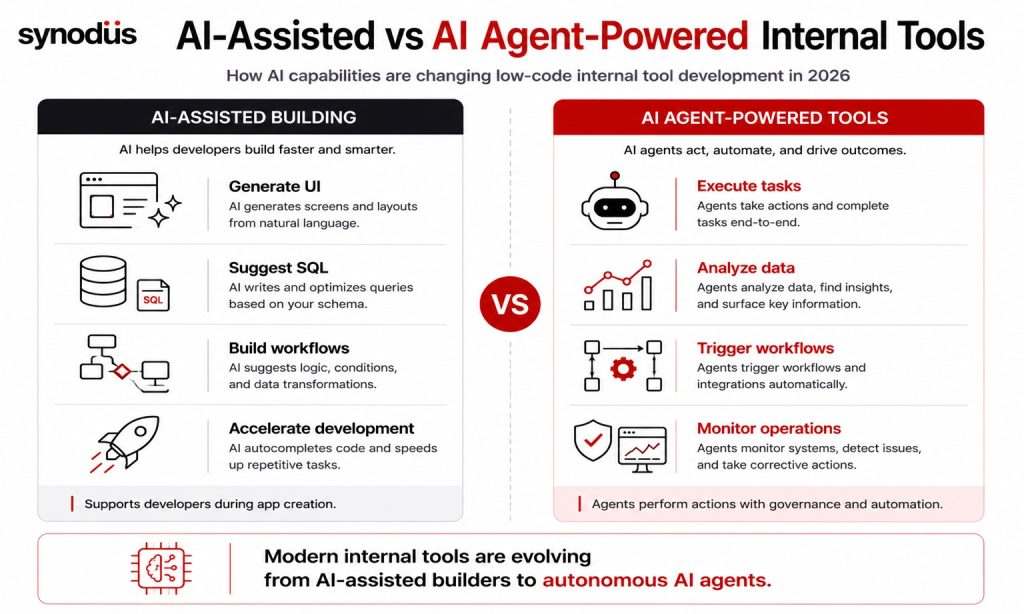
The internal tools market used to compete on component counts and connectors. In 2026 the axis has shifted to AI, and it is worth understanding the difference between two levels of it.
AI-assisted building means the platform helps you build faster: generating an app from a plain-language prompt against your schema, suggesting code, writing SQL and transforms. Retool’s AppGen does exactly this, and most major platforms now offer some version.
AI agents inside your tools is the bigger shift. Internal tools are no longer just dashboards and admin panels, they now contain agents that act. Teams are building agents that triage tickets, run data lookups, summarize customer history, and kick off workflows, with observability and guardrails around them. Platforms differ sharply here: ToolJet built AI in as the starting point rather than an afterthought, generating complete applications from natural language including the UI, database, and logic, while Retool offers its own agent builder alongside AI primitives you can drop into apps and automations.
When you evaluate a platform now, ask two questions: can it generate apps from natural language against my real schema, and can it build and govern agents that take actions? For more, see our roundup of low-code AI platforms.
The pricing trap to watch for
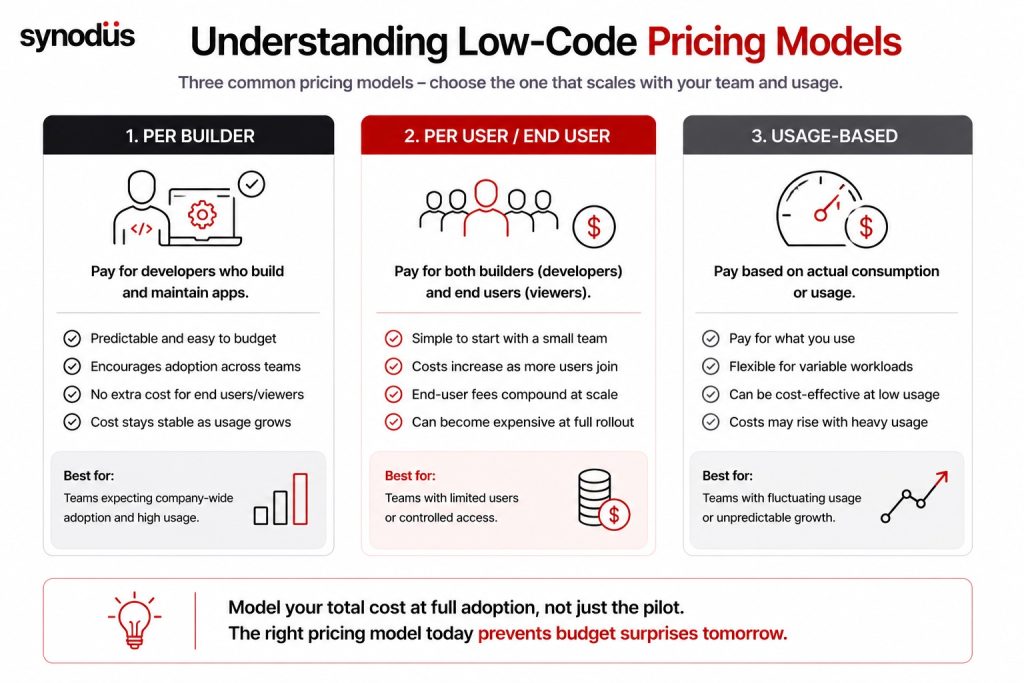
This is the factor that surprises teams most, and no component count will warn you about it.
Some vendors charge per builder only. Others charge for both builders and end users, which means your bill compounds as adoption spreads. Retool distinguishes between standard users (builders and editors) and end users (viewers), so a tool with 3 developers and 20 viewers costs very differently from one with 23 developers, while ToolJet bills per builder with no per-end-user fees, which gets significantly cheaper at scale.
Two practical implications. First, model your cost at full rollout, not at pilot: internal tools succeed by spreading across the company, which is exactly when per-end-user pricing bites. Second, check what self-hosting actually costs on your plan, since terms change. Retool’s self-hosted deployment is available only on Enterprise plans as of 2026, after the older self-hosted tiers were consolidated, whereas ToolJet, Appsmith, and Budibase support self-hosting without an enterprise conversation.
Governance: The problem that arrives with success
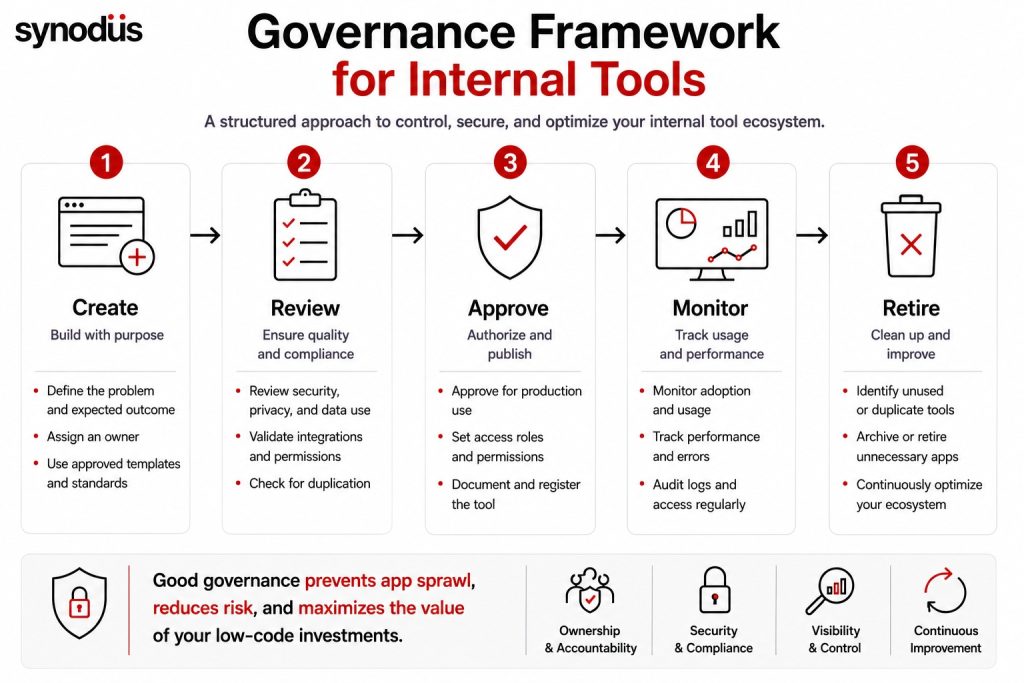
Here is a lesson worth learning from someone else’s experience. Retool’s own case study library includes Saxo Bank, which built a governed internal platform, and found the governance layer itself became a bottleneck once hundreds of apps were in play. The takeaway is not that the platform failed, it is that internal tool builders need internal tool governance.
This is the app sprawl problem in miniature, and AI accelerates it, since anyone can now spin up an app from a prompt. Plan for it early: keep a registry of what has been built and who owns it, set review cycles, and retire duplicates before they pile up. See our guide to low-code governance.
Top 9 low-code internal tools to use
Pricing, ratings, and feature counts change often, so treat the details below as a snapshot and confirm with each vendor.
1. Microsoft Power Apps
For an enterprise-grade platform, the Power Platform is a strong choice. Combining Power Apps for building and Power Automate for automation, there is little limit to what internal tools you can create, and Copilot adds AI-assisted building with Copilot Studio for agents.
Pros: cloud and on-premises hosting, web and mobile apps, multi-stage business process flows, deep integration with Microsoft 365, Office, SharePoint, and Teams, connections to many data sources, an interface that suits technical and non-technical users, and a large library of components and templates.
Cons: deployment can be confusing at first, and debugging falls short compared with some rivals.
Pricing note: the older $5 per-app plan was retired in January 2026. Current options are Power Apps Premium at around $20 per user per month or Pay-As-You-Go at $10 per active user per app, with Copilot Studio priced separately. To learn more, we have reviewed the Power Apps low-code platform in terms of performance, features, and extensions.
As a Microsoft Power Platform specialist in APAC, Synodus provides an end-to-end custom low-code development service, from internal applications and process automation to mobile apps. We blend agile with waterfall delivery and work on fixed pricing, so we absorb the risk of overruns, an approach trusted by companies like BOC Aviation, KPMG, and Unilever across more than 100 projects.
2. Retool
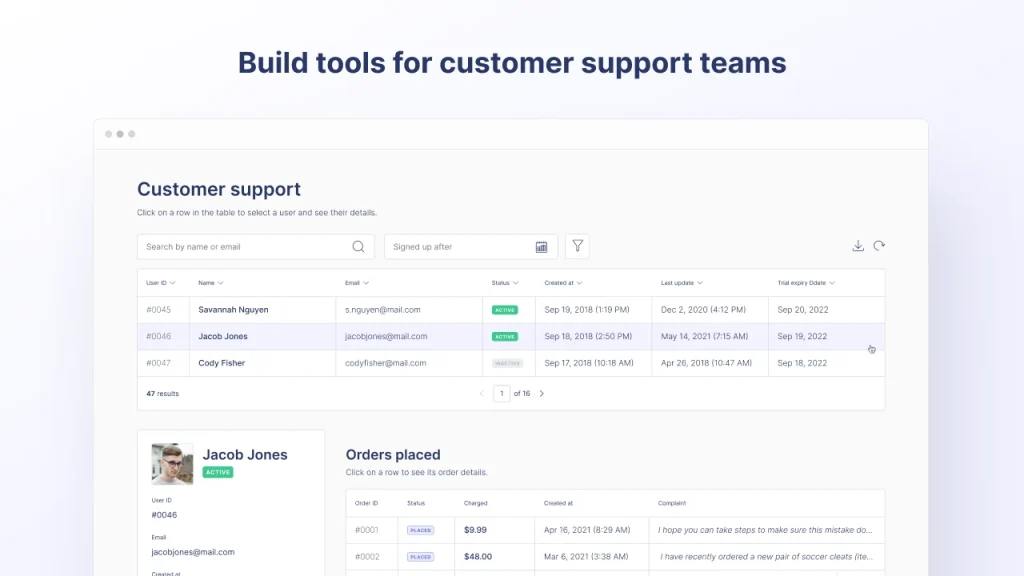
Retool helps teams quickly create custom applications and dashboards, with strong integrations and customizability. It has invested heavily in AI, offering app generation from natural language plus its own agent builder.
Pros: drag-and-drop building blocks with tables, lists, maps, forms, wizards, and charts (100+ components), ready-made templates, broad integration with databases and REST or third-party APIs, JavaScript customization, an active community with solid documentation, and strong data security.
Cons: limited responsive design can be challenging for mobile users, pricing charges both builders and end users so costs compound at scale, and self-hosted deployment is Enterprise-only as of 2026.
3. ToolJet
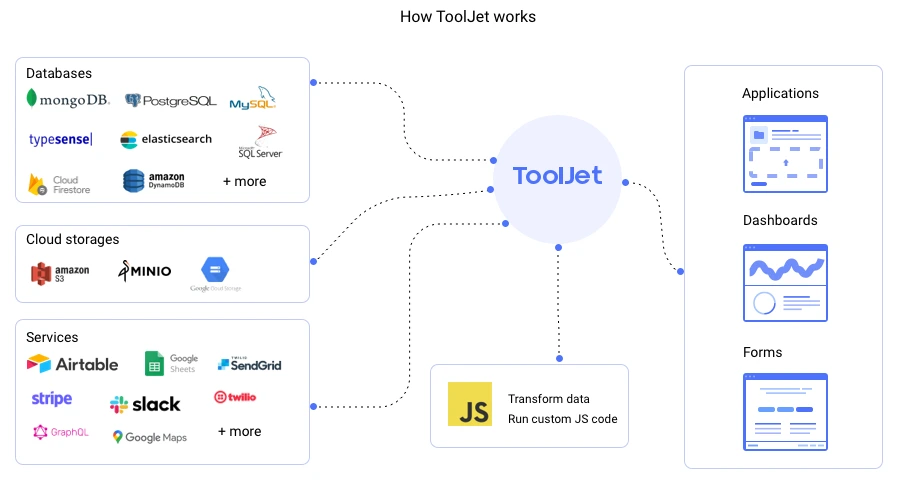
ToolJet is an open-source builder you can self-host or run in the cloud, compatible with MySQL, PostgreSQL, MongoDB, and Cloud Firestore. It stands out in 2026 for treating AI agents as a first-class capability rather than an add-on.
Pros: a robust set of pre-built widgets, real-time updates, access control, version control and automatic deployment, customizable connectors, separate environments for testing, development, and production, AI-native app generation, and per-builder pricing without end-user fees.
Cons: the open-source model can mean additional hosting costs, and the learning curve is steep for non-technical users.
4. UI Bakery
UI Bakery offers a user-friendly interface, a customizable design system, and broad API integration, with AI-assisted development. It suits small and medium businesses thanks to reasonable pricing with unlimited end users.
Pros: cloud and on-premises hosting, easy connection to SQL and NoSQL databases, version control with one-click deployment, around 50 front-end components, extensive data and API integration, JavaScript for extra customization, and responsive support.
Cons: custom app branding is not free, and the template library could be larger.
For more in this space, see our roundup of low-code API builders.
5. Budibase
Budibase is an open-source builder that helps technical teams create internal tools, admin panels, and processes quickly.
Pros: an open-source model with an active community, rapid development with customizable features, multiple ways to connect data (REST API, CSV, or its built-in database), responsive design across mobile, desktop, and tablet, no subscription cost for the core, and self-hosting via Docker, Kubernetes, and Digital Ocean.
Cons: open-source means hosting costs, and it expects a solid technical background, which may not suit non-technical users.
6. DronaHQ
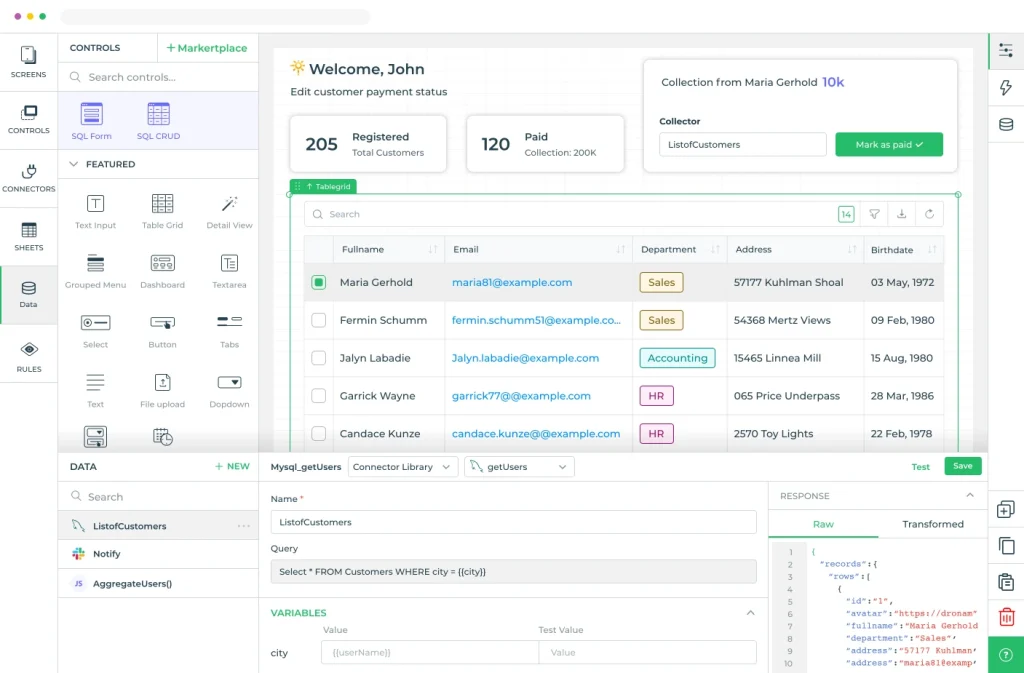
DronaHQ is a cloud-based builder for operational apps on top of any API or database, and has evolved to support AI agents alongside internal tools and mobile apps.
Pros: advanced logic-building automation, high customization through custom code, usage-based pricing that can beat user-based rivals, 150+ built-in design elements, apps automatically available as both web and mobile, and JavaScript for data manipulation and custom UI components.
Cons: some coding is required, and the learning curve is steep for those new to low-code.
7. Appsmith
Appsmith is an open-source builder with a large GitHub following, known for developer control.
Pros: Git-based version control, a built-in JavaScript editor and libraries, reusable and customizable code blocks, 45+ UI widgets, connection to any data source on cloud or self-hosted, and integration with SaaS and BaaS platforms through its API.
Cons: it expects technical knowledge, and some users find the interface less intuitive than rivals.
Explore further in our comparison of open-source low-code platforms.
8. Forest Admin
Forest Admin is a niche platform focused specifically on admin panel development, which makes it a fit for businesses of any size or industry that need exactly that.
Pros: quick setup with built-in CRUD, search, analytics dashboards, and roles and permissions, a drag-and-drop layout editor, and strong privacy since user data stays invisible to Forest Admin servers.
Cons: it targets developers and needs some coding knowledge, and advanced features like SSO, enforced 2FA, white labeling, and custom domains are premium-only.
9. Internal.io
Internal lets teams build internal tools on their APIs, databases, and business apps, with a no-code approach and flexible customization.
Pros: an intuitive drag-and-drop interface accessible to non-technical users, all builder features available on the free plan, and connection to Google Sheets for app development.
Cons: limited templates, and no custom domain support.
Comparison of the top platforms
Feature counts and pricing move constantly, so use this to shortlist rather than to decide. Confirm current details with each vendor.
| Platform | AI capability | Pricing model | Self-hosting | Best for |
|---|---|---|---|---|
| Microsoft Power Apps | Copilot plus Copilot Studio agents | Per user (Premium ~$20) or PAYG | Yes | Microsoft-ecosystem enterprises |
| Retool | AppGen plus native agent builder | Builders and end users | Enterprise plans only | Polished developer-first builds |
| ToolJet | AI-native, agents built in | Per builder, no end-user fees | Yes, open-source | Open-source AI-powered tools |
| UI Bakery | AI-assisted development | Flat, unlimited end users | Yes | Small and medium teams |
| Budibase | AI features available | Free core, paid tiers | Yes, open-source | Fast CRUD and admin panels |
| DronaHQ | Supports AI agents | Usage-based | Cloud-focused | Mobile-friendly ops apps |
| Appsmith | AI features available | Free core, paid tiers | Yes, open-source | Developer control and Git workflows |
| Forest Admin | Limited | Free tier, premium features | Yes | Dedicated admin panels |
| Internal.io | Limited | Per user | Limited | No-code starts on existing data |
How to choose the right low-code internal tool
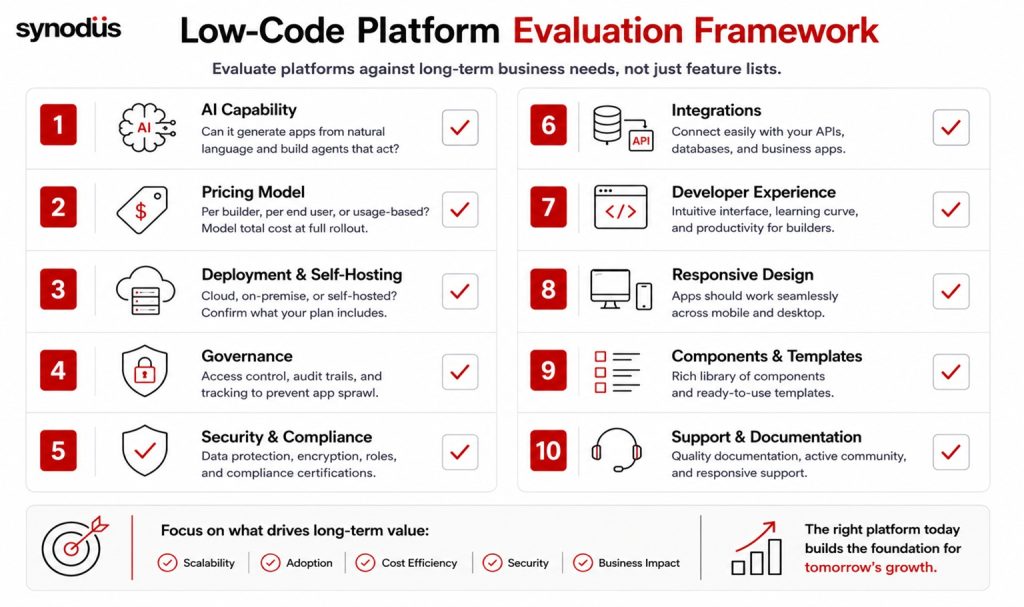
Weigh these criteria against your situation:
- AI capability: can it generate apps from natural language against your schema, and build agents that act? This is the fastest-moving differentiator in 2026.
- Pricing model: per builder, per end user, or usage-based. Model the cost at full rollout, not at pilot.
- Deployment and self-hosting: confirm what your plan actually includes, especially if you handle sensitive data.
- Governance: access control, audit trails, and a way to track what has been built, before app sprawl sets in.
- User experience: an intuitive interface that simplifies onboarding for the people who will actually build.
- Responsive design: apps should work across mobile and desktop.
- Components and templates: a rich library speeds up building.
- Third-party integrations: connections to your APIs, databases, and business apps.
- Custom code: the ability to extend when low-code hits its ceiling.
- Support and documentation: clear tutorials and responsive help smooth the learning curve.
- Branding: customizing look and feel, which often costs extra.
- Security: where your data lives and how the vendor protects it.
Frequently asked questions
They are business applications like admin panels, dashboards, CRUD apps, and approval workflows built with visual drag-and-drop builders instead of hand-coding. They let teams solve niche internal problems that off-the-shelf software cannot, without a full development project.
It depends on your setup. Power Apps suits Microsoft-based enterprises, Retool suits developer-first teams wanting polish, ToolJet and Appsmith suit open-source and self-hosting needs, Budibase suits fast CRUD apps, and UI Bakery suits smaller teams on a budget.
In two ways. Platforms now generate apps from plain-language prompts against your schema, and internal tools increasingly contain AI agents that take actions, such as triaging tickets or running data lookups. AI capability has become the main differentiator between platforms.
Because some vendors charge for both builders and end users, so the bill compounds as adoption spreads across the company. Model your cost at full rollout, and compare per-builder pricing against per-user pricing at your expected scale.
Yes, and earlier than you think. Once hundreds of apps exist, tracking ownership and quality becomes the bottleneck, and AI accelerates that by making apps trivial to create. Keep a registry, assign owners, and set review cycles from the start.
Wrapping up
The best low-code internal tool is the one that aligns with your business needs, not the one with the longest feature list. In 2026 that decision hinges on two things component counts will not tell you: whether the platform’s AI can genuinely build and govern agents, and whether its pricing model still works when your tools spread across the company. Get those right, and the rest is detail.
If you would rather have experts build it for you, Synodus offers a low-code development service that turns your data into apps 10x faster and cuts development costs by half, with the governance internal tools need at scale. Book a free consultation to find the right fit for your team.