What is data integration?
Data integration is a process in which data from multiple sources is joined in a unified environment using integration tools and technology. The aim is a streamlined, optimal data flow and a modernized data warehouse, which in turn improves customer interactions through analytics-driven automation.
The need keeps growing. Seagate and IDC found that enterprise data is projected to increase 42.2% annually, while up to 68% of it may go unused. Most companies now run dozens of SaaS applications, each holding a different piece of customer, finance, or product data, which leaves answers scattered across disconnected systems.
Regulated sectors like banking lean on data integration heavily. Banks use it to manage customer information and financial reports in a single system for easy access, and it helps them reduce errors and improve security through patching, monitoring, and troubleshooting.
Why use low-code for data integration?
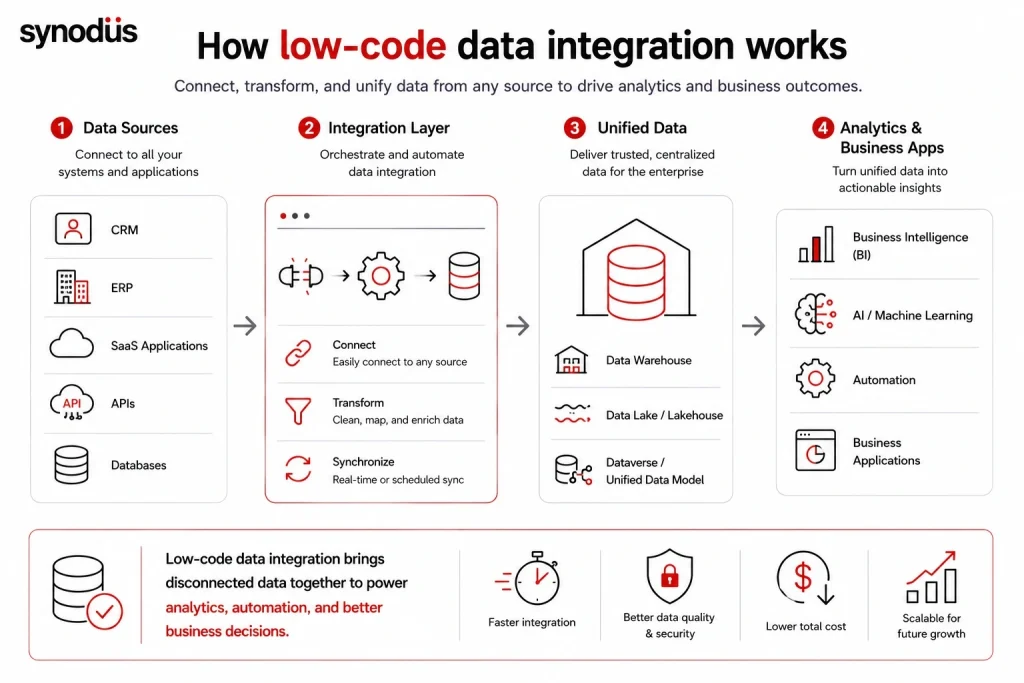
As new languages, technologies, and applications keep arriving, demand for developers grows with them. Low-code lets non-experts build at scale while relieving professionals of routine work.
For complex projects, the range of data formats and endpoints is enormous, and integration at that level usually needs highly specialized developers. That is where low-code helps:
- Quick access to varied data sources like databases, sensors, and SaaS applications.
- Fewer barriers when connecting data points.
- The ability to design custom APIs and cut maintenance through standardization.
- More transparency and control over any custom code you add.
- An easy-to-use interface with drag-and-drop components.
- Efficient real-time data synchronization.
Traditional hand-coded pipelines bring long timelines, brittle scripts, and endless maintenance, where even a minor schema change can stall progress. Low-code platforms remove that bottleneck with drag-and-drop builders, pre-built connectors, and AI-assisted mapping, letting teams build workflows in hours instead of weeks.
First, know which category you actually need
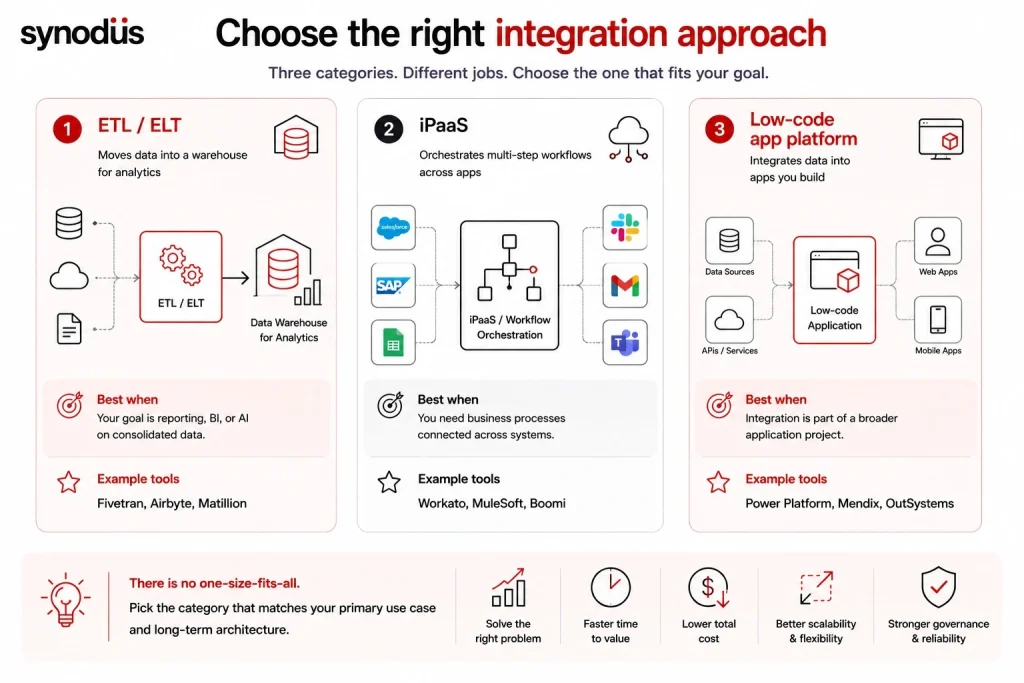
This is the step most buyers skip, and it causes more bad purchases than any feature gap. “Data integration” covers three different jobs, and the tools are not interchangeable.
| Category | What it does | Choose it when | Example tools |
|---|---|---|---|
| ETL/ELT | Moves data into a warehouse for analytics | Your goal is reporting, BI, or AI on consolidated data | Fivetran, Airbyte, Matillion |
| iPaaS | Orchestrates multi-step workflows across apps | You need business processes connected across systems | Workato, MuleSoft, Boomi |
| Low-code app platforms | Integrates data into apps you build | Integration is part of a broader application project | Power Platform, Mendix, OutSystems |
As one industry comparison puts it: choose ETL/ELT tools like Fivetran, Airbyte, or Matillion when the goal is loading a warehouse for analytics; choose an iPaaS like Workato, MuleSoft, or Boomi when you need to orchestrate multi-step workflows across apps; and many mature stacks run more than one, because they solve different problems.
Time to value differs too: low-code iPaaS typically deploys in 4 to 12 weeks, while custom enterprise service bus implementations take 3 to 6 months or more.
The pricing trap that catches most teams
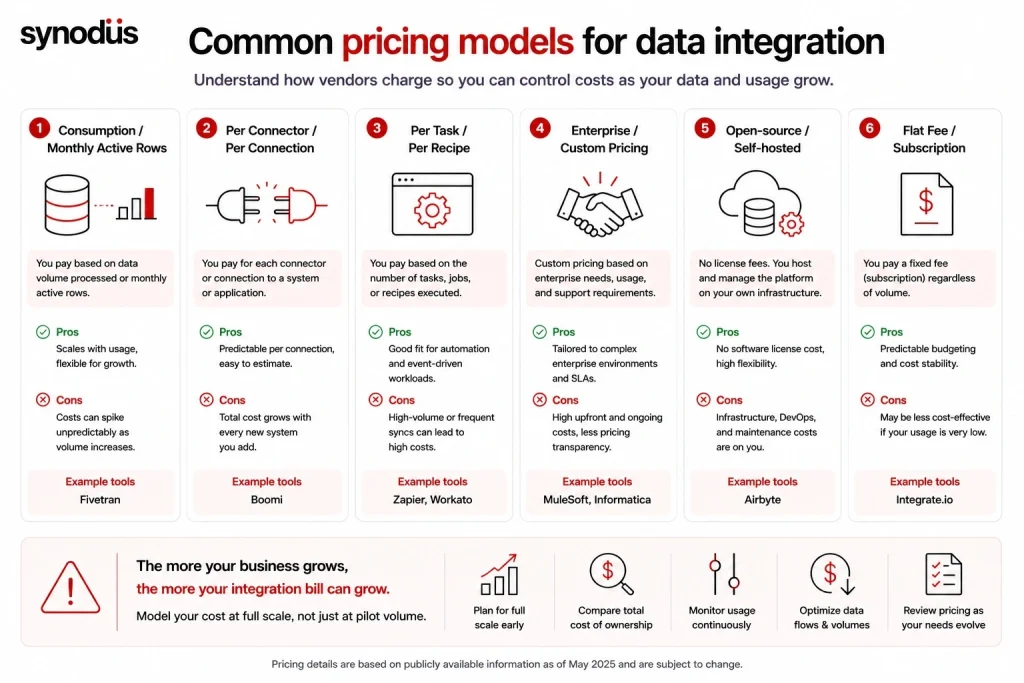
Comparison of common pricing models for enterprise low-code data integration platforms
Before comparing features, understand how each vendor charges, because this is where budgets break. The models in this market are unusually varied:
- Consumption or monthly active rows (Fivetran): scales with data volume, flexible, but bills can spike unpredictably as usage climbs.
- Per connector or connection (Boomi): predictable per connection, but the total grows with every system you add.
- Per task or recipe (Zapier, Workato): fits automation workloads, less suited to continuous high-volume sync where task counts explode.
- Enterprise custom (MuleSoft, Informatica): negotiated contracts with significant implementation cost.
- Open-source self-hosted (Airbyte): no license fee, but you absorb infrastructure and DevOps cost.
- Flat fee (Integrate.io): predictable regardless of volume.
The warning worth internalizing: models that bill per row, per active row, per task, or per API call can turn growth into a penalty, where the more your business succeeds, the more your integration bill balloons, sometimes forcing teams to throttle data flows. For reference, low-code iPaaS generally starts around $500 per month, while enterprise ESBs require licensing plus consulting that can exceed $50,000.
Model your cost at full scale, not at pilot volume.
Key features of low-code data integration
Code generation
A good platform offers a graphical interface with drag-and-drop components and pre-coded blocks. This lowers the barrier for non-technical data users, who can build sophisticated structures instead of writing thousands of lines of code, and it lets you self-build rather than outsource. A capable platform also lets you add hand-written code and modify what it generates, so you can tailor the integration to your data sources and existing systems.
Intelligent automation
Small automations like autofill add up, especially when powered by automatically gathered metadata such as API or database catalogs. Look for:
- Proactive alerting on conditions that suggest a failing data operation.
- Cost and runtime forecasting.
- Predictive scaling.
- Auto-detection of data categories, such as personally identifiable information (PII).
- Source code control and collaboration.
- Documentation generation.
- Automated data lineage.
Full governance and compliance are required even in fast-changing environments, which is exactly what these features enable.
Declarative design modes
An effective platform is data-centric and distraction-free, so users do not deal with the mechanics of running code at the right time in the right order. Declarative interactions look like: create this table this way and replace it if it exists; ensure this table exists with this model and these privileges; make this source data available to this target platform.
Ease of deployment
Data work is a collective effort across reporting and analytics teams, and terms like DataOps, MLOps, and AIOps underscore the need for repeatable systems. A low-code platform helps teams ship changes in short release cycles, provided it can package code into transferable formats and slot into a wider DevOps scope, with development and production differences defined as parameters rather than hardwired. The simplest fix is to deploy less: look for a platform that lets you invoke reusable modules, ships broad pre-built functionality, and parameterizes widely, which prevents copy-paste and constant redeploying. For more, read our guide on how low-code and DevOps blend together.
Reusability
A good platform lets you invoke pre-built modules that can be parameterized, optimized, and extended, so you do not worry about paging and authentication. It should also make new modules easy to create and share through a template system or marketplace, since every piece of business-specific data logic is a potential advantage.
The AI shift: from mapping assistance to agentic pipelines
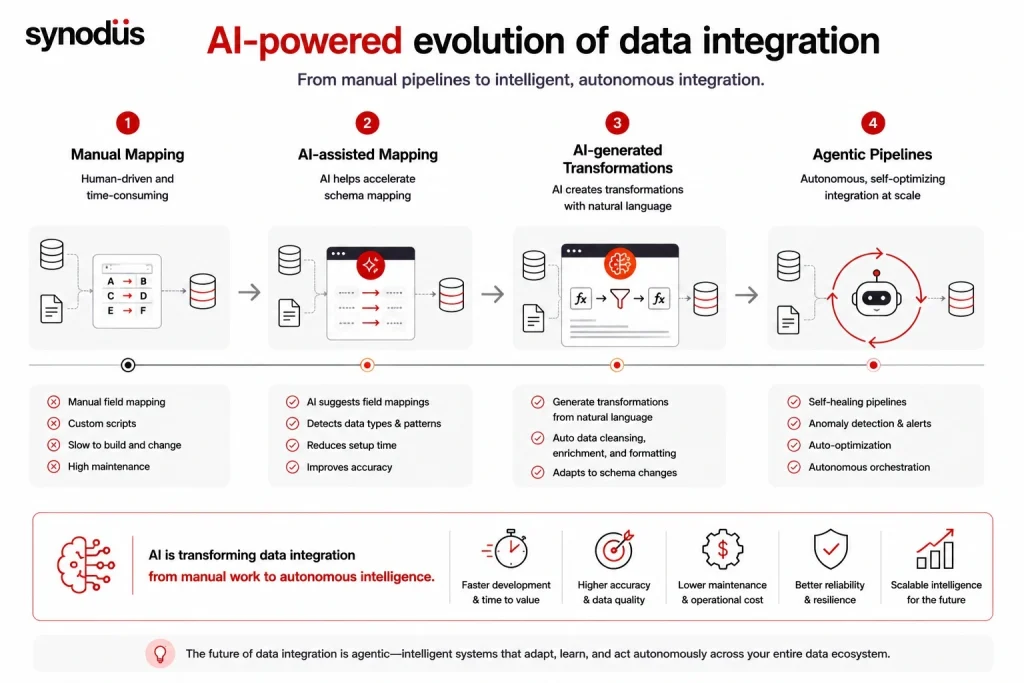
Older platforms called autofill and alerting their AI features. In 2026 the bar is much higher, and this is the fastest-moving differentiator.
Modern platforms use AI to map schemas automatically, generate transformation logic from plain-language descriptions instead of hand-written scripts, and adapt when a source schema changes. Beyond that, agentic data engineering is emerging, where autonomous agents manage orchestration, monitor data quality, and resolve pipeline issues on their own. MuleSoft, for example, now offers AI-assisted automation and workflow execution at scale alongside enterprise scalability handling thousands of agents and integrations.
The practical shift is from defining every step to defining intent and letting the system adapt. The caveat is the same as everywhere else in low-code: AI complements rule-based pipelines rather than replacing them, and generated logic needs review, versioning, and lineage tracking before it reaches production. See our roundup of low-code AI platforms and our guide to low-code ETL.
Top low-code data integration tools to use
Pricing and connector counts change often, so treat these as a snapshot and confirm with each vendor.
| Tool | Category | Best for | Pricing model |
|---|---|---|---|
| Microsoft Power Platform | App platform | Microsoft-ecosystem integration and apps | Per user or PAYG |
| Boomi | iPaaS | Broad enterprise integration and MDM | Per connector |
| Workato | iPaaS | Regulated industries needing governance | Per recipe or task |
| MuleSoft | iPaaS | Complex enterprise API-led integration | Enterprise custom |
| Fivetran | ELT | Hands-off managed pipelines to a warehouse | Monthly active rows |
| Airbyte | ELT | Open-source flexibility and self-hosting | Free self-host, volume-based cloud |
| Integrate.io | ELT and ETL | Predictable cost with low-code transforms | Flat fee |
Microsoft Power Platform
If your organization runs on Microsoft, the Power Platform is the natural starting point. Dataverse provides the unified data layer, hundreds of connectors link your systems, Power Automate orchestrates the flows, and Power BI handles analytics, with Copilot adding AI-assisted building across the suite. It suits teams whose integration work sits inside a broader application project rather than a standalone pipeline. To learn more, we have reviewed the Power Apps low-code platform in terms of performance, features, and extensions.
As a Microsoft Power Platform specialist in APAC, Synodus offers a custom low-code development service alongside our data analytics work, building integrated systems that pull scattered sources into one place. Our pharmaceutical ERP project on Dynamics 365, Power BI, and Azure unified order, customer, and inventory data and supported 80% year-on-year growth. We work on fixed pricing and blend agile with waterfall delivery, an approach trusted by companies like BOC Aviation, KPMG, and Unilever.
Boomi
Boomi is a mature enterprise iPaaS, serving over 20,000 customers with 1,000+ application connectors since 2000, covering API management, B2B and EDI, and master data management. Its breadth is the draw, and its per-connector pricing is predictable, though the total climbs with each system you connect. Best for enterprises with many systems and broad integration needs beyond analytics.
Workato
Workato combines no-code usability with enterprise-grade security. It offers pre-built recipes for common processes like employee onboarding or quote-to-cash, which you can chain into complex automations, and it is especially strong in regulated industries where compliance matters as much as usability, though it requires onboarding and can get expensive. Best for orchestrating business workflows across apps in a compliance-heavy environment.
MuleSoft
MuleSoft is the heavyweight for complex enterprise integration, with pre-built connectors linking to over 300,000 endpoints across environments, unified application and data integration, a low-code drag-and-drop interface, hybrid support for multi-cloud and on-premises, and comprehensive API management with full lifecycle governance. Expect enterprise pricing and implementation effort to match. Best for large organizations pursuing an API-led integration strategy.
Fivetran
Fivetran automates pipeline creation and maintenance, with pre-built connectors that sync data to cloud warehouses with minimal setup, automatic schema migration, and built-in monitoring and security compliance. Pricing is based on monthly active rows, which is flexible but can spike as volume grows. Best for teams wanting a hands-off approach to loading a warehouse.
Airbyte
Airbyte is an open-source ELT platform, founded in 2020 with 600+ connectors, many community-built, targeting engineering teams comfortable with self-hosting and code-first workflows, and relying on external tools like dbt for transformation. Self-hosting means no license fee but real infrastructure and DevOps cost. Best for engineering teams that want control and connector breadth. See our roundup of open-source low-code platforms.
Integrate.io
Integrate.io delivers a low-code pipeline platform with 200+ connectors, built-in transformations, and a drag-and-drop interface with 220+ transformations that lets analysts build pipelines without engineering support. Its flat-fee model is unusual in this market and makes budgeting predictable. Best for teams that want ETL and ELT without deep pipeline engineering, and without volume-based billing surprises.
For adjacent tooling, see our guides to low-code databases and low-code API builders.
How to choose
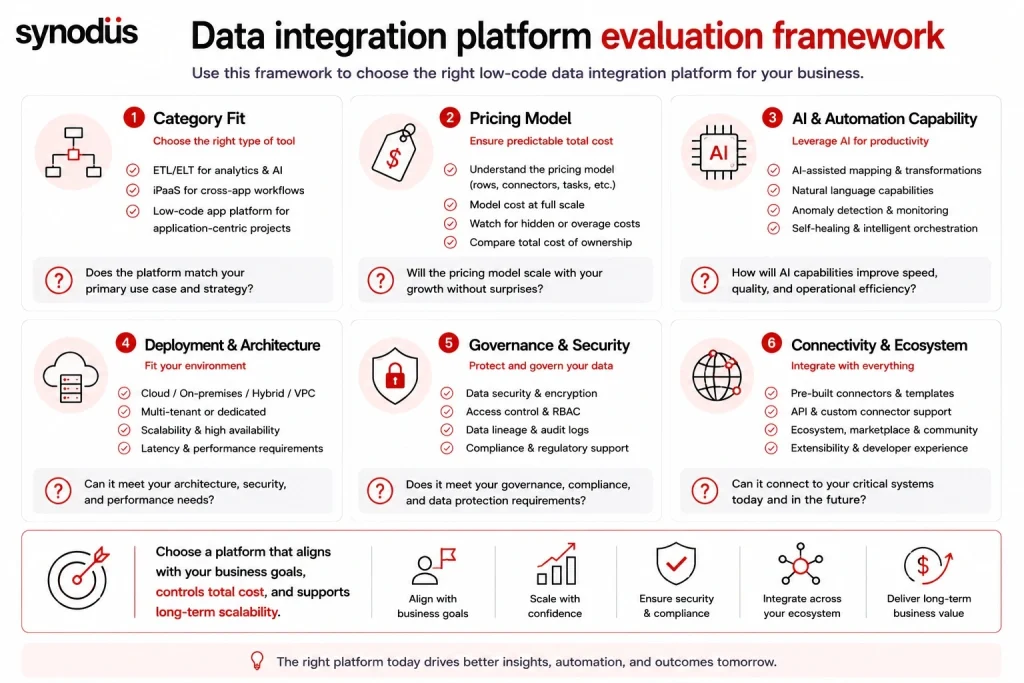
- Start with the category: warehouse analytics (ETL/ELT), cross-app workflows (iPaaS), or app-embedded integration. Many mature stacks run more than one.
- Model pricing at full scale, not at pilot, and avoid growth-penalty models if your volumes will climb.
- Check AI capability: can it map schemas and generate transformations from plain language, and can it govern what it generates?
- Confirm deployment: cloud, hybrid, or self-hosted, especially if you handle regulated data.
- Weigh governance: lineage, PII detection, access control, and audit trails.
- Count the real connectors you need, not the headline number.
Frequently asked questions
It is the practice of connecting and unifying data from multiple sources using visual, drag-and-drop tools and pre-built connectors instead of hand-coded pipelines. It lets analysts and business users build integrations in hours rather than weeks, while developers extend with custom code where needed.
ETL and ELT tools move data into a warehouse for analytics, while an iPaaS orchestrates multi-step workflows across business applications. They solve different problems, and many mature data stacks run both rather than forcing one tool to do everything.
Because many vendors bill per row, per active row, per task, or per API call, so your bill grows as your business does. Some teams end up throttling data flows to control cost. Model your spend at expected volume, and consider flat-fee or per-builder models if predictability matters.
AI now maps schemas automatically, generates transformation logic from plain-language descriptions, and adapts to schema changes, with agentic systems beginning to orchestrate and repair pipelines on their own. It complements rule-based pipelines rather than replacing them, and still needs review and lineage tracking.
Yes, for most workloads, and platforms like MuleSoft and Boomi are built for exactly that. The limits appear with extremely high data volumes and intricate legacy databases, where low-code often needs support from custom code.
Wrapping up
Low-code has real potential to lift the data integration field, handling repetitive work and making data management far more efficient. The decision, though, comes down to two things most feature lists ignore: which category of tool you actually need, and how the vendor’s pricing behaves when your data volumes grow. Low-code also cannot single-handedly handle very high volumes and intricate databases without some custom coding.
If you would rather have experts build it for you, Synodus offers a low-code development service that turns your data into apps 10x faster and cuts development costs by half, with the governance integrated data demands. Book a free consultation to find the right fit for your data stack.