Key takeaway
If you only have five minutes, here is what matters most from this guide.
- On what an MVP actually is: A Minimum Viable Product (MVP) is not a cheap version of your final product. It is a learning instrument. Its job is to test one specific assumption about your market with the least amount of work required to get a credible answer.
- On timing: Talk to at least ten potential users before you build anything. Most teams skip this and end up building for a problem that exists in their heads but not in the market.
- On scope: The right scope for an MVP is almost always smaller than you think. If your MVP scope document is longer than one page, you have probably included too much. Cut to the core loop and nothing else.
- On metrics: Vanity metrics like total signups or press coverage do not tell you whether your MVP is working. The metrics that matter are activation rate, Day 7 retention, and whether users come back without being pushed. If they do not come back on their own, the product has not solved the problem well enough.
- On what to do after launch: You have three options: persevere if the data confirms your assumptions, pivot if the data points to a different direction, or stop if the data clearly shows the market is not there. Stopping early is not failure. It is the system working as intended.
- On cost: A focused MVP built by the right team over six to ten weeks will almost always cost less than a sprawling build that takes six months and requires a full rebuild after the first round of user feedback.
What is MVP in software development?
MVP stands for Minimum Viable Product. In software development, it refers to the earliest functional version of your product that includes just enough features to be used by real people and generate real feedback.
The keyword here is “viable”. An MVP is not a broken prototype. It is not a wireframe. It is a working product, stripped down to its core value proposition, released to a specific group of early users to test whether the core idea actually solves a real problem.
The concept was popularized by Eric Ries in “The Lean Startup“, where he described it as a version of a new product that allows a team to collect the maximum amount of validated learning about customers with the least effort.
In practice, MVP software development answers one central question: does anyone actually want this?
Why “minimum” matters:
Most teams building their first product make the same mistake. They scope too wide, try to build everything at once, and launch six months later to an audience that has moved on or changed their mind entirely.
The “minimum” in MVP forces you to ruthlessly prioritize. What is the single problem you are solving? What is the one feature that delivers that solution? Everything else is a feature for version two.
Amazon, Airbnb, and Spotify all launched with dramatically stripped-down versions of what they are today. The early Airbnb site had no payments, no instant booking, and no mobile app. It was a simple page where hosts could post photos and guests could send an email. That was enough to test whether strangers would pay to sleep in someone else’s home. They would.
What is difference between MVP vs POC (proof of concept) vs prototype?
These terms are often mistaken for one another, so let’s clear them up.
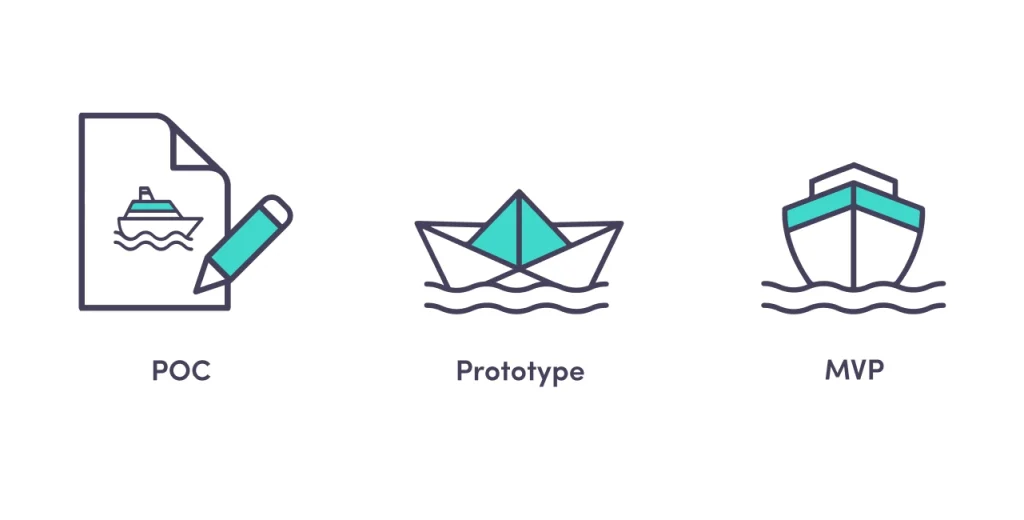
Proof of concept (POC)
A POC answers a technical question: “Can we build this at all?” It exists internally, often as a throwaway experiment, to validate that a specific technology or approach is feasible before committing engineering resources to it.
A POC is not shown to users. It is not functional end-to-end. It is a test of possibility, not usability.
Example: Your team wants to use machine learning to detect fraud in real time. A POC might be a notebook experiment that tests whether the model achieves acceptable accuracy on a sample dataset. No UI, no production infrastructure, no users.
Prototype
A prototype is a visual and interactive representation of what the product will look and feel like. It is used for design validation, investor pitches, and early user testing of workflows.
A prototype does not need to be functional. Tools like Figma or Marvel let you build clickable mockups that simulate the experience without a single line of production code.
Example: A clickable Figma file that shows the onboarding flow of your app. Users can click through the screens, but no data is saved, no logic runs.
MVP
An MVP is functional. Real users can use it. Real data flows through it. Real outcomes happen because of it, whether that is a purchase, a signup, or a completed task.
The key difference from a prototype is that an MVP ships. It goes into the world. People use it, and you measure what they do.
| POC | Prototype | MVP | |
|---|---|---|---|
| Audience | Internal team | Stakeholders, test users | Real end users |
| Functional | No | Partially | Yes |
| Goal | Technical feasibility | Design validation | Market validation |
| Time to build | Days | Days to weeks | Weeks to months |
| Cost | Low | Low to medium | Medium |
Why build an MVP? The real business case
The case for MVP software development goes beyond “it saves money.” Here is what you actually get.
Validated learning before major investment
You learn whether your core assumption is correct before you spend six months and $200,000 building the full product. If users do not engage with the core feature of your MVP, adding 15 more features will not fix that.
Real feedback instead of survey data
People say one thing in surveys and do another thing in practice. An MVP gives you behavioral data. What did users actually click? Where did they drop off? What did they tell support in the first week?
Faster path to first revenue
An MVP can generate paying customers. That revenue, even if small, changes the dynamic with investors and gives your team concrete proof the business model works.
The cost of not validating early is well documented. CB Insights analyzed 101 post-mortems from failed startups and found that 42% cited “no market need” as a primary reason for failure. An MVP is the most direct way to rule out that outcome before spending serious money.
Lower risk for investors
Investors fund traction, not ideas. An MVP with 200 active users and measurable retention is a far stronger pitch than a 40-slide deck about a product that does not exist yet.
Reduces feature bloat before it starts
One of the most expensive problems in software development is building features nobody uses. According to Pendo’s Feature Adoption Report, which analyzed usage data across 615 software products, 80% of features in the average software product are rarely or never used, representing an estimated $29.5 billion in wasted R&D spend annually. MVP development forces you to find out which 20% actually matter before you build the other 80%.
Is MVP “only” for startups?
No. That is one of the most persistent myths in product development.
Startups use MVPs to validate new business ideas. But established companies use them just as often, often under different names.
Microsoft runs the Windows Insider Program, where hundreds of thousands of volunteers test pre-release builds of Windows before they ship to the general public. That is MVP logic at enterprise scale.
Google launched Gmail in a limited invite-only beta for two years before opening it to everyone. Meta constantly A/B tests new features with subsets of users before rolling them out globally.
Even in large organizations, launching a new internal tool, a new product line, or a new market entry all benefit from MVP thinking. The question is always the same: how do you learn the most with the least risk?
Types of minimum viable product
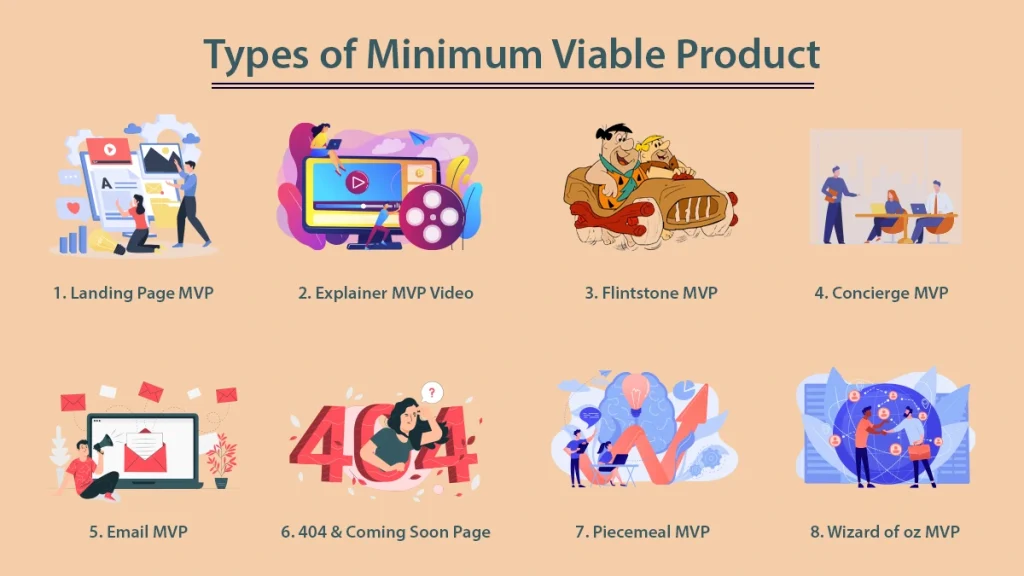
Not every MVP is a software product. The right type depends on what you are trying to validate and how much you can invest upfront.
1. Landing Page MVP
You build a simple web page that describes your product, its value proposition, and a call to action, usually an email signup or a pre-order. You run paid ads or organic traffic to the page and measure conversion rate.
This tells you whether people are interested enough to take an action, before you build anything.
Dropbox used a screencast video before they even had a working product. Drew Houston posted the demo to Hacker News in 2007 under the title “My YC app: Dropbox – Throw away your USB drive.” The waitlist jumped from 5,000 to 75,000 in a single day”. That was their market validation.
Best for: Validating demand before any development. Lowest cost, fastest execution.
2. Concierge MVP
You deliver the service manually, without automating it through software. Users get the outcome they want. You do the work behind the scenes by hand.
Food Rocket, a grocery delivery startup, had founders personally driving orders before building any logistics software. The service worked. The software came later.
Best for: Service businesses, marketplaces, and any product where the human version can simulate the software version.
3. Single-Feature MVP
You build one core feature and nothing else. No dashboard, no notifications, no settings. Just the one thing that delivers your core value.
Instagram launched as a photo sharing app with filters. That was it. No DMs, no stories, no reels. Just photos and filters. The app attracted 25,000 registered users on its first day of release on the App Store, October 6, 2010, and reached one million users within two months
Best for: Products where one feature is clearly the core value and everything else is secondary.
4. Piecemeal MVP
You assemble existing tools and platforms to deliver the experience without custom software. You might use Airtable as a backend, Typeform for data collection, Zapier for automation, and Stripe for payments. The user experience feels like a product. The backend is all no-code.
Best for: Teams with limited engineering resources that want to validate the business model first.
5. Wizard of Oz MVP
Similar to the concierge model, but users do not know that humans are doing the work. The front end looks automated. The back end is manual.
A common example is an AI-powered recommendation system that appears automated to users but is actually a human reviewing and selecting recommendations by hand while the team validates whether users respond positively to the suggestions at all.
Best for: Testing AI features, personalization logic, or any automated workflow before building the automation.
6. Video MVP
A demonstration video, screenshare walkthrough, or explainer that shows what the product will do. Users can sign up, pre-order, or leave feedback based on what they see.
Best for: Complex products where a prototype is hard to build but a video can convey the value clearly.
7. Crowdfunding MVP
Launch on Kickstarter or Indiegogo. If people put down real money for something that does not exist yet, that is validated demand backed by financial commitment, not just interest.
Best for: Hardware products, consumer goods, and anything with a clear pre-sale story.
How to build an MVP in software development: A step-by-step process
Step 1: Define the problem, not the product
Most MVPs fail because teams start with a solution in mind and work backwards to justify it. Start with the problem instead.
Write one sentence that describes the problem your product solves, who has the problem, and why existing solutions are not good enough. If you cannot write that sentence clearly, you are not ready to build.
Example: “Independent consultants lose 5 to 10 hours per week on manual invoicing because existing tools are either too complex or not designed for their workflow.”
That sentence tells you the user, the pain, and the competitive gap.
Step 2: Identify your riskiest assumption
Every business idea rests on a set of assumptions. Some are low risk. Some, if wrong, would kill the entire business.
List your assumptions. Then rank them by risk. The riskiest assumption is the one your MVP needs to test first.
For a marketplace: “Enough suppliers will join the platform to make it useful for buyers” is almost always the riskiest assumption. Test that before you build the buyer-side experience.
Step 3: Map the user journey
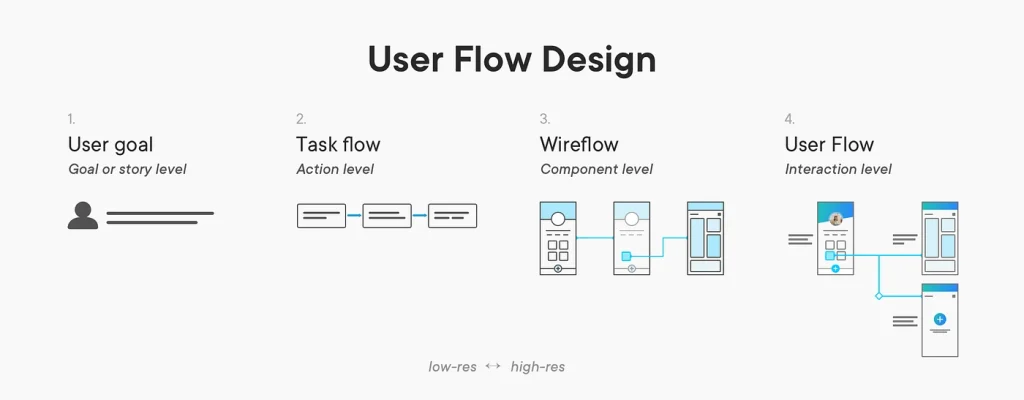
Put yourself in the user’s shoes from the moment they first hear about your product to the moment they achieve the outcome you promised. Map every step, decision point, and potential friction along the way.
This exercise surfaces the core loop, the sequence of actions that delivers the product’s primary value. Your MVP needs to complete that core loop cleanly. Everything outside the core loop is out of scope.
Step 4: Define MVP scope
Take the core loop. Cut everything that is not strictly necessary to complete it. Then cut some more.
A useful framework: for each proposed feature, ask “if we do not include this, can users still complete the core loop?” If yes, it is not in the MVP.
Write a one-page scope document with: the problem statement, the target user, the core loop, the features included, and explicitly, the features excluded.
Step 5: Choose your MVP type
Based on your riskiest assumption and your available resources, select the MVP type from the list above that gives you the most learning for the least investment.
If your riskiest assumption is about demand, a landing page MVP may be enough. If it is about whether users can complete a workflow, you probably need a functional software MVP.
Step 6: Build and launch
Build only what you defined in scope. Resist the temptation to add “just one more thing” during development. Set a deadline and hold it.
Launch to a small, defined group. Warm contacts, beta waitlist signups, a specific community, or a targeted ad campaign to a narrow demographic. The goal is to get the MVP in front of the right users, not the most users.
Step 7: Measure, learn, decide
After launch, you have three options based on what the data tells you.
Persevere: the core assumptions were right. Continue building in the same direction and add features based on user feedback.
Pivot: the core assumptions were partially right. Adjust the target user, the core feature, or the business model based on what you learned.
Stop: the data clearly shows the problem does not exist, the market is too small, or the approach does not work. Stopping early is not failure. It is the MVP doing its job.
How to measure MVP success
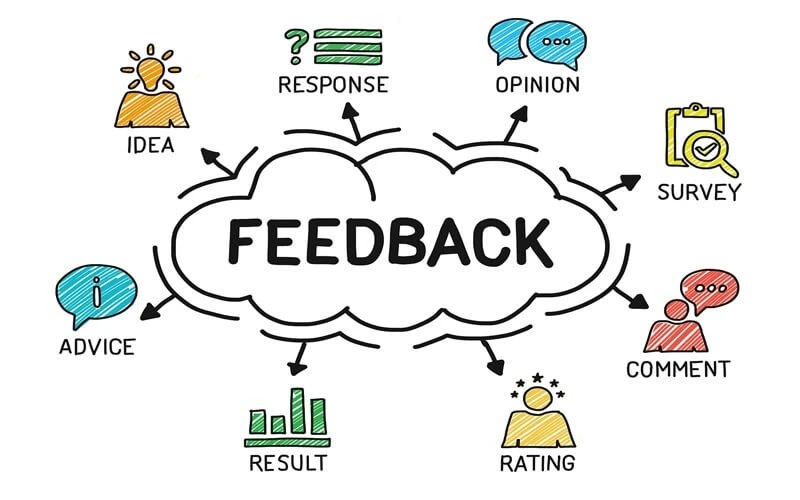
Picking the right metrics before you launch matters as much as the metrics themselves. Here are the key ones.
- Activation rate: the percentage of new users who complete the core loop at least once. If your activation rate is below 40%, your onboarding or core feature has a problem.
- Retention rate (Day 7 and Day 30): how many users come back after their first session. Day 7 retention below 20% is a red flag for most consumer apps. B2B benchmarks are different.
- Net Promoter Score (NPS): a single survey question that asks users how likely they are to recommend the product. Score above 40 is strong for an early MVP.
- Customer Acquisition Cost (CAC): how much you spend to acquire one paying user. Compare this to your average revenue per user to see whether the unit economics are sustainable.
- Churn rate: the percentage of users who stop using the product each month. For SaaS, monthly churn above 5% is a signal to investigate before scaling.
- Qualitative feedback: talk to users directly. Five conversations with real users who canceled will teach you more than 500 data points in a dashboard. Do not skip this step.
Common MVP mistakes and how to avoid them
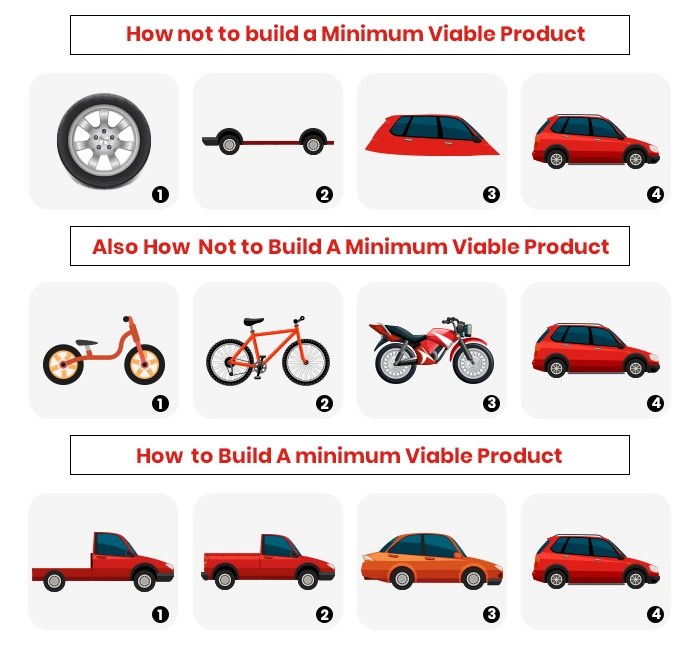
Treating MVP as an excuse to ship something broken
Minimum viable does not mean low quality. It means focused. The features you do include need to work reliably. A buggy MVP teaches you about your bugs, not about your market.
Building too much before talking to users
The most common mistake. Teams spend three months building, then show users something. Talk to potential users before you write a line of code. Validate the problem first.
Measuring vanity metrics
Total signups, social followers, and press mentions feel good but tell you nothing useful. Measure activation, retention, and revenue. Those are the metrics that reflect real product-market fit.
Skipping the prototype phase
A quick Figma prototype can save weeks of development. Show it to ten users before building. You will almost always learn something that changes what you build.
Not defining success criteria upfront
Before you launch, write down what “success” looks like in numbers. Day 30 retention above X%. NPS above Y. Without a clear target, you will rationalize any result as acceptable.
Targeting everyone
The best MVPs target a very specific user in a very specific context. “Freelance graphic designers in Southeast Asia who manage 5 or more clients” is a target audience. “Small businesses” is not.
How much does MVP development cost?
Cost varies significantly based on the type of MVP, your tech stack, and your team structure. Here is a realistic breakdown across the main approaches.
A landing page MVP can cost as little as $500 to $2,000 if you use existing tools like Webflow, Typeform, and Mailchimp. You are paying for design time and possibly a small ad budget to drive traffic, not engineering.
A no-code piecemeal MVP using tools like Bubble, Airtable, and Zapier typically runs $3,000 to $10,000 including setup and design. This range assumes a freelancer or small agency doing the configuration, not a senior engineering team.
A custom software MVP with a dedicated development team is where the range gets wider. Custom software development costs for an MVP typically fall between $15,000 and $80,000 depending on scope, the seniority of the team, and geography. A four-person team of senior engineers in Western Europe or the US working for eight weeks will cost significantly more than an equally capable team in Vietnam or Poland working the same timeline. The output quality does not have to reflect that cost difference, which is one reason outsourcing MVP development has become a standard approach for cost-conscious founders.
To give you a more concrete sense of custom software development costs by scope:
| MVP Type | Typical Scope | Estimated Cost | Timeline |
|---|---|---|---|
| Landing page + waitlist | No custom code | $500 to $2,000 | 1 to 3 days |
| No-code workflow app | Bubble or Webflow | $3,000 to $10,000 | 2 to 4 weeks |
| Web app MVP (custom) | Auth, core feature, basic dashboard | $15,000 to $35,000 | 4 to 8 weeks |
| Mobile MVP (one platform) | iOS or Android, core loop only | $20,000 to $50,000 | 6 to 10 weeks |
| Web + mobile MVP | Cross-platform, custom backend | $40,000 to $80,000 | 8 to 14 weeks |
Factors that drive cost up regardless of approach: complex third-party integrations, real-time functionality like chat or live updates, security and compliance requirements for regulated industries like healthcare or finance, and any requirement for custom data processing or machine learning at the core of the product.
The most expensive MVP is the one you build wrong and have to throw away. Investing in proper scoping, user research, and a lightweight prototype before development almost always saves money in the end. Teams that skip the discovery phase consistently overspend on the wrong features.
MVP software development examples worth studying
Real-world MVP software development examples are the fastest way to understand how the concepts in this guide translate into actual decisions. Uber launched in one city, for one vehicle type, on one platform. Airbnb started with three air mattresses and a simple website with no payment system. Zappos manually fulfilled shoe orders by hand before building any inventory infrastructure. Dropbox validated demand with a screencast video before writing a line of production code, jumping from 5,000 to 75,000 waitlist signups overnight. Buffer confirmed purchase intent by showing a pricing page before the product existed.
Each of these cases illustrates a different MVP type and a different hypothesis being tested. If you want the full breakdown of what each team was actually validating, the specific decisions they made, and what other companies have done since, we have a dedicated deep-dive: 18 examples of MVP in software development: Learn from top brands
Build vs. buy vs. no-code: The real decision framework
Every team building an MVP faces this decision repeatedly. Build a custom feature, buy a SaaS tool that covers it, or use a no-code platform to assemble something quickly. The wrong decision in either direction wastes time or money.
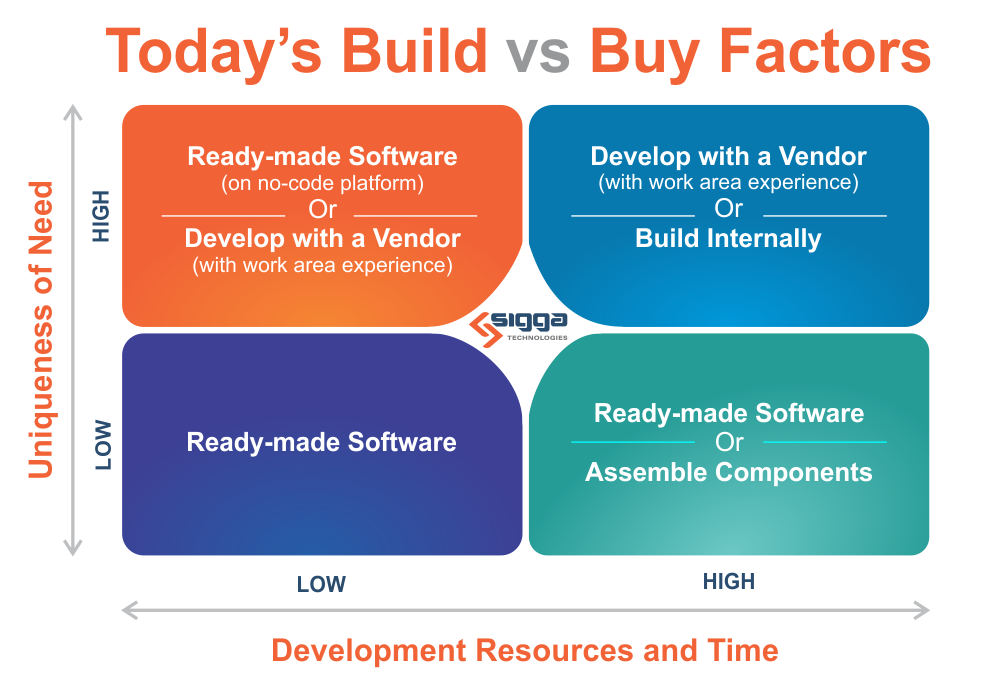
When to build custom
Custom software development makes sense for an MVP when the feature you are building is your core differentiator, no existing tool delivers the experience you need, or your industry has data residency and compliance requirements that rule out most SaaS tools. It is not the right call when the goal is simply to avoid a monthly subscription. At MVP scale, engineering time is always your most expensive resource.
For a deeper look at when custom software earns its cost and when it does not, including real-world decision frameworks and industry-specific considerations, see our full guide: Custom software development: Types, process and when it makes sense.
When to buy (SaaS tools)
Buy when the problem is well-defined and well-solved. Payments, email, SMS, authentication, document generation, reporting dashboards, and customer support tooling all fall into this category for most products.
Buy when the tool covers 80% of your use case and the remaining 20% is not your differentiator (80/20 rule). No SaaS tool will fit perfectly. The question is whether the gap matters to your users during the MVP phase. In most cases it does not.
Be careful about buying tools that own your data in ways that make migration painful. CRM data, customer communication history, and user behavior data that lives exclusively in a vendor’s platform creates lock-in that compounds over time. Prefer tools that give you full data export capability.
When no-code is the right call
No-code platforms like Bubble, Webflow, Glide, and Softr are genuinely powerful tools for specific MVP scenarios. They work best when the product is primarily a workflow or form-based application, when the team has no engineering resources, or when the goal is to validate demand before committing to a build.
The ceiling of no-code is real, though. Performance under load, complex conditional logic, custom integrations, and mobile-specific behavior all hit limits faster than they would in a custom-coded product. No-code is a valid MVP tool, not a long-term architecture strategy for most software products.
A useful mental model: no-code is excellent for validating whether people want the outcome your product delivers. Once you know they do, and you understand the specific workflow they need, a custom-coded MVP built on that validated understanding will be significantly better scoped than one built without that knowledge.
The hybrid approach most teams miss
The most efficient approach for many MVPs is a hybrid: build the core differentiating feature custom, use SaaS tools for everything surrounding it, and use no-code for internal tooling. A logistics startup might build their route optimization algorithm from scratch, use Stripe for payments, Retool for the internal ops dashboard, and Auth0 for authentication, focusing all engineering effort on the actual differentiator.
For real-world examples of how companies across industries have applied this thinking, including what they built, what they bought, and what the outcomes looked like, see: 10 real-life successful examples of custom software development.
From MVP to product-market fit: What the signals actually look like
Most teams who ship an MVP do not know what product-market fit actually looks and feels like in practice. They either declare PMF too early based on positive feedback from polite early users, or they dismiss genuine traction because it does not look like the hockey-stick growth they expected.
The Sean Ellis test and why it is imperfect
Sean Ellis developed the most widely used early PMF test: survey your users and ask “How would you feel if you could no longer use this product?” If 40% or more answer “very disappointed,” the product has meaningful PMF signal.
Ellis arrived at this benchmark after analyzing data across more than 100 early-stage startups, observing that products with more than 40% “very disappointed” responses consistently grew, while those below that threshold consistently struggled to gain traction. Notably, when Hiten Shah surveyed 731 Slack users in 2015, 51% said they would be very disappointed without it, well above the benchmark and consistent with Slack’s explosive growth at the time.
The test is useful but incomplete. It measures sentiment, not behavior. A user who says they would be very disappointed but has not logged in for three weeks is giving you conflicting signals. Use the Ellis test as one input, not the deciding one.
Retention curves: The clearest PMF signal
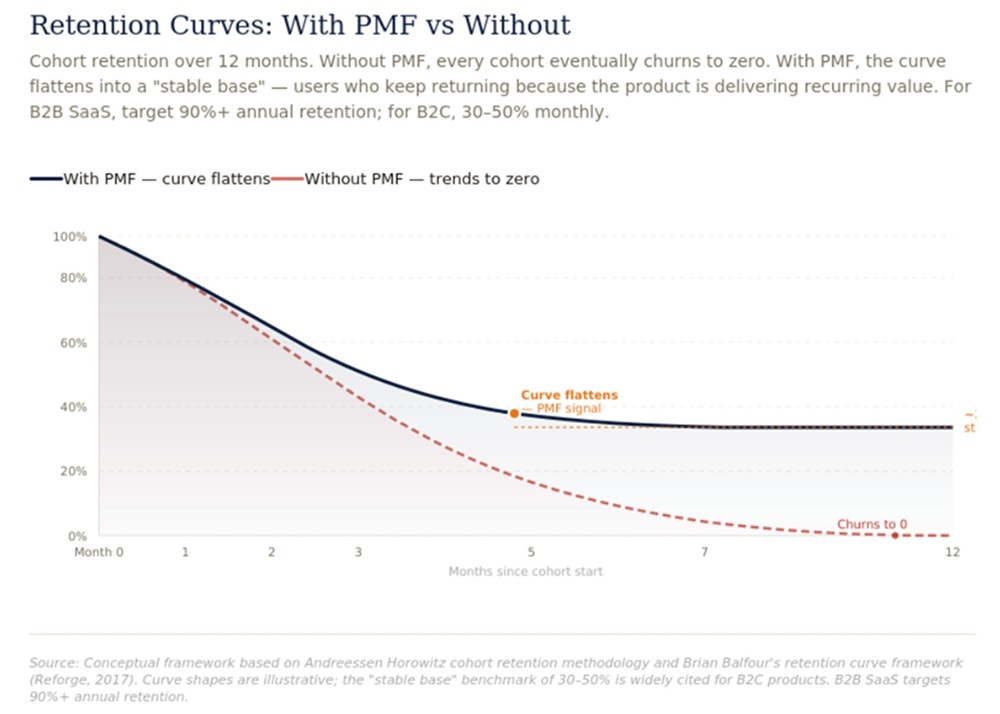
Retention curve shape tells you more about PMF than almost any other single metric. Plot the percentage of users who are still active over time, by cohort.
A product without PMF shows a retention curve that keeps declining and approaches zero. Users try it and leave. The curve never flattens.
A product with real PMF shows a retention curve that declines initially and then flattens. There is a core group of users who stick around and keep coming back. That flattening, even if it happens at a relatively low percentage, is the clearest signal that the product has found a use case that genuinely matters to some people.
The target retention floor varies by product type. Consumer apps typically need Day 30 retention above 20 to 25% to indicate real PMF. B2B SaaS with annual contracts uses different cohort windows, typically looking at 12-month retention rather than 30-day.
Organic growth as a PMF indicator
When users start referring other users without being incentivized to do so, that is a strong PMF signal. It means they found enough value in the product that they are willing to stake their own reputation on recommending it to someone they know.
Track your referral sources from the beginning. Ask every new user how they heard about the product. If organic word-of-mouth starts appearing in that data before you have done anything to encourage it, pay close attention to which user segments it is coming from. That segment is often where your real PMF is hiding.
When to stop trying to find PMF with the current approach
The hardest decision in the post-MVP phase is recognizing when the data is telling you to change direction rather than just improve execution. Some signals that suggest a pivot is more appropriate than iteration:
Retention curves that have not improved across three or more consecutive cohorts despite significant product changes. If you have changed the onboarding, improved core features, and adjusted positioning without any measurable improvement in who stays, the problem may be more fundamental than execution.
High activation but low retention. Users are completing the core loop but not coming back. This usually means the product solved a one-time problem that does not recur, or the experience of the core loop is not compelling enough to create a habit.
Strong retention from a segment you were not targeting. Sometimes the most valuable PMF signal is discovering that a specific type of user is retaining at high rates while your original target audience is not. That retained segment deserves serious investigation as a potential market to pivot toward.
Where to build your MVP: Top IT outsourcing countries compared
If you do not have an in-house team, where you build your MVP directly affects how far your budget goes. A senior engineer in San Francisco or London costs two to four times more per year than an equivalent profile in Vietnam, Poland, or India, and for a six-week MVP build that gap can exceed $80,000 in savings.
For a full breakdown of the top IT outsourcing countries with rate benchmarks, talent pool data, time zone considerations, and a practical guide to evaluating partners, see: Top Countries for software outsourcing: With statistics and reviews.
FAQs
An MVP is designed to test a specific hypothesis with minimal features. A beta product is typically a near-complete version of the product released for broader testing before the official launch. An MVP comes before a beta.
Yes, but those features should all serve the core loop. If a feature does not help users complete the primary action your product is designed for, it belongs in the backlog, not the MVP.
When the core loop works reliably, and you can put it in front of real users without embarrassment. It does not need to be beautiful. It needs to be functional and focused.
If possible, yes. Charging, even a nominal amount, filters out users who are curious from users who have the problem you are solving badly enough to pay to fix it. Payment is the strongest form of validation.
For a simple no-code MVP, two to four weeks. For a custom software MVP with a focused scope, four to twelve weeks. Longer than twelve weeks usually means the scope has crept beyond what an MVP should be.
Wrapping up
MVP software development is not a shortcut. It is a method for learning faster than the competition, spending smarter than the alternative, and building products that actually fit the market rather than products that assume they do.
The teams that use MVPs well are not the ones who build the least. They are the ones who ask the right questions, measure the right things, and have the discipline to act on what they learn, even when it means changing direction.
If you are building something new, start with the problem. Find the riskiest assumption. Build the minimum version that tests it. Then learn.
That loop, repeated with enough rigor, is how most of the software products you use every day got built.
Looking for an experienced MVP development partner? Synodus has helped startups and scale-ups MVPs in 2 to 8 weeks.